
A few months ago, a founder I know was in the middle of a frantic seed funding round. They had promising conversations with multiple venture capitalists, but their process for sharing sensitive information was a mess of expiring links and shared folders. They were worried about their business plan and financial projections falling into the wrong hands, a valid concern that could derail the entire process.
This situation is incredibly common. Startups need to move fast, but they also need to be secure. The founder asked me if they needed to invest in a costly, full-featured virtual data room (VDR). While VDRs are powerful, I suggested a more agile and cost-effective approach for their early stage: a robust strategy centered on strong PDF encryption. This is the story of how that simple shift protected their intellectual property and helped them close the deal.
Table of Contents
The Challenge: Balancing Speed and Security
The core problem for this fintech startup was managing the flow of highly confidential documents. Their pitch deck, detailed financial models, cap table, and technical architecture documents needed to be shared with a dozen different potential investors. Each investor group required access at different times and to different sets of files.
Using a generic cloud storage link was out of the question. It offered no tracking, no access control per user, and no real security if the link was forwarded. They needed a system that was both secure and easy for non-technical investors to use. The high monthly cost and complexity of a traditional VDR felt like overkill for a seed-stage company trying to conserve cash.
Key Pain Points
The startup's primary concerns were clear. First, they feared unauthorized sharing of their proprietary information. Second, they lacked a professional and organized way to present documents, which could reflect poorly on their operational maturity. Finally, they had no way of knowing who accessed which document and when, which is critical during due diligence.
The Solution: A Lightweight, Secure Document Strategy

Instead of a full VDR, we devised a hybrid approach. The strategy relied on creating individually encrypted PDF files for each investor group, combined with a secure, organized folder structure. This approach to startup pdf encryption provided a layer of security that traveled with the document itself, regardless of how it was stored or transmitted.
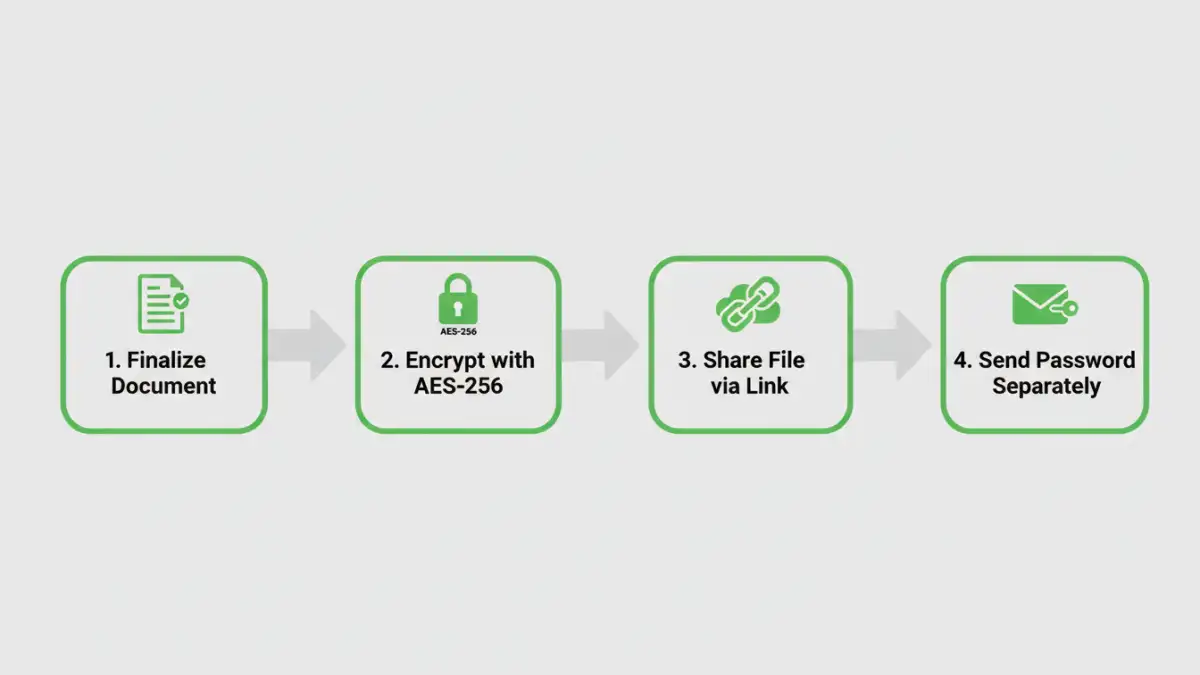
The idea was simple: each document would be converted to a PDF and encrypted with a strong, unique password. The password for each set of documents would then be shared with the specific investor group through a separate, secure channel (like a direct message or text). This two-factor approach—needing both the file and the separately-communicated password—dramatically increased security without adding significant friction.
Why PDF Encryption Worked
This method was effective for several reasons. PDFs are a universal standard, readable on any device without special software. Modern PDF encryption standards (like AES-256) are incredibly strong and virtually impossible to break with brute force. Most importantly, it gave the startup granular control. If they needed to revoke access from one investor, they didn't have to shut down an entire data room; the files that investor had were useless without a password that could be changed for future shares.
Implementation: Putting Encryption into Practice
The implementation was straightforward and cost-effective. We used Adobe Acrobat Pro, which has robust, built-in security features, but other tools like Smallpdf or even open-source libraries could have worked too. The process involved just a few steps for each document set.
First, we finalized the documents (pitch deck, financials, etc.). Second, we used the 'Protect' feature in the PDF software to add password protection, ensuring we selected the option requiring a password to open the document. We generated a unique, strong password for each investor group. Third, we organized these encrypted files into a clean folder structure on a secure cloud drive and shared a link to the folder. The corresponding password was then sent via a secure messaging app, completely separate from the email containing the file link.
The Results: A Successful and Secure Funding Round
This strategy was a resounding success. The investors appreciated the professional and secure manner in which the documents were handled. It demonstrated a level of operational diligence that built trust. The startup saved thousands of dollars per month by avoiding a VDR subscription, a significant saving for an early-stage company.
Ultimately, they closed their seed round with a lead investor who was impressed by their thoroughness. This virtual data room case study shows that you don't always need the most expensive tool on the market. Sometimes, a smart, well-implemented strategy using existing technology provides the right level of financial document security while keeping the process lean and efficient.
Comparison of Document Security Methods
| Method | Security Level | Cost | Best For |
|---|---|---|---|
| Email Attachment (Unencrypted) | Very Low | Free | Non-sensitive, public information only. |
| Cloud Storage Link (Public) | Low | Low | Sharing collaborative, non-confidential files. |
| Password-Protected ZIP File | Medium | Free | Grouping multiple files with basic protection. |
| Individual PDF Encryption | High | Low | Securing investor documents and protecting business plans. |
| Full Virtual Data Room (VDR) | Very High | High | Late-stage funding rounds, M&A, or complex deals requiring advanced tracking. |