
I was recently brought in to consult for a mid-sized real estate firm that had a close call. One of their top agents clicked on a sophisticated phishing link, and for a few tense hours, the agent's entire email account was compromised. The attacker's goal was clear: find closing documents and divert funds. Luckily, their bank flagged the unusual wire transfer request, but the incident was a massive wake-up call. Their old system of emailing contracts, financial statements, and identification documents was a disaster waiting to happen.
This firm's story isn't unique. Many businesses, especially in high-stakes industries like real estate, operate on a patchwork of consumer-grade tools like Gmail, Dropbox, and USB drives. While convenient, these methods create significant security vulnerabilities that can lead to financial loss, reputational damage, and legal nightmares. This case study explores how they moved from a high-risk environment to a fortified one.
Table of Contents
The Anatomy of a Real Estate Data Risk
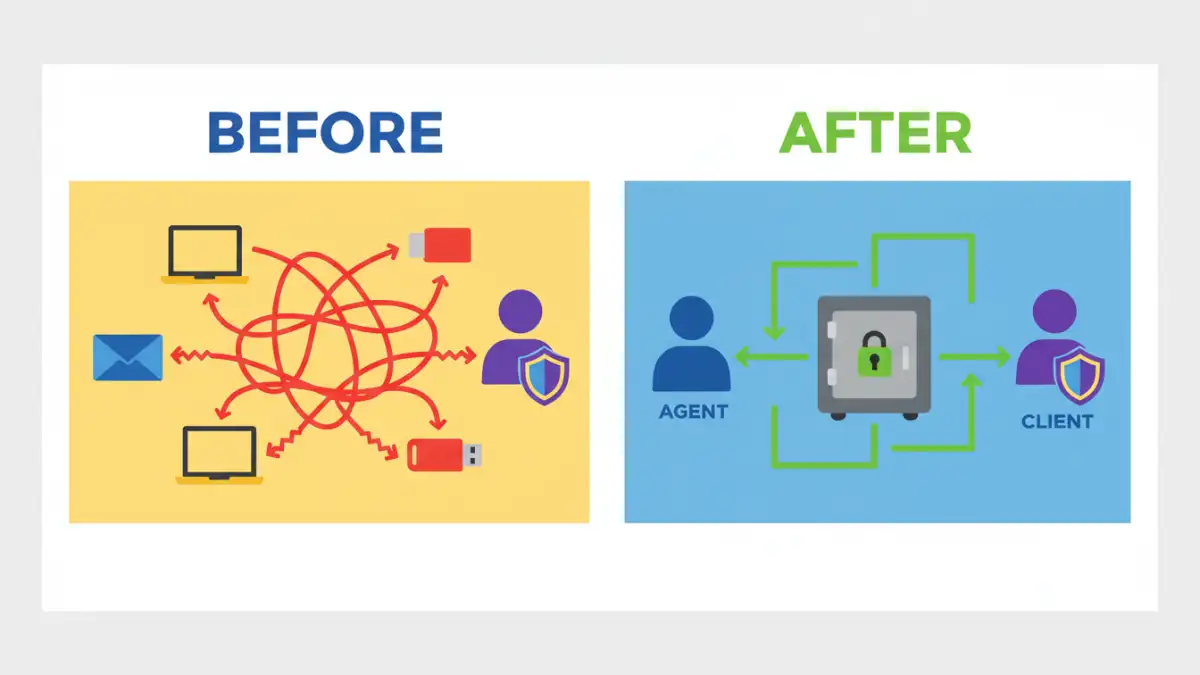
Before the incident, the firm's document workflow was typical but dangerously flawed. Agents stored sensitive client files on their personal laptops, shared contracts as email attachments, and used personal cloud accounts to transfer large files. This decentralized approach meant there was no central oversight, no audit trail, and no consistent security protocol. If an agent's laptop was stolen or their email hacked, the client data on it was completely exposed.
Effective real estate document management is about more than just organization; it's a critical security function. Every transaction involves a mountain of personally identifiable information (PII), including social security numbers, bank account details, and driver's licenses. Protecting client data isn't just good practice—it's a legal and ethical obligation.
The High Cost of Inconvenience
The core problem was a reliance on convenience over security. Agents needed to access and share files quickly while on the go. Email was the path of least resistance. However, standard email lacks end-to-end encryption for attachments, making documents vulnerable to interception. Furthermore, once a document is emailed, you lose all control over it. It can be forwarded, downloaded, and stored on insecure devices without any tracking.
The Phishing Incident: A Catalyst for Change

The breach attempt started with a cleverly disguised email that appeared to be from a mortgage lender, asking the agent to review an attached document. Clicking the link led to a fake login page that captured the agent's email credentials. Within minutes, the attacker was inside the account, setting up forwarding rules and searching for financial documents related to upcoming closings.
The firm's IT team detected the intrusion when they noticed login attempts from an unusual geographic location, but not before the attacker had downloaded several sensitive files. The immediate aftermath was chaotic: locking the account, notifying affected clients, and conducting a forensic analysis to understand the scope of the breach. This near-miss highlighted the urgent need for a system that isolated sensitive documents from the vulnerabilities of email.
Implementing a Centralized Security Solution
My recommendation was straightforward: they needed to adopt a purpose-built secure document vault. Unlike general-purpose cloud storage, these platforms are designed with security as the primary focus. The goal was to create a single, fortified repository for all client-facing and internal documents, completely removing them from email inboxes and local hard drives.
We chose a platform that offered several critical features. First, end-to-end encryption, ensuring that data is encrypted both in transit and at rest. Second, granular access controls. This was a game-changer for contract security. The firm could now set specific permissions for who could view, edit, or download a document. An agent could grant a client view-only access to a contract, while their attorney could be given rights to comment and edit.
Key Features for Secure File Access for Agents
Beyond encryption, the new system provided a full audit trail. Management could now see exactly who accessed which file and when. This accountability is crucial for compliance and for investigating any potential internal issues. The platform also included secure sharing links that could be password-protected and set to expire, giving them full control over the document lifecycle. This provided a much-needed layer of security for remote and mobile agents.
The Business Impact: Beyond Breach Prevention
The transition required training and a shift in mindset, but the benefits were immediate and far-reaching. The most obvious win was the dramatic reduction in security risk. By centralizing all files into the vault, they closed the loopholes that the phishing attacker had tried to exploit. But the operational improvements were just as significant.
Agents no longer had to search through endless email threads to find the latest version of a contract. The vault served as the single source of truth, with built-in version control. This streamlined workflows, reduced errors, and accelerated transaction timelines. Furthermore, the ability to demonstrate robust security measures became a selling point, helping them build trust and win over security-conscious clients.
Document Management Method Comparison
| Feature | Traditional Method (Email & Local Storage) | Secure Document Vault |
|---|---|---|
| Access Control | None. Once sent, control is lost. | Granular (view, edit, download permissions per user). |
| Encryption | Limited or non-existent for attachments at rest. | End-to-end encryption (in transit and at rest). |
| Audit Trail | No centralized tracking of who accessed files. | Detailed logs of every file access and action. |
| Version Control | Manual and prone to error (e.g., 'contract_final_v2.docx'). | Automated, ensuring everyone works from the correct version. |
| Secure Sharing | Insecure attachments or public cloud links. | Password-protected, expiring links with controlled permissions. |
| Centralization | Fragmented across devices and inboxes. | Single, secure repository for all firm documents. |