A client recently asked me a question that comes up constantly: "Where is the safest place to store our confidential documents?" It's not a simple yes-or-no answer. The decision between cloud services and a hard drive sitting on your desk involves a fundamental trade-off between accessibility and direct control. Both have significant strengths and weaknesses, and the right choice depends entirely on your specific needs for security, collaboration, and recovery.
Understanding this balance is crucial. I've seen teams lose critical data from a failed local server with no backup, and I've also helped others navigate the complexities of ensuring a cloud provider meets stringent industry compliance standards. Let's break down the realities of each approach.
Table of Contents
The Core Dilemma: Accessibility vs. Control
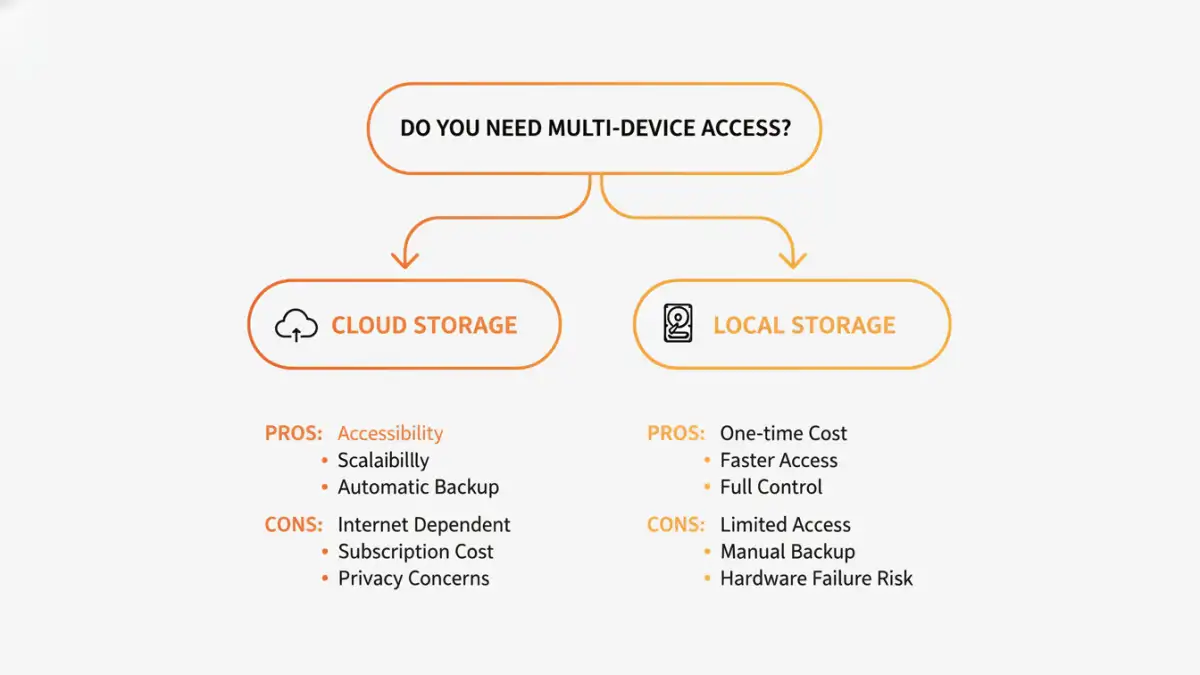
At its heart, the debate between cloud and local storage is about what you prioritize. Do you need to access your files from anywhere on any device, or do you need absolute certainty that no third party can ever access your data without your explicit permission? Each model serves a different primary goal.
What is Local Document Storage?
Local document storage refers to saving files on physical hardware that you own and manage. This includes your computer's internal hard drive, an external USB drive, or a Network Attached Storage (NAS) device connected to your home or office network. The defining characteristic is physical possession; you have direct, tangible control over the hardware holding your data.
You are solely responsible for its security, maintenance, and backups. If the drive fails or is stolen, the data is gone unless you have a separate backup plan. This method provides ultimate control but also carries the full weight of responsibility.
What is Cloud Storage?
Cloud storage involves entrusting your files to a third-party company like Google (Drive), Microsoft (OneDrive), or Dropbox. Your data is stored on their massive, distributed servers, and you access it via the internet. The provider handles all the hardware maintenance, redundancy, and infrastructure security.
The primary benefit is convenience and accessibility. You can sync files across all your devices and collaborate with others in real-time. However, you are placing your trust in the provider's security protocols and privacy policies.
A Deep Dive into Cloud File Security

The term "cloud" can sometimes sound nebulous and insecure, but reputable providers invest billions in security measures that are far beyond the reach of most individuals or small businesses. Modern cloud file security relies on several layers of protection.
Most major services use strong encryption to protect your data both 'in transit' (as it travels between your device and their servers) and 'at rest' (while it's stored on their hard drives). This prevents snooping and unauthorized access if a server is physically compromised. Furthermore, many providers offer features like two-factor authentication (2FA) and detailed access logs to secure your account.
For those needing the highest level of privacy, some services offer 'zero-knowledge' or end-to-end encrypted cloud storage. With this model, only you hold the encryption key. The provider cannot decrypt your files, even if compelled by a court order. This offers the privacy of local storage with the convenience of the cloud.
The Case for Local Document Storage
The primary advantage of local document storage is absolute control. Your files are not traversing the public internet or sitting on a server owned by another company. For highly sensitive intellectual property, legal documents, or data subject to strict sovereignty laws, this can be a non-negotiable requirement. You control who has physical access to the drive and who can connect to the network it resides on.
However, this control comes with significant risks. A single point of failure is the biggest threat. A hardware malfunction, office fire, flood, or simple theft could result in total data loss. I once worked with a small business that lost years of financial records because their only server's hard drive failed and their backups were stored in the same room, which suffered water damage. This is the critical weakness of a local-only strategy.
Proper local storage requires a rigorous backup discipline, including off-site copies, and physical security for the hardware. It's an active, ongoing responsibility, not a 'set it and forget it' solution.
Hybrid Solutions: The Best of Both Worlds?
For many, the debate isn't about choosing one over the other but about combining them intelligently. A hybrid approach leverages the strengths of both local and cloud storage to create a resilient and secure system. This is often the most robust strategy for truly secure document storage.
A common best practice is the 3-2-1 backup rule: have at least three copies of your data, on two different types of media, with one copy stored off-site. A hybrid model makes this easy to achieve. For example, you can keep your primary working files on a local NAS for speed and control, which then automatically syncs an encrypted backup to a cloud service.
This way, you get the immediate access and privacy of local storage for your daily work, while the cloud provides a geographically separate, redundant backup for disaster recovery. If your office is inaccessible, you can still retrieve your critical files. This layered approach mitigates the biggest risks of each individual method.
Storage Method Comparison
| Feature | Cloud Storage | Local Storage | Hybrid Approach |
|---|---|---|---|
| Accessibility | Excellent (anywhere with internet) | Limited (physical location) | Excellent (local speed, cloud access) |
| Security Control | Depends on provider policies | Total user control | High user control with provider redundancy |
| Initial Cost | Low (subscription-based) | High (hardware purchase) | Highest (hardware + subscription) |
| Disaster Recovery | Excellent (provider managed) | Poor (user's responsibility) | Excellent (best of both) |
| Maintenance | None for user | High (user responsible for all) | Moderate (manage local hardware) |
| Collaboration | Seamless and built-in | Difficult and requires setup | Flexible, depends on configuration |