A client recently asked if they could send a proposal PDF to a vendor that would automatically become inaccessible after 30 days. It's a common and logical request in a world where we want tight control over our intellectual property. This question gets straight to the heart of how PDF security actually works, and the answer isn't as straightforward as a simple 'yes' or 'no'.
The core issue is a misunderstanding of what a standard PDF password does. It's a static key, not a dynamic subscription. Let's break down why this is the case and explore the professional methods we use to achieve the goal of time-limited document access.
Table of Contents
Understanding Standard PDF Security
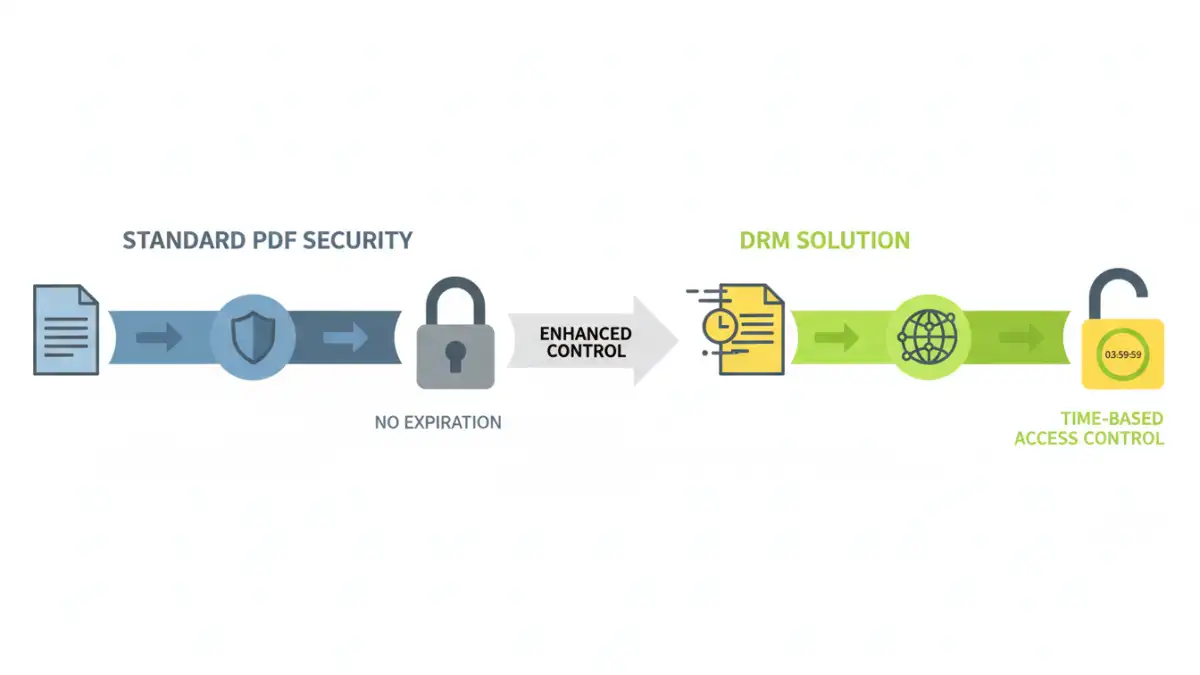
When you password-protect a PDF using software like Adobe Acrobat or other editors, you're applying encryption directly to the file itself. The security is self-contained. There are typically two types of passwords you can set, and neither includes an expiration feature.
User (or Document Open) Password
This is the password most people are familiar with. It's a single key required to open and view the document. Without it, the file's contents remain encrypted and unreadable. Once someone has this password, they can theoretically open the file forever, as long as they have the file and the password.
Owner (or Permissions) Password
This password is more about control. It restricts specific actions like printing, copying text, or editing the document. Someone might be able to open the PDF without a password (if no user password is set), but they would need the owner password to change these permissions. This password also doesn't expire.
Why PDF Passwords Don't Inherently Expire

The concept to extend pdf password expiration doesn't apply to the standard PDF format because the security mechanism isn't built for it. A PDF is a standalone file. The encryption and password checks happen locally on the user's computer, completely offline.
For a password to 'expire,' the file would need to communicate with an external server to check the current date and verify its access rights. Standard PDF files simply don't have this capability. The password hash is embedded within the document's data structure. If the password you enter matches that hash, the file decrypts. There's no built-in logic to check a calendar.
Effective Methods for Managing Document Access
So, if you can't set an expiration date, how do you solve the original problem of providing temporary access? You have to move beyond standard passwords and look at different strategies for file password management.
Manual Password Rotation
The simplest, albeit most labor-intensive, method is to manually manage access. You can send a password-protected file and then, after a certain period, change the password and redistribute a new version to authorized users. This works for small-scale sharing but quickly becomes impractical for larger audiences or long-term projects.
Digital Rights Management (DRM) Solutions
This is the professional-grade solution. DRM systems are designed specifically for controlling access to digital content. When you use a DRM service, the PDF is wrapped in a secure layer that 'calls home' to a server to verify access rights before it can be opened.
These systems allow you to set granular permissions, including:
- Expiration Dates: Set a specific date and time after which the file can no longer be opened.
- Revoke Access: Instantly revoke access for any user or document, even after it's been downloaded.
- Dynamic Watermarking: Apply watermarks with the user's name or email to discourage unauthorized sharing.
- Location-Based Access: Restrict document access to specific IP addresses or geographic locations.
DRM turns a static document into a managed asset, giving you the time-based control that standard PDF security lacks.
Best Practices for Secure File Sharing
Regardless of the method you choose, sound security practices are essential. When you need to update PDF security settings or manage access, always prioritize the integrity of your information.
First, always use strong, unique passwords for any document protection. A combination of upper and lowercase letters, numbers, and symbols is crucial. Second, deliver the password separately from the file itself. Sending a PDF in one email and the password in a separate message (or via a different channel like a text message) adds a simple but effective layer of security. Finally, for highly sensitive information, a DRM solution is almost always the superior choice for its robust control and tracking capabilities.
Comparison: Standard PDF Security vs. DRM
| Feature | Standard PDF Password | Digital Rights Management (DRM) |
|---|---|---|
| Expiration Date | Not supported | Supported (can set specific dates/times) |
| Revoke Access | No (once shared, control is lost) | Yes (access can be revoked at any time) |
| Offline Access | Yes (once password is known) | Often requires an initial internet connection to verify |
| Cost | Free (built into most PDF software) | Typically requires a subscription service |
| Setup Complexity | Simple (a few clicks) | More involved (requires setting up policies on a platform) |
| Tracking & Auditing | None | Provides detailed logs of who accessed what and when |