
A few years back, my team was preparing a set of technical documents for a third-party audit. We needed to share complex reports without revealing proprietary code snippets or the personal details of the engineers involved. Just drawing black boxes over the text wasn't an option—we needed true, irreversible document sanitization. This experience drove home the importance of not just *how* you redact, but *what* you redact.
Simply blacking out text can create a false sense of security. True redaction involves permanently removing information from a document, ensuring it cannot be recovered. This process is crucial for protecting sensitive data, maintaining privacy, and complying with legal standards. Knowing what to remove is the first and most critical step.
Table of Contents
What is Ethical PDF Redaction?
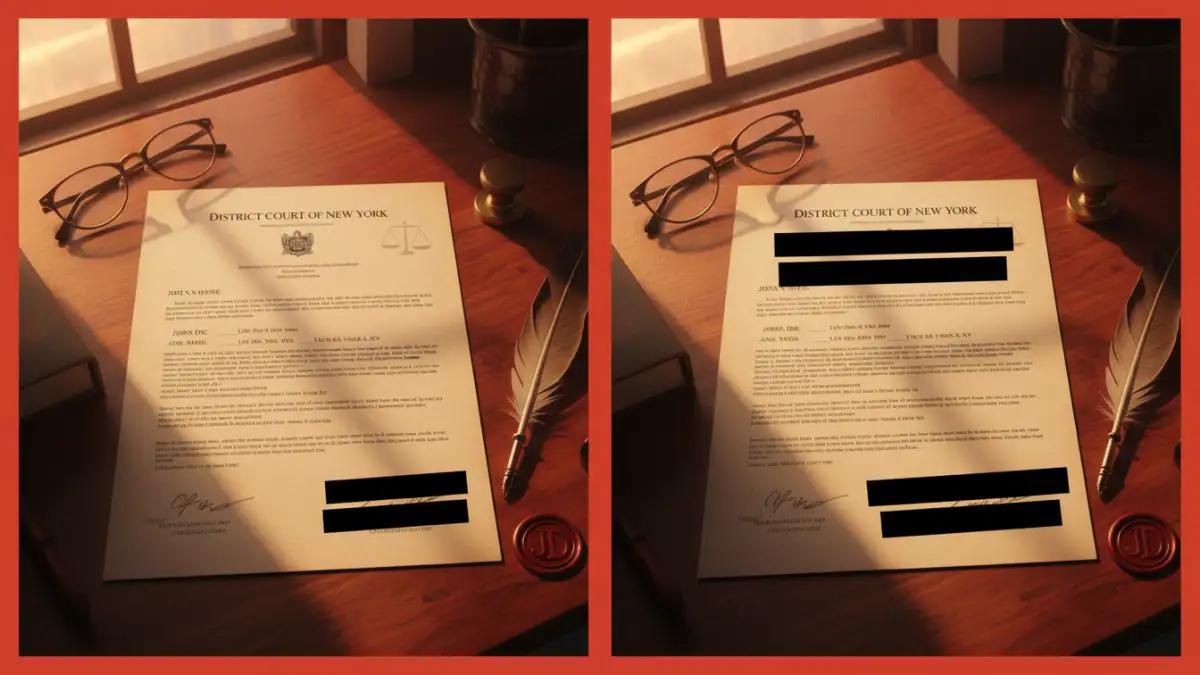
At its core, redaction is the process of selectively obscuring or removing sensitive information from a document before it's shared with a wider audience. However, the term 'ethical' adds a layer of responsibility. Ethical PDF redaction isn't just about compliance; it's about a commitment to information privacy and protecting individuals and organizations from harm.
Unlike simply changing text color to white or placing a black rectangle over a sentence, proper redaction permanently scrubs the data from the file's underlying code. When you use a professional redaction tool, it removes the text, images, and associated metadata entirely. This ensures that no one can simply copy and paste the blacked-out area into another editor to reveal the hidden content—a mistake I've seen cause serious data leaks.
Key Information Categories to Redact
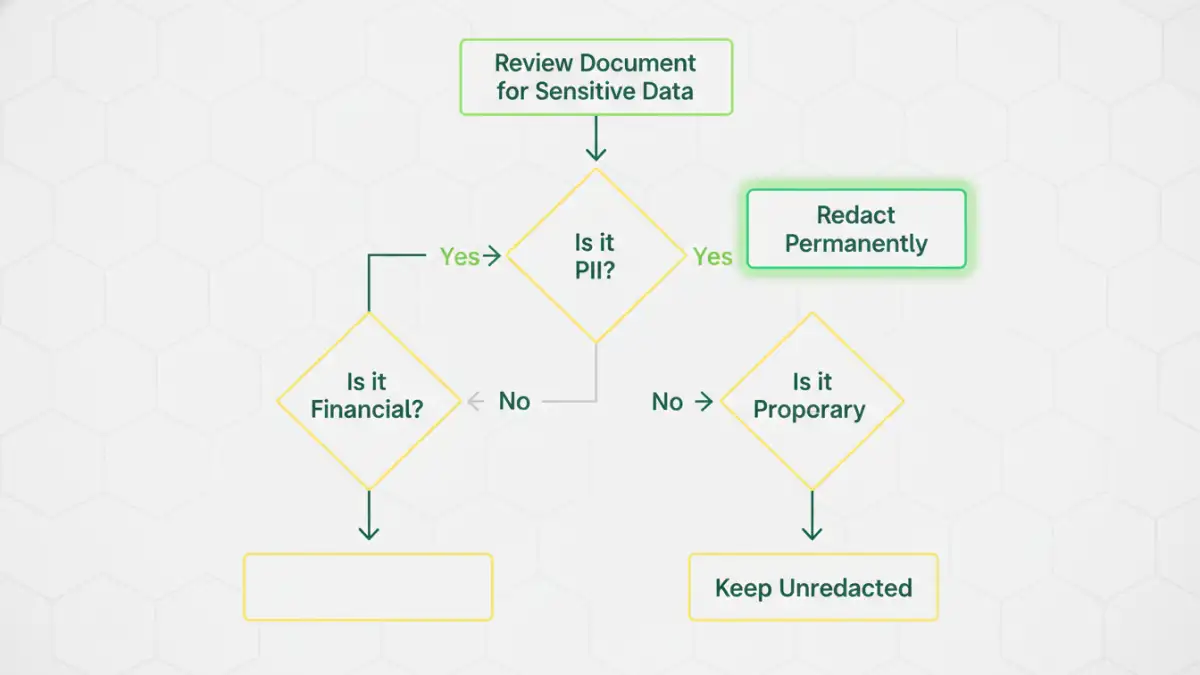
The central question in any redaction process is: what information poses a risk if exposed? The answer depends on the context, but several categories are almost always considered sensitive. Protecting this data is fundamental to maintaining trust and security.
Personally Identifiable Information (PII)
PII is any data that can be used to identify a specific individual. This is often the primary target for redaction in legal, HR, and government documents. Failing to protect PII can lead to identity theft, privacy violations, and severe legal penalties under regulations like GDPR and CCPA.
Common examples include:
- Full names and maiden names
- Social Security Numbers (SSNs) or other national identification numbers
- Home addresses, email addresses, and phone numbers
- Dates of birth and driver's license numbers
- Biometric data (fingerprints, retinal scans)
Financial and Health Information
This category includes highly confidential data governed by strict regulations. For instance, the Payment Card Industry Data Security Standard (PCI-DSS) governs financial data, while HIPAA in the United States protects health information. Exposure can lead to financial fraud or deep personal privacy breaches.
Be sure to redact:
- Bank account and credit card numbers
- Medical records, patient IDs, and treatment histories
- Insurance policy numbers and financial statements
Intellectual Property and Trade Secrets
For businesses, protecting competitive advantages is paramount. When sharing documents with partners, regulators, or in legal proceedings, redacting proprietary information is essential to prevent it from falling into the wrong hands. This is a common task in engineering and R&D, where we often share technical specifications without revealing the core 'secret sauce'.
This includes:
- Proprietary source code, formulas, and algorithms
- Client lists and strategic business plans
- Confidential research and development data
Common Redaction Pitfalls and How to Avoid Them
Effective document sanitization is about more than just knowing what to remove; it's also about understanding the common ways the process can fail. A single mistake can undermine the entire effort, leading to an unintentional data breach.
The 'Black Box' Fallacy
The most frequent mistake I encounter is when someone uses a simple annotation tool—like a black rectangle shape in a standard PDF viewer—to cover text. This only adds a layer on top of the original data. The underlying text is still there and can be easily revealed by deleting the shape or copying the text. Always use a dedicated redaction tool that permanently removes the data.
Ignoring Metadata
Every digital document contains metadata, which is data about the data. This can include the author's name, creation and modification dates, software version, and even comments or tracked changes. This hidden information can inadvertently reveal sensitive details. A proper redaction process must include scrubbing or sanitizing the document's metadata before publication.
Redaction Best Practices for Compliance and Security
To ensure your redaction process is robust and defensible, it's helpful to follow a standardized workflow. These practices help minimize human error and create a consistent, secure approach to handling sensitive documents.
First, always work on a copy of the original file. Never perform redactions on the master document. This preserves the original record for internal use and protects against accidental, irreversible data loss if a mistake is made.
Second, implement a two-step verification process. One person performs the initial redaction, and a second person reviews the document to ensure nothing was missed. This 'four-eyes' principle significantly reduces the risk of oversight.
Finally, use certified and trusted redaction software. Tools built specifically for this purpose are designed to remove data permanently and often include features for metadata scrubbing. They provide a level of assurance that general-purpose document editors simply cannot match.
Sensitive Data Redaction Checklist
| Data Category | Examples | Redaction Priority |
|---|---|---|
| Personally Identifiable Information (PII) | Social Security Numbers, Addresses, Birth Dates | High |
| Protected Health Information (PHI) | Medical Records, Patient IDs, Diagnoses | High |
| Financial Data | Credit Card Numbers, Bank Accounts, Salaries | High |
| Intellectual Property (IP) | Trade Secrets, Source Code, Client Lists | High |
| Privileged Communication | Attorney-Client Emails, Internal Memos | Medium to High |
| Operational Security Data | Server IP Addresses, System Configurations | Medium |