Have you ever received a document that was 'digitally signed' and wondered if that also meant it was encrypted? It's a common point of confusion. Many people use these terms interchangeably, but in the world of software and security, they represent two distinct concepts that solve different problems. Getting this right is fundamental to proper document security basics.
Think of it this way: one is like sealing a letter with a unique wax seal so everyone knows it came from you and hasn't been opened. The other is like writing the letter in a secret code that only the intended recipient can read. Both provide security, but in very different ways. Let's break down what each one does and when you should use them.
Table of Contents
What is Encryption? The Lock on Your Data
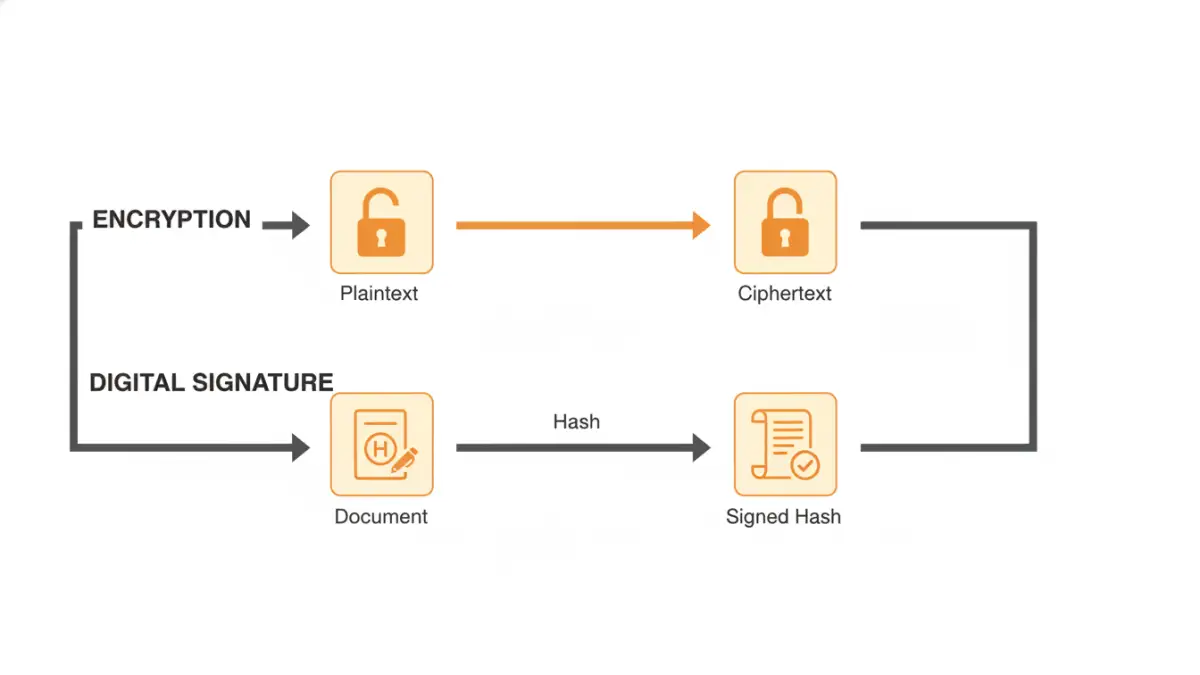
Encryption is all about confidentiality. Its sole purpose is to take readable data (plaintext) and scramble it into an unreadable format (ciphertext). Only someone with the correct key can unscramble it back into its original, readable form. This process prevents unauthorized parties from understanding the information even if they manage to access it.
I often explain this to junior developers using the analogy of a safe. You put your sensitive documents inside, spin the combination lock, and now they're secure. Anyone who steals the safe still can't read the documents without the combination. In the digital world, the 'combination' is a cryptographic key. This is the foundation of protecting data at rest (on a hard drive) or in transit (over the internet).
What is a Digital Signature? The Seal of Authenticity

A digital signature, on the other hand, is not about hiding information. It's about verifying it. A digital signature provides three key assurances:
- Authenticity: It proves who the sender or signer is. You can be confident the document came from the person who claims to have sent it.
- Integrity: It guarantees that the document has not been altered since it was signed. This is a critical file integrity check. Even a tiny change, like adding a single space, will invalidate the signature.
- Non-repudiation: It prevents the signer from later denying that they signed the document. This is legally binding in many jurisdictions, making it essential for contracts.
Instead of locking the content, a digital signature creates a unique mathematical value (a 'hash') of the document and then encrypts that hash with the signer's private key. Anyone can use the signer's public key to verify that the signature is valid and that the document is unchanged.
The Core Differences: Confidentiality vs. Authenticity
The debate of digital signatures vs encryption is really a misunderstanding of their roles. They aren't competing technologies; they are complementary ones that address different security needs. The primary distinction lies in their core purpose.
Purpose: Secrecy vs. Identity
Encryption's goal is secrecy. It answers the question: "Can unauthorized people read this?" If a file is encrypted properly, the answer is no. Its focus is on preventing access to the content.
A digital signature's goal is identity and integrity. It answers the questions: "Did this really come from you?" and "Has this been tampered with?" Its focus is on validating the source and state of the document, not hiding its contents. When you are signing a PDF, you are asserting its authenticity, not necessarily making it secret.
Mechanism: Keys and Hashes
While both technologies often use a similar underlying system (public-key cryptography), they apply it differently. Encryption uses the recipient's public key to 'lock' the data, ensuring only the recipient with their private key can 'unlock' it.
A digital signature uses the sender's private key to 'sign' the document's hash. Anyone with the sender's public key can verify the signature. This reversal of key usage is the technical crux of their different functions.
How They Work Together for Ultimate Security
The most secure communications use both encryption and digital signatures. In my work building secure systems, we almost never implement one without considering the other for sensitive data exchange. A typical workflow looks like this:
- Sign the Document: The sender first creates a digital signature for the document to ensure authenticity and integrity. This attaches a verifiable 'seal' to the file.
- Encrypt the Document: The sender then encrypts the entire package—the original document plus its digital signature—using the recipient's public key.
- Send Securely: The encrypted package is sent to the recipient.
- Decrypt and Verify: The recipient uses their private key to decrypt the package. They then use the sender's public key to verify the digital signature, confirming the sender's identity and that the document hasn't been altered in transit.
This two-step process provides the best of both worlds: confidentiality from encryption and trust from the digital signature. You know who it's from, you know it hasn't been tampered with, and you know no one else could have read it along the way.
Practical Use Cases for Beginners
To make this concrete, here are some everyday scenarios:
- Use Encryption when: You need to store sensitive personal files (like tax returns or medical records) on your laptop or a cloud service. You want to send a confidential email with private business information.
- Use a Digital Signature when: You are sending a legal contract, an official invoice, or a software update. The recipient needs to be 100% certain it came from you and is exactly as you sent it. A common example is signing a PDF contract.
- Use Both when: A lawyer sends a sensitive, signed contract to a client. A doctor sends a patient's signed prescription to a pharmacy. The content is private (needs encryption) and its origin and integrity must be verifiable (needs a digital signature).
Encryption vs. Digital Signature Comparison
| Feature | Encryption | Digital Signature |
|---|---|---|
| Primary Goal | Confidentiality (Secrecy) | Authenticity, Integrity, Non-repudiation |
| Answers the Question | "Is this information private?" | "Who sent this and has it been changed?" |
| Key Used to Create | Recipient's Public Key | Sender's Private Key |
| Key Used to Verify/Read | Recipient's Private Key | Sender's Public Key |
| Effect on Data | Makes the entire data unreadable | Adds verifiable data block; content remains readable |
| Real-World Analogy | A locked safe or a sealed envelope with coded message | A handwritten signature or a tamper-proof wax seal |