
That one critical spreadsheet, protected by a password set two years ago, is a familiar story in many teams. Everyone knows the password, including former employees. While password-protecting documents is a good first step, static, unchanging passwords create a significant security blind spot. Over time, they become liabilities rather than safeguards.
The solution isn't to stop using passwords, but to manage them dynamically. This involves creating a process where document passwords are changed on a regular schedule, just like user account passwords. It’s a simple concept that drastically improves your team's overall security posture.
Table of Contents
Why a Password Expiration Policy is Crucial
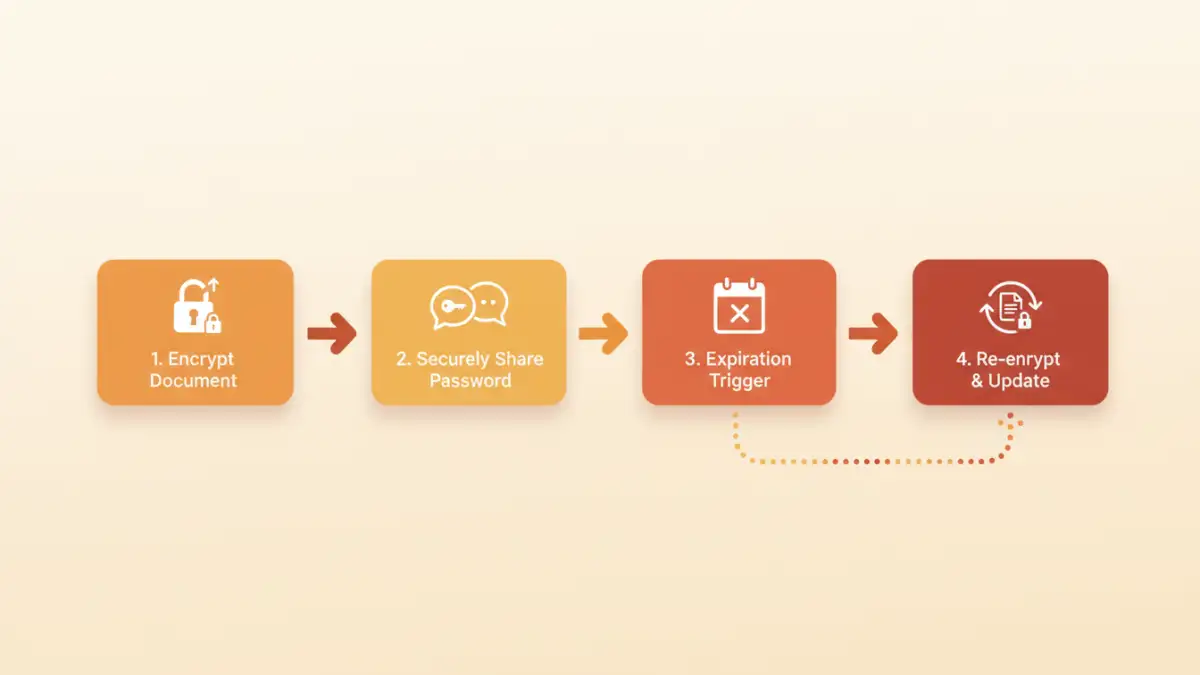
A static password on a shared document is like leaving the same key under the doormat forever. Eventually, too many people know it's there. A formal policy for rotating these passwords addresses several critical risks and is a core component of any modern secure file sharing policy.
First, it mitigates the risk of unauthorized access from former employees or compromised accounts. If a team member leaves, their knowledge of a shared document password remains a threat. Regular rotation ensures that old credentials become useless over time. I once worked with a client who failed a security audit because their sensitive financial projections were secured with a password that hadn't changed in three years and was known by several ex-staffers.
Second, it supports data security compliance. Regulations like GDPR, HIPAA, and CCPA require organizations to implement reasonable technical measures to protect sensitive data. Demonstrating that you actively manage access credentials, including those for documents, is a key part of compliance. It shows you are proactive, not reactive, about security.
Key Components of an Effective Policy

A successful document password expiration policy is clear, simple, and easy to follow. It shouldn't be a bureaucratic nightmare. The goal is to create a framework that enhances security without crippling productivity. Here are the essential elements to include.
Defining Expiration Timelines
The core of the policy is the rotation schedule. How often should passwords be changed? There's no single right answer; it depends on the sensitivity of the data.
- Highly Sensitive Data (e.g., financial records, HR files): 30-60 day rotation.
- Moderately Sensitive Data (e.g., internal project plans): 90-day rotation.
- Archived Data (read-only access): Annual rotation or upon project closure.
The key is to segment your data and apply a risk-based approach. A one-size-fits-all policy often leads to either excessive work or inadequate protection.
Secure Password Communication
How do you share the new password with the team? This is often the weakest link. Emailing the new password in plaintext completely defeats the purpose. Instead, your policy must mandate a secure channel. The best practice is to use a team password manager like 1Password or Bitwarden. You can securely share the new credential with the authorized group, and the update is instantly available to them.
How to Implement Your Policy Step-by-Step
Rolling out a new security policy requires careful planning and communication. Abrupt changes can lead to confusion and resistance. I recommend a phased approach to ensure a smooth transition.
- Draft the Policy: Write a clear, concise document outlining the rules. Define the scope (which documents are covered), the rotation schedule, the responsible parties (who changes the password), and the secure communication method.
- Get Leadership Buy-In: Explain the risks the policy mitigates. Gaining support from management is crucial for enforcement and resource allocation, especially if you need to invest in tools like a password manager.
- Communicate to the Team: Announce the upcoming change well in advance. Explain the 'why' behind the policy, focusing on protecting the team's work and company data. Provide clear instructions and a timeline.
- Run a Pilot Program: Start with one or two teams. This allows you to identify any unforeseen issues or friction points in a controlled environment. Use their feedback to refine the process before a company-wide rollout.
- Train and Deploy: Conduct brief training sessions on the new process, especially on how to use the designated secure sharing tool. After training, officially launch the policy.
Tools and Automation for Enforcement
Manually tracking dozens of document passwords and their expiration dates is not scalable and is prone to human error. Fortunately, several tools can help automate and enforce your policy.
Document Management Systems (DMS)
Platforms like SharePoint, Google Drive (with add-ons), and dedicated DMS solutions often have built-in features for access control and security policies. While they may not have a direct "password expiration" feature for individual files, they manage access at the user level. By rotating user passwords and enforcing MFA, you achieve a similar, often superior, level of security without managing individual document passwords.
Password Managers
For teams that rely on password-protected PDFs or ZIP archives, a team password manager is essential. You can store the document password as a shared item and set a reminder or expiration date within the password manager itself. When the reminder triggers, the designated owner generates a new password, updates the document, and updates the shared entry in the vault. This keeps the process organized and secure.
Best Practices for Team Adoption
For any security policy to be effective, people have to follow it. Focus on making compliance as easy as possible.
- Keep it Simple: The fewer steps involved, the better. Automate wherever possible.
- Assign Clear Ownership: For each secure document, designate one person as the 'owner' responsible for rotating the password. This avoids confusion and ensures accountability.
- Integrate with Existing Workflows: If your team lives in Slack, use a Slack-integrated password manager. If they use a specific project management tool, see if you can integrate reminders there. The less context-switching required, the higher the adoption rate.
- Regularly Review the Policy: A policy written today may not be relevant in a year. Schedule an annual review to ensure it still meets your team's needs and addresses current security threats.
Policy Enforcement Method Comparison
| Enforcement Method | Pros | Cons | Best For |
|---|---|---|---|
| Manual Tracking | No cost, simple for very small teams. | Prone to human error, not scalable, hard to audit. | Solo practitioners or teams with fewer than 5 shared documents. |
| Calendar Reminders | Easy to set up, uses existing tools. | No enforcement mechanism, easy to ignore or forget. | Small, disciplined teams who need a basic reminder system. |
| Password Manager | Secure sharing, centralized management, audit trails. | Requires subscription and team training. | Most teams handling sensitive ZIP, PDF, or encrypted files. |
| Document Management System (DMS) | User-based access control, comprehensive security features. | Higher cost, can be complex to configure. | Organizations needing robust data governance and compliance. |