
A legal firm recently approached me with a daunting task: they had terabytes of old email archives from departed employees stored in PST files. These archives were a black box—inaccessible without specific Outlook versions, difficult to search, and a potential compliance nightmare. Their goal was to make this data searchable for e-discovery and secure it for long-term retention without relying on obsolete software.
This is a common problem I've seen across various industries. Legacy email formats lock away valuable information. The most robust solution I've consistently recommended is to transform these disparate files into a unified, secure document portfolio. This process not only preserves the data but makes it more accessible and secure for the future.
Table of Contents
Why Convert Email Archives to PDF Portfolios?
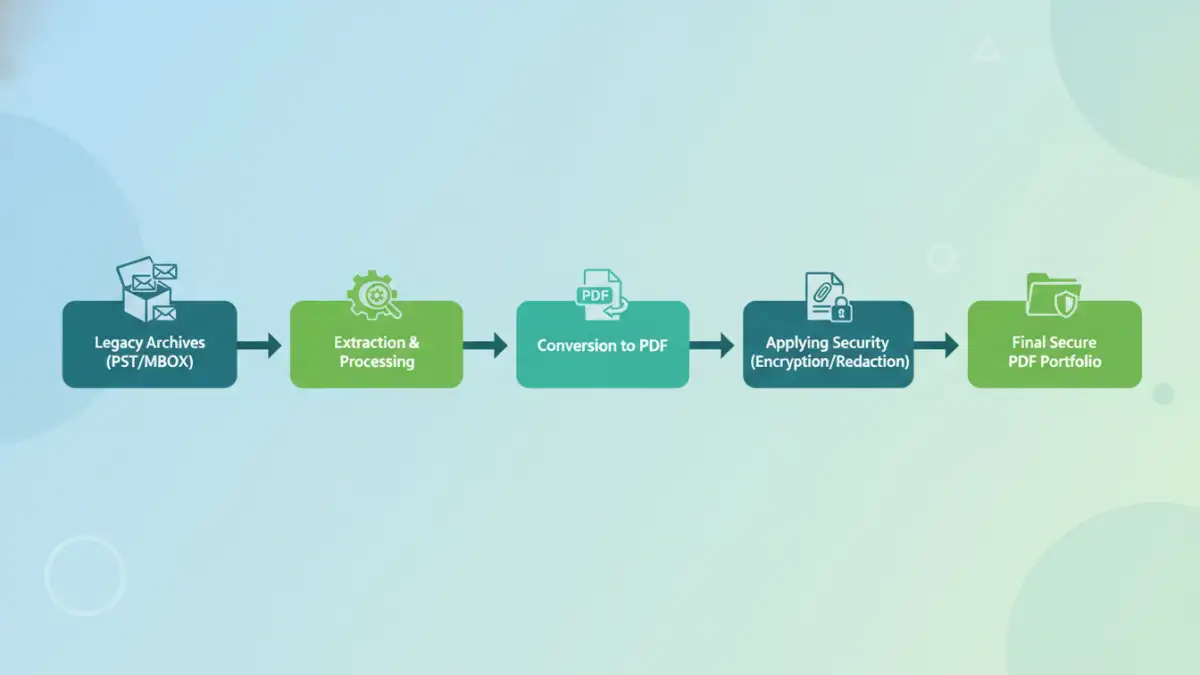
Moving from proprietary formats like PST or MBOX to a PDF portfolio isn't just a file conversion; it's a strategic upgrade for your data management. The primary benefit is universal accessibility. PDFs can be opened on any device with a free reader, eliminating the need for licensed software like Microsoft Outlook to view old archives.
Furthermore, a secure document portfolio is ideal for compliance and legal discovery. Each email and its attachments are contained within a single, organized file. This structure simplifies searching, bates stamping, and redaction, which are critical functions in e-discovery formats. It creates a static, tamper-evident record suitable for long-term archiving.
Ensuring Long-Term Preservation
Proprietary file formats can become obsolete, rendering the data within them inaccessible. The PDF/A (Archival) standard was specifically designed for long-term preservation of electronic documents. Converting emails to this format ensures they will be readable decades from now, regardless of changes in technology.
Understanding Legacy Email Formats
To appreciate the solution, it's important to understand the problem. Most legacy archives come in a few common formats, each with its own challenges.
PST (Personal Storage Table) files are used by Microsoft Outlook to store emails, calendars, and contacts locally. They are notorious for corruption, especially as they grow in size, and are tied to the Windows ecosystem. MBOX files are a more open standard used by clients like Thunderbird and Apple Mail, but they can still be cumbersome to manage and search in bulk.
The Attachment Challenge
A major hurdle in any email migration is handling attachments. Simply converting an email's text to PDF and leaving the attachments as separate files breaks the integrity of the original communication. A PDF portfolio solves this by embedding the attachments in their native format within the parent PDF file, preserving the complete record in one container.
The Conversion Process: A Strategic Approach
The path to convert archives to secure pdf portfolios requires careful planning. A haphazard approach can lead to data loss or corrupted files. I generally guide clients through a process that prioritizes data integrity and security from start to finish.
The first step is always discovery and consolidation. You need to locate all the archive files, which might be scattered across old hard drives, servers, or backup tapes. Once gathered, the next phase involves choosing a conversion method. For large-scale projects, automated tools are the only practical option. These solutions can process terabytes of data, maintain the original folder structure, and preserve critical metadata like timestamps and sender/recipient information.
Securing Your New PDF Portfolio
Conversion is only half the battle. The resulting PDF portfolios contain sensitive information and must be secured. This is where the real power of the PDF format comes into play. You can apply robust security measures directly to the files.
Implementing AES-256 bit encryption with a strong user or owner password prevents unauthorized access. This ensures that only individuals with the correct credentials can open and view the contents of the archive. For legal or compliance purposes, you can also apply permissions to restrict printing, copying, or editing.
Redaction for Sensitive Data
In many e-discovery scenarios, certain information must be redacted before an archive can be shared. This could include personally identifiable information (PII), trade secrets, or legally privileged content. Professional-grade PDF tools and specialized e-discovery platforms allow for permanent redaction, effectively blacking out sensitive text and images so they cannot be recovered.
Choosing the Right Email Archiving Solution
When selecting a tool or service for a PST to PDF conversion, several factors are critical. Look for a solution that guarantees metadata preservation (To, From, CC, Sent/Received dates). The tool must also handle attachments flawlessly, embedding them within the PDF portfolio rather than extracting them to a separate folder.
Scalability is another key consideration. The right solution should be able to handle the volume of data you have without performance degradation. For enterprise needs, look for features like batch processing, detailed logging for audit trails, and support for a wide range of source email formats. This ensures your investment serves you well both now and in the future.
Comparison of Conversion Methods
| Method | Pros | Cons | Best For |
|---|---|---|---|
| Manual Print-to-PDF | Free, no special software needed. | Extremely slow, loses attachments and metadata, not scalable. | Archiving a handful of individual emails. |
| Outlook Add-ins | Integrates with existing software, relatively simple. | Requires Outlook, often processes one PST at a time, limited features. | Small businesses or individuals with a few PST files. |
| Online Converters | Quick for single files, accessible from anywhere. | Major security and privacy risks for sensitive data, file size limits. | Non-sensitive, small MBOX or EML files. |
| Dedicated Desktop Software | High-speed batch processing, preserves metadata and folder structure, secure. | Requires investment, may have a learning curve. | Businesses of all sizes, legal firms, and compliance officers. |
| Enterprise Archiving Platforms | Comprehensive solution with e-discovery, security, and retention policies. | Significant cost and implementation complexity. | Large corporations with strict regulatory requirements. |