Working with sensitive information often means needing to protect your documents. While formats like PDF and DOCX have robust built-in security features, Rich Text Format (RTF) files, due to their simplicity and cross-platform compatibility, often require a bit more attention when it comes to security. Ensuring that your RTF documents remain private and uncompromised is crucial, whether for business contracts, personal notes, or any data you don't want falling into the wrong hands. Fortunately, there are effective ways to implement document protection for RTF files.
The challenge with RTF is its inherent design for broad compatibility, which sometimes means less emphasis on advanced, built-in security layers compared to more complex proprietary formats. However, this doesn't mean you're left without options. By understanding the available methods for encryption and password protection, you can significantly enhance the security of your RTF documents, giving you peace of mind.
Table of Contents
Understanding RTF Security
Rich Text Format (RTF) is a document file format developed by Microsoft. Its primary goal is to enable cross-platform document interchange between different word processing applications. Because of this design philosophy, RTF files themselves do not have native, robust encryption capabilities built into the file format itself, unlike some other document types.
This lack of native encryption means that if you need to secure RTF content, you'll typically rely on external tools or methods to add layers of protection. This can involve encrypting the file before sharing it or using software that can password-protect RTF files. Understanding this limitation is the first step in knowing how to effectively secure RTF document files.
The Need for External Protection
When you need to secure RTF document files, it's essential to recognize that the RTF format alone doesn't offer strong protection against unauthorized access. Therefore, you must employ supplementary security measures. These measures are crucial for safeguarding sensitive data contained within these widely compatible files.
Methods for Encryption

Since RTF files lack built-in encryption, we need to turn to external solutions. These methods essentially wrap your RTF document in a secure layer, making it unreadable without the correct key or password. These techniques are vital for maintaining the confidentiality of your information.
Using Archiving Software
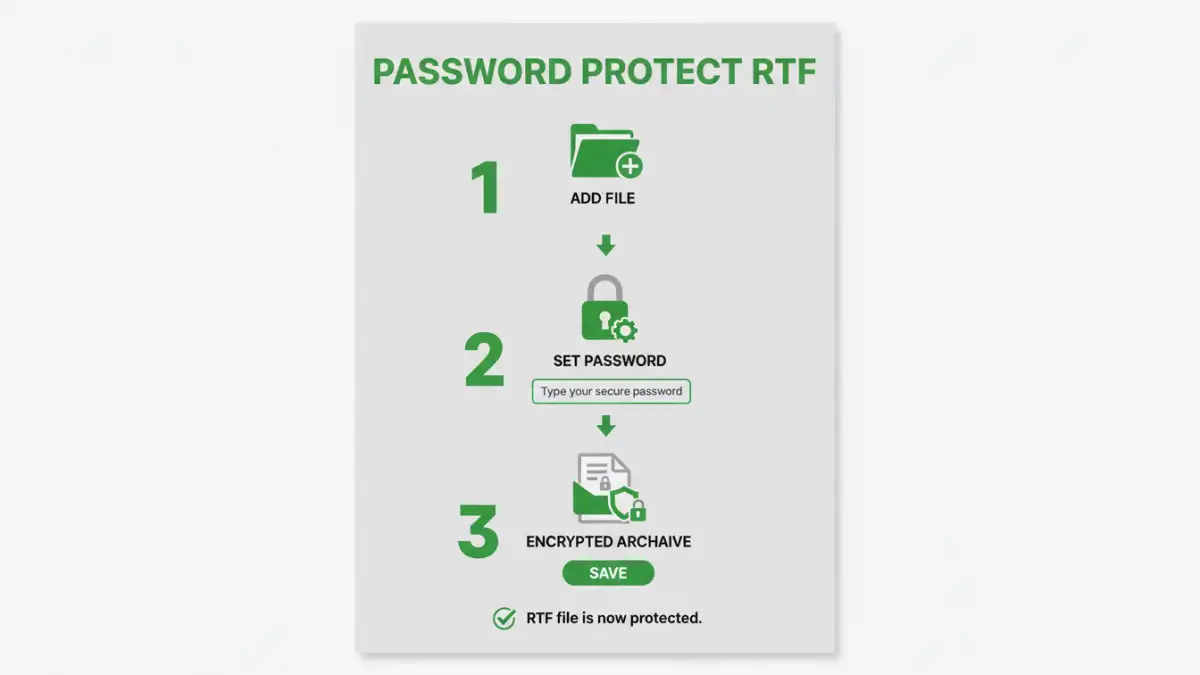
One of the most accessible methods is to use file archiving and compression tools like 7-Zip, WinRAR, or the built-in compression features in operating systems. These programs allow you to create password-protected archives (e.g., .zip, .7z, .rar). When you add your RTF file to such an archive and set a strong password, the contents become encrypted.
Leveraging Third-Party Encryption Tools
There are numerous dedicated encryption software applications available, both free and paid. Tools like VeraCrypt (for full-disk or container encryption), AxCrypt (file encryption), or even online encryption services can be used. You select your RTF file, apply encryption with a strong password or key, and then you have a protected version of your document.
Text Editors with Encryption Features
Some advanced text editors or word processors might offer basic file encryption options when saving. While not as common for RTF specifically, it's worth checking the capabilities of the software you use to create or edit your RTF files. This can sometimes offer a straightforward way to password protect RTF files directly.
Password Protection Strategies
Simply encrypting a file isn't enough if your password is weak. A strong password is your primary line of defense. When setting passwords for your RTF files, aim for complexity and uniqueness.
Creating Strong Passwords
A strong password should be long (at least 12-15 characters), a mix of uppercase and lowercase letters, numbers, and symbols. Avoid using easily guessable information like names, birthdays, or common words. Consider using a passphrase – a sequence of unrelated words – which can be easier to remember but hard to crack.
Managing Your Passwords
Keeping track of multiple strong passwords can be challenging. This is where password managers come in. They can generate complex passwords for you and store them securely. When you need to access your encrypted RTF file, you can retrieve the password from your manager. This is a fundamental aspect of robust document protection.
Best Practices for RTF Security
Beyond encryption and strong passwords, several best practices can enhance the security of your RTF documents. These habits ensure that your protection measures are effective and that you minimize risks.
Regular Backups
Always maintain secure, encrypted backups of your important RTF files. Losing access to an encrypted file due to a forgotten password or a corrupted file can be devastating. Ensure your backups are also protected.
Secure Sharing Methods
When sharing an encrypted RTF file, use secure channels. Avoid sending the password through the same communication method as the file itself. Consider using a separate secure messaging app, a phone call, or a secure file-sharing service to transmit the password.
Understand File Permissions
While not encryption, understanding and setting appropriate file system permissions on your RTF files can add another layer of security, especially on shared computers or networks. This restricts who can open, modify, or delete the file.
Comparison Table
Here's a look at different methods for securing RTF files:
| Method | Ease of Use | Security Level | Flexibility | Considerations |
|---|---|---|---|---|
| Archiving Software (e.g., 7-Zip) | Moderate | High (AES-256) | Good, can bundle multiple files | Requires software installation, password management |
| Dedicated Encryption Tools (e.g., AxCrypt) | Easy to Moderate | High (AES-256) | Excellent, file-specific protection | May require paid versions for full features, software installation |
| Password Protected ZIP (OS Native) | Easy | Moderate to High (depending on method) | Good, standard archive format | Less robust than specialized tools, potential compatibility issues |
| Cloud Storage Encryption (e.g., Sync.com, Tresorit) | Easy | Very High (end-to-end) | Excellent, syncs across devices | Requires subscription, relies on provider's security |