
I was recently helping a small business migrate some ancient data archives. We found a folder of password-protected ZIP files from the early 2000s containing old financial records. The manager was relieved they were “encrypted,” but I had to deliver some bad news. The protection on those files was likely trivial to break, offering little more than a false sense of security.
This is a common scenario. Many people still rely on the default, outdated encryption offered by older tools without understanding the underlying technology. While any password feels like a barrier, the method used to create that barrier is what truly matters.
Table of Contents
The Illusion of Security: What is Legacy ZIP Encryption?
When most people think of a password-protected ZIP file, they are unknowingly thinking of ZipCrypto. This was the original encryption method developed for the legacy ZIP format back in the late 1980s. For its time, it was a reasonable solution for casual data protection, designed to be fast and work on the limited computing power of that era.
The problem is that technology has not stood still. A security measure designed three decades ago is simply no match for the processing power and cryptanalysis techniques available today. Many operating systems and older compression utilities still offer this method, sometimes as the default, which perpetuates its use and creates significant security vulnerabilities.
Why ZipCrypto Fails: The Core Security Risks
The fundamental issue with ZipCrypto is its weak cryptographic design. It relies on a stream cipher that has been thoroughly analyzed and found to have several critical flaws. These aren't just theoretical weaknesses; they are practical exploits that can be used to recover the password or the data directly.
Known-Plaintext Attacks
One of the most devastating vulnerabilities in ZipCrypto is its susceptibility to a “known-plaintext attack.” If an attacker has an unencrypted copy of just one of the files inside the archive (or even a small part of one file), they can use it to quickly deduce the encryption key and unlock the entire archive. This completely bypasses the need to guess the password.
For instance, if a ZIP archive contains a standard software library or a common document template, an attacker can use the publicly available version of that file to break the encryption on the entire archive in minutes, regardless of password complexity. This is one of the most significant zip encryption security risks associated with the old format.
Brute-Force Vulnerabilities
Even without a known plaintext file, ZipCrypto is highly vulnerable to modern brute-force attacks. The algorithm's design is computationally inexpensive, which was a feature in the 1990s but is a major bug today. Modern GPUs can test billions of password combinations per second, making even moderately complex passwords crackable in a matter of hours or days. The lack of key derivation functions means the password is used too directly, providing little resistance against high-speed guessing.
The Modern Standard: AES-256 Encryption in ZIPs
Fortunately, the industry recognized the flaws of ZipCrypto and introduced a much stronger alternative: the Advanced Encryption Standard (AES). Modern ZIP utilities, including 7-Zip, WinZip, and the built-in Windows tool, now support AES-256 encryption, which is the same standard used by governments and corporations worldwide to protect classified information.
AES is a block cipher that is fundamentally more robust and has withstood intense scrutiny from the global security community. When you create an encrypted ZIP file today, choosing AES-256 is the single most important step you can take to ensure your data is actually secure.
How AES-256 Solves the Problem
Unlike ZipCrypto, AES-256 is not vulnerable to known-plaintext attacks. Its design is far more complex, preventing attackers from reverse-engineering the key even if they have parts of the unencrypted data. Furthermore, it incorporates key derivation techniques that significantly slow down brute-force attempts. An attack that might take hours against ZipCrypto could take centuries against a properly implemented AES-256 with a strong password.
Practical Steps for Upgrading File Encryption
Transitioning to a secure archive format is straightforward. The key is to be deliberate in your choice of tools and settings. Don't just right-click and “Send to > Compressed (zipped) folder” without checking the options.
- Use Modern Software: Rely on updated tools like 7-Zip (free and open-source) or the latest version of WinZip. The default compression utility in Windows has also improved, but third-party tools often provide more explicit control over encryption methods.
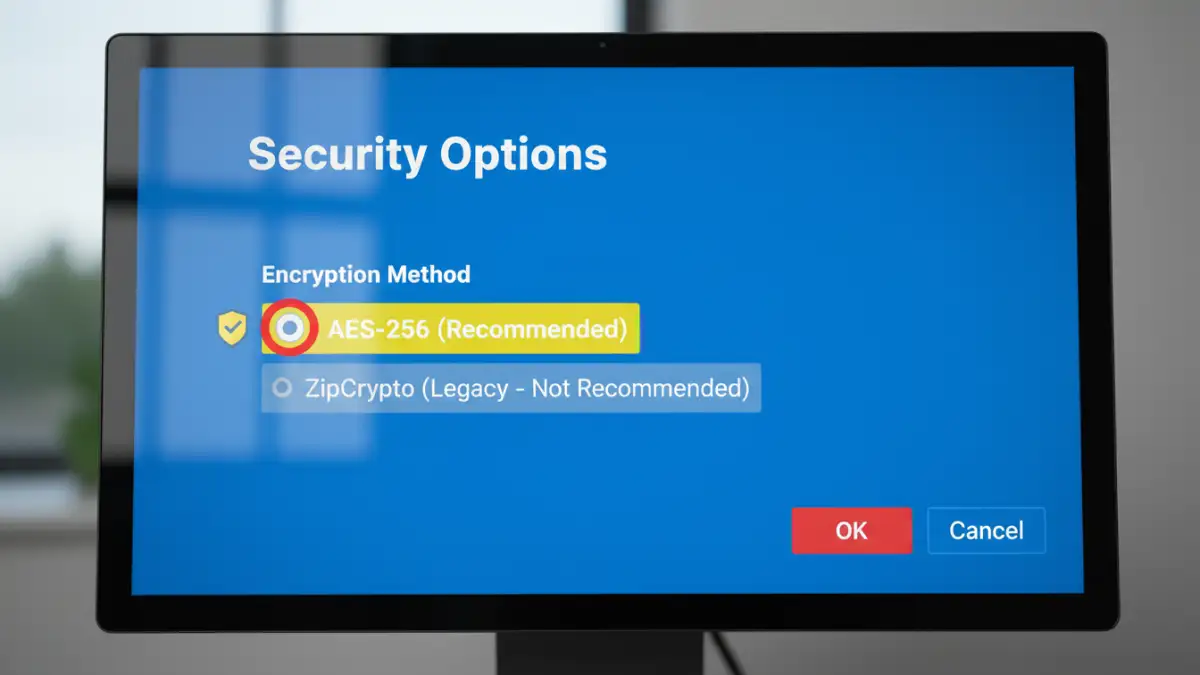
- Explicitly Select AES-256: When creating a password-protected archive, look for the encryption method setting. It might be in an “Advanced” or “Security” tab. Always choose AES-256 over options like “Standard,” “Legacy,” or “ZipCrypto.”
- Create a Strong Password: Encryption is only as strong as its password. Use a long, complex, and unique passphrase. Combine upper and lowercase letters, numbers, and symbols. A password manager can help generate and store these securely.
- Audit Old Archives: If you have old, encrypted ZIP files containing sensitive information, consider them insecure. The best practice is to decrypt them with the old password and re-compress them into a new archive using AES-256 encryption.
By consciously upgrading your file encryption practices, you move from a fragile, easily broken lock to a modern, bank-vault-level secure archive format. It's a small change in workflow that makes a massive difference in security.
Encryption Method Comparison: ZipCrypto vs. AES-256
| Feature | ZipCrypto (Legacy) | AES-256 (Modern) |
|---|---|---|
| Algorithm Type | Stream Cipher | Block Cipher |
| Key Size | 96-bit internal state | 256-bit |
| Known Vulnerabilities | Known-Plaintext Attack, weak to brute-force | No known practical vulnerabilities |
| Brute-Force Resistance | Very Low | Extremely High |
| Modern Tool Support | Supported for backward compatibility | Widely supported and recommended |
| Security Recommendation | Insecure; Do Not Use for sensitive data | Highly Secure; Industry Standard |