
A client recently came to me with a common challenge: they distribute a sensitive quarterly financial report as an encrypted PDF to a large group of stakeholders. Their process involved manually changing the password each quarter, a tedious task that was prone to errors and delays. This situation perfectly illustrates the need for a more robust and efficient system.
Using a single, static password for a document shared over a long period is a significant security risk. If that password is ever compromised, all past and future versions of that document are vulnerable. The solution is to implement a system for regular, scheduled password changes, and the best way to do that reliably is through automation.
Table of Contents
Why Automate PDF Password Rotation?
Before diving into the technical details, it's important to understand the fundamental reasons for moving away from static passwords. In any secure document workflow, the goal is to minimize risk and ensure that only authorized individuals have access. Static passwords are a weak link in that chain.
The Problem with Static Passwords
A password that never changes is a fixed target. Over time, its exposure risk increases dramatically. It might be written down, shared insecurely via email, or remain accessible to former employees who no longer require access. Each of these scenarios undermines the entire purpose of encrypting the document in the first place. Compliance standards in many industries also mandate periodic credential rotation, and document passwords are no exception.
Benefits of an Automated Workflow
Automating this process provides immediate and significant benefits. Firstly, it drastically enhances file security by ensuring credentials are fresh and limiting the window of opportunity for a compromised password. Secondly, it eliminates human error; no one can forget to change the password or make a typo when distributing the new one. This leads to a more reliable and streamlined process, freeing up valuable time for more critical tasks.
Core Components of an Automation Solution

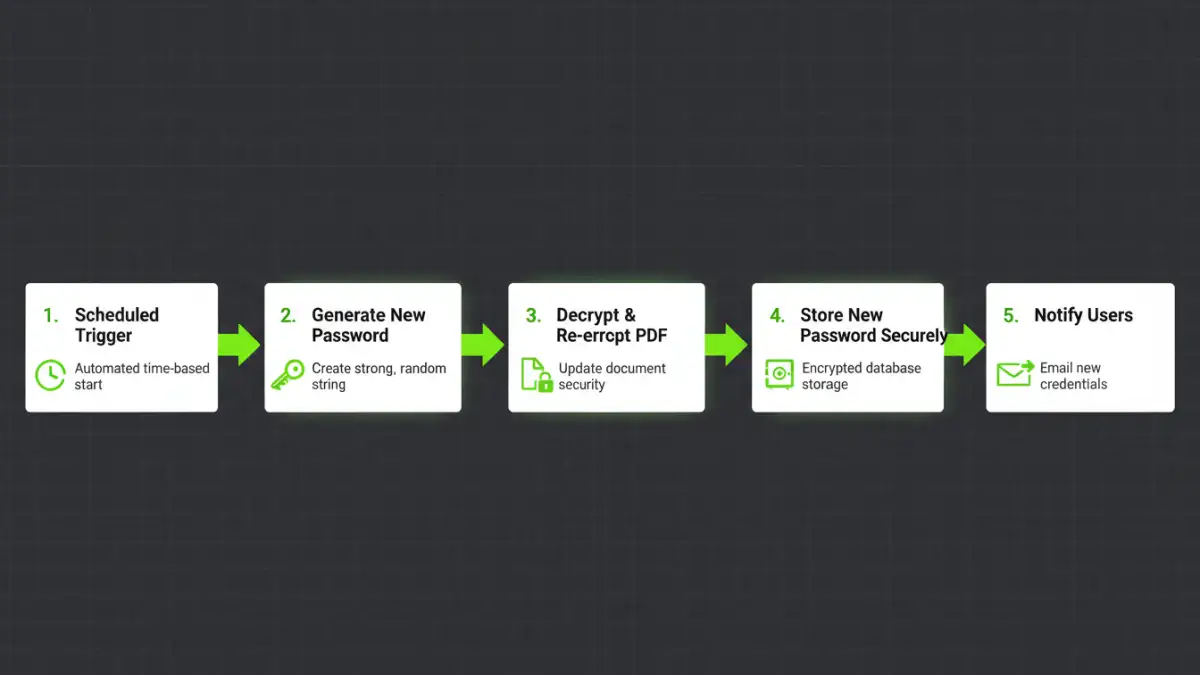
Building a system to automate pdf password rotation involves several key logical steps, whether you're writing a custom script or using a low-code platform. Think of it as a digital assembly line for your documents.
The process generally follows this sequence:
- Trigger: The automation needs a starting signal. This is typically a time-based scheduler (e.g., run on the first day of every month) or an event-based trigger (e.g., when a new file is added to a specific folder).
- Password Generation: The system must create a new, strong, and random password. Hardcoding passwords is a major security anti-pattern.
- Decryption and Re-encryption: The script or tool needs to open the target PDF using the current password, and then save a new version of it encrypted with the newly generated password.
- Secure Credential Storage: The new password must be stored securely. Simply writing it to a plain text file is not an option. This could involve a dedicated secrets manager, an encrypted configuration file, or a secure database.
- Distribution and Logging: Finally, the new password needs to be communicated to authorized users through a secure channel, and the entire rotation event should be logged for auditing purposes.
A Practical Approach: Automation with Scripts
For those with some technical comfort, a custom script offers the most flexibility. Python is an excellent choice for this due to its extensive libraries for handling PDFs and cryptographic functions. I've built several of these workflows for clients, and they are remarkably effective.
Key Python Libraries
To get started, you'd primarily use a library like `PyPDF2` or `pikepdf`. `Pikepdf` is particularly powerful for this task as it's built on the robust QPDF library and handles encryption and decryption very cleanly. You would also need libraries for generating random strings (`secrets`) and for scheduling (`schedule` or system-level tools).
The Script Logic
The core of the script would involve a function that accepts a file path, an old password, and a new password. It would use the library to open the PDF with the old password and then save it with the new one. The main part of your program would call this function after generating a new strong password. The final step is to schedule this script using a tool like `cron` on Linux/macOS or Task Scheduler on Windows to run at your desired interval (e.g., weekly or monthly).
Beyond Scripts: Tools and Platforms
While scripting is powerful, it's not the only way to achieve PDF encryption automation. Many modern business platforms can be configured to handle these workflows, often with less direct coding.
Enterprise Content Management (ECM) systems like SharePoint or Documentum often have built-in capabilities or can be extended with workflows (like Microsoft Power Automate) to perform these actions. You can create a flow that triggers on a schedule, retrieves a file, calls an Azure Function (which contains the Python logic) to rotate the password, and then updates a secure list with the new credential. This approach integrates the process directly into your existing document management ecosystem, which is a huge plus for governance and oversight.
Low-code platforms like Zapier or Make can also connect different services to create a similar chain of events. For instance, a scheduled trigger could pull a file from Dropbox, send it to a serverless function for password rotation, and then place the newly secured file in a different folder while sending a secure notification via a tool like 1Password or Bitwarden.
Automation Method Comparison
| Method | Complexity | Cost | Security Level |
|---|---|---|---|
| Custom Script (Python) | Medium to High | Low (developer time) | High (if implemented correctly) |
| Low-Code Platform (Zapier) | Low to Medium | Medium (subscription fees) | Medium to High |
| Enterprise System (e.g., SharePoint) | High | High (licensing costs) | Very High |
| Manual Rotation | Low | Low (staff time) | Low |