What happens if a client's sensitive financial data, legal strategy, or personal health information leaks from your system? The consequences extend far beyond a simple apology. It can lead to legal action, severe financial penalties, and a complete erosion of professional trust. This isn't just a hypothetical IT problem; it's a core issue of professional ethics that every service provider must confront.
For years, I've engineered systems designed to protect data, and I've seen firsthand how a simple failure in security protocol can unravel a business relationship. The duty of care we owe our clients is paramount, and in our digital age, that duty is intrinsically linked to robust data security practices.
Table of Contents
The Foundation: Why Encryption is a Professional Mandate
At its core, encryption is the process of converting data into a code to prevent unauthorized access. For professionals—be they lawyers, accountants, consultants, or software developers—this isn't just a technical feature. It's the modern equivalent of a locked filing cabinet and a soundproof room, fulfilling fundamental duties of confidentiality and care.
Beyond 'Best Practice': The Legal and Regulatory Landscape
Many industries are governed by strict confidentiality rules and data protection regulations. Laws like GDPR in Europe, HIPAA for healthcare in the US, and various financial regulations explicitly require safeguarding client information. A failure to implement adequate security measures, such as encryption, isn't just poor form; it can be illegal. Regulators are increasingly viewing unencrypted sensitive data as a sign of negligence.
The Trust Equation: Upholding Client Confidentiality
Clients entrust us with their most sensitive information based on an expectation of absolute confidentiality. This trust is the bedrock of any professional relationship. When you proactively encrypt client files, you are sending a clear message: 'I value your privacy and take my responsibility to protect your data seriously.' It's a tangible demonstration of your commitment to professional ethics and builds long-term confidence.
Practical Encryption Methods for Daily Workflows

Implementing client data protection doesn't have to be overly complex. Many powerful tools are readily available, often built directly into the software and operating systems you already use. The key is to understand the options and apply them consistently.
Full-Disk Encryption: The First Line of Defense
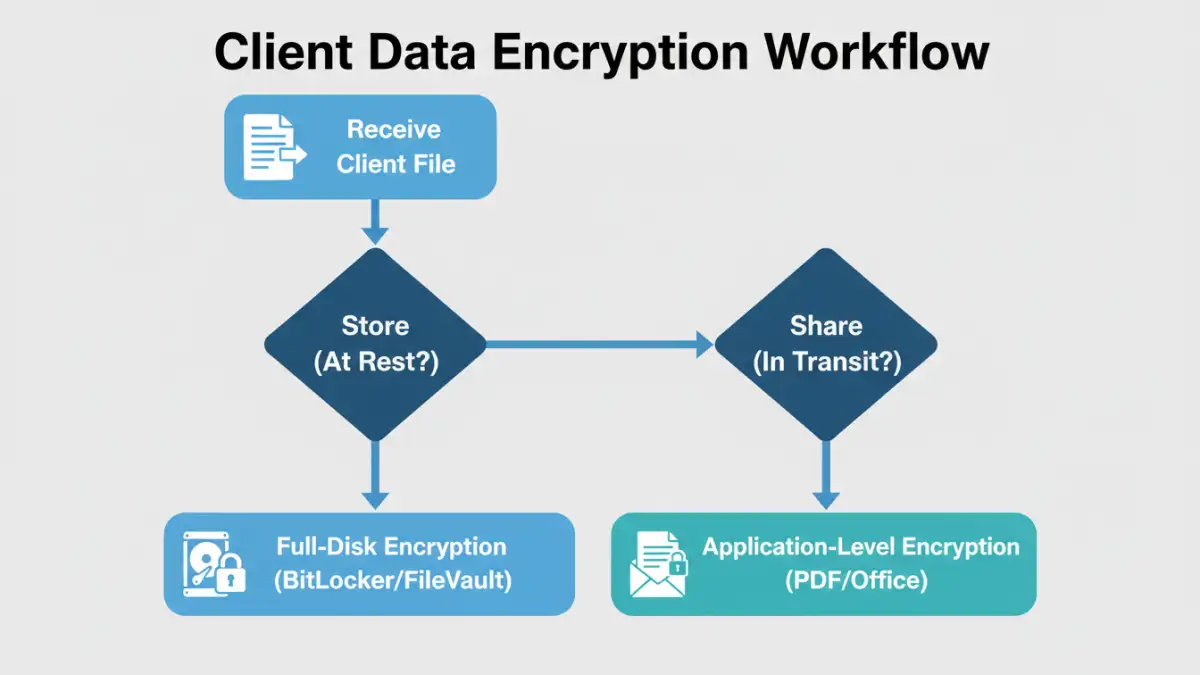
Before you even think about individual files, your entire device should be encrypted. If a laptop is stolen, full-disk encryption prevents the thief from simply removing the hard drive and accessing all its contents. Windows has BitLocker, and macOS has FileVault. Enabling these is a simple, one-time setup that provides a powerful baseline of security for all data at rest.
Application-Level Encryption for Secure Sharing
When you need to send a document to a client or colleague, you must protect it in transit. Most modern productivity suites offer built-in encryption:
- PDFs: Adobe Acrobat and many other PDF editors allow you to set a strong password that encrypts the document's contents. Always choose AES-256 bit encryption when available.
- Microsoft Office: Word, Excel, and PowerPoint have a 'Protect Document' feature (found under the 'File' > 'Info' menu) that allows you to encrypt the file with a password.
- Archive Files: Tools like 7-Zip or WinZip can create encrypted, password-protected archives (.zip or .7z). This is an excellent way to bundle and encrypt a folder of multiple client files before sending.
Building a Secure Document Handling Policy
Technology is only half the battle. A successful security strategy relies on a consistent process that everyone on your team follows. A formal policy removes ambiguity and ensures that secure document handling becomes a habit, not an afterthought.
Your policy should clearly define what constitutes sensitive client data and mandate encryption for it, both at rest and in transit. It should also specify the approved tools and methods. I once worked with a consulting firm whose 'policy' was just an informal understanding. After a minor security incident involving an employee sending unencrypted financials via email, they implemented a strict, formal policy. The clarity immediately reduced security errors and improved their overall client data protection posture.
Key and Password Management: The Weakest Link
The strongest encryption is useless if the password or key is weak or poorly managed. Your policy must address this. Mandate the use of a reputable password manager to generate and store strong, unique passwords for encrypted files. Sharing passwords securely is also critical. Never send a password in the same email as the encrypted file. A best practice is to share it via a different communication channel, such as a phone call or a secure messaging app.
Common Pitfalls and How to Avoid Them
Even with the right tools and policies, mistakes can happen. Awareness is the best defense against common security gaps.
The 'Convenience' Trap
The most frequent reason for security lapses is the desire for convenience. It's faster to email an unprotected file or use a simple, memorable password. You must cultivate a culture where security is understood as a non-negotiable part of the professional workflow. The momentary inconvenience of encrypting a file is insignificant compared to the potential damage of a data breach.
Forgetting About Data in Transit
Encrypting a file on your hard drive is great, but what about when you send it? Email is inherently insecure. Besides encrypting the file attachment itself, consider using a secure file-sharing portal that encrypts the entire transmission. This provides end-to-end protection, ensuring the data is secure from your machine all the way to your client's.
Encryption Method Comparison
| Encryption Type | Granularity | Primary Use Case | Potential Weakness |
|---|---|---|---|
| Full-Disk Encryption (FDE) | Entire Device | Protecting data at rest from physical theft. | Offers no protection if the device is running and logged in. |
| File/Folder Encryption | Individual Files/Folders | Securing specific documents for storage or sharing. | Relies on user diligence; unencrypted copies may exist. |
| End-to-End Encrypted (E2EE) Cloud Storage | Files at Rest & In Transit | Secure cloud backup and collaboration. | Provider may have access to metadata; relies on provider's security. |
| Encrypted Email (PGP/S/MIME) | Email Contents | Securing the content of email communications. | Complex setup for sender and receiver; doesn't protect attachments automatically. |