
Have you ever sent an email with sensitive attachments and worried about who might see them? Or maybe you've stored confidential client information on a laptop and wondered what would happen if it were lost or stolen. These are common concerns, and the solution is a fundamental concept in cybersecurity: file encryption.
At its core, encryption is the process of converting your data into a secret code to prevent unauthorized access. Think of it as putting a letter in a special safe that only someone with the exact key can open. Without that key, the contents are just gibberish.
Table of Contents
The Core Idea: What Is File Encryption?
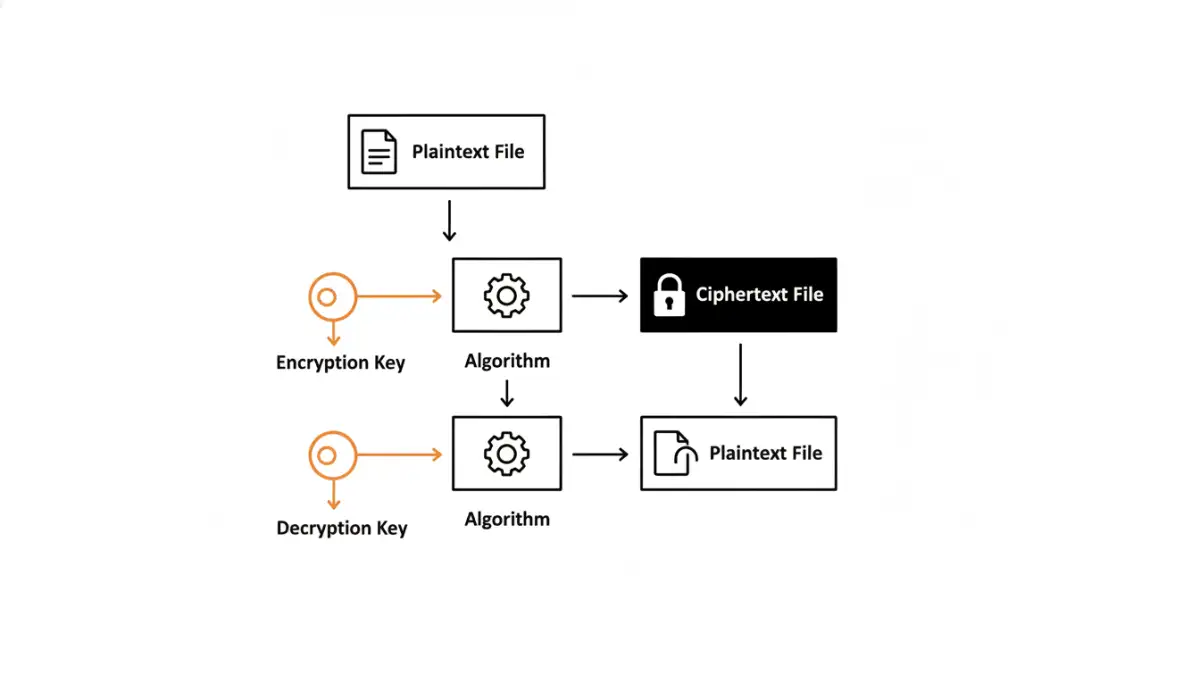
File encryption is the technological process of transforming the data within a file into an unreadable format, known as ciphertext. This is achieved using a mathematical algorithm and a secret piece of information called a key. Only someone who possesses the correct key can reverse the process—a step called decryption—to restore the file to its original, readable state, or plaintext.
This process ensures confidentiality. Even if an unauthorized person gains access to the encrypted file, the data itself remains secure and meaningless to them. It's the digital equivalent of locking a sensitive document in a vault instead of just leaving it on a desk.
Plaintext, Ciphertext, and Keys
To really grasp how this works, it's helpful to know the three core components involved in the process. These terms are central to all forms of data encryption:
- Plaintext: This is your original, readable data. It could be a Word document, a spreadsheet, a photo, or any other file in its normal state.
- Ciphertext: This is the result of applying an encryption algorithm to the plaintext. It's the scrambled, unreadable version of your data.
- Key: The key is a secret piece of information, like a password or a long string of random characters, that the algorithm uses to encrypt and decrypt the data. The security of your entire file rests on the strength and secrecy of this key.
How Encryption Works: A Look Under the Hood
Encryption relies on complex mathematical algorithms, called ciphers, to systematically scramble data. Modern encryption standards, such as the Advanced Encryption Standard (AES), are so robust that they are used by governments and corporations worldwide to protect classified information. These algorithms are publicly known and vetted by security experts; their strength comes from the secrecy and complexity of the key, not the algorithm itself.
When you encrypt a file, the algorithm takes your plaintext and the key, then performs a series of intricate mathematical operations to produce the ciphertext. The process is designed to be easy to perform with the correct key but computationally infeasible to reverse without it. Attempting to guess the key, known as a brute-force attack, would take even the world's most powerful supercomputers billions of years for a strong key.
Symmetric vs. Asymmetric Encryption
There are two primary models for encryption, each with its own specific use cases. Understanding the difference is a key part of data security basics.
- Symmetric Encryption: This is the simpler of the two. It uses a single, shared secret key to both encrypt and decrypt data. It’s fast and efficient, making it ideal for encrypting large amounts of data, like the entire hard drive of a computer. The challenge, however, is securely sharing that single key with the intended recipient.
- Asymmetric Encryption (Public-Key Cryptography): This model uses a pair of keys: a public key and a private key. The public key can be shared with anyone and is used to encrypt data. However, only the corresponding private key, which is kept secret by the owner, can decrypt it. This solves the key-sharing problem and is fundamental to secure communication over the internet, like HTTPS and secure email.
Why File Encryption is Non-Negotiable Today
In a world of constant data breaches and evolving cyber threats, protecting sensitive files is more critical than ever. I once worked with a client whose employee lost a company laptop at an airport. It was a stressful situation, but because the entire hard drive was encrypted, it was merely a loss of hardware, not a catastrophic data breach that would have triggered regulatory fines and destroyed customer trust.
Encryption provides a powerful last line of defense. If your other security measures, like firewalls or passwords, fail, encryption ensures the data itself remains protected. It's essential for regulatory compliance (think GDPR, HIPAA), safeguarding intellectual property, and maintaining personal privacy. Whether it's personal financial records or corporate trade secrets, encryption is the lock that keeps your digital life secure.
Practical Ways to Encrypt Your Files
The good news is that you don't have to be a cryptography expert to use encryption. Many tools are built directly into the software and operating systems you already use, making data security basics accessible to everyone.
For instance, both Windows (BitLocker) and macOS (FileVault) offer full-disk encryption, which automatically encrypts everything on your computer. You can also create encrypted archives using tools like 7-Zip or WinRAR. For individual files, many applications like Microsoft Office and Adobe Acrobat allow you to add password protection, which applies a layer of encryption. For more advanced needs, open-source tools like VeraCrypt allow you to create secure, encrypted virtual disks to store your most sensitive files.
Encryption Method Comparison
| Feature | Symmetric Encryption | Asymmetric Encryption |
|---|---|---|
| Key Usage | A single, shared key is used for both encryption and decryption. | Uses a pair of keys: a public key for encryption and a private key for decryption. |
| Speed | Faster and less computationally intensive. | Slower and more resource-intensive due to complex calculations. |
| Key Management | The main challenge is securely distributing the shared secret key. | Simpler key distribution, as the public key can be shared openly. |
| Best Use Case | Encrypting large volumes of data at rest (e.g., full-disk encryption, databases). | Securing communications and data in transit (e.g., SSL/TLS, secure email, digital signatures). |