When handling sensitive business information, the integrity and confidentiality of your documents are paramount. Many organizations grapple with ensuring their digital files, particularly PDFs, meet stringent security requirements. This isn't just about preventing casual viewing; it's about adhering to legal obligations and maintaining client trust.
I've seen firsthand how a lack of standardized security practices can lead to costly data breaches and compliance failures. Implementing robust measures isn't always straightforward, but understanding the core principles and available tools makes it manageable. This guide will walk you through the essentials of adopting effective pdf security standards for your business.
Table of Contents
Understanding the Basics of PDF Security
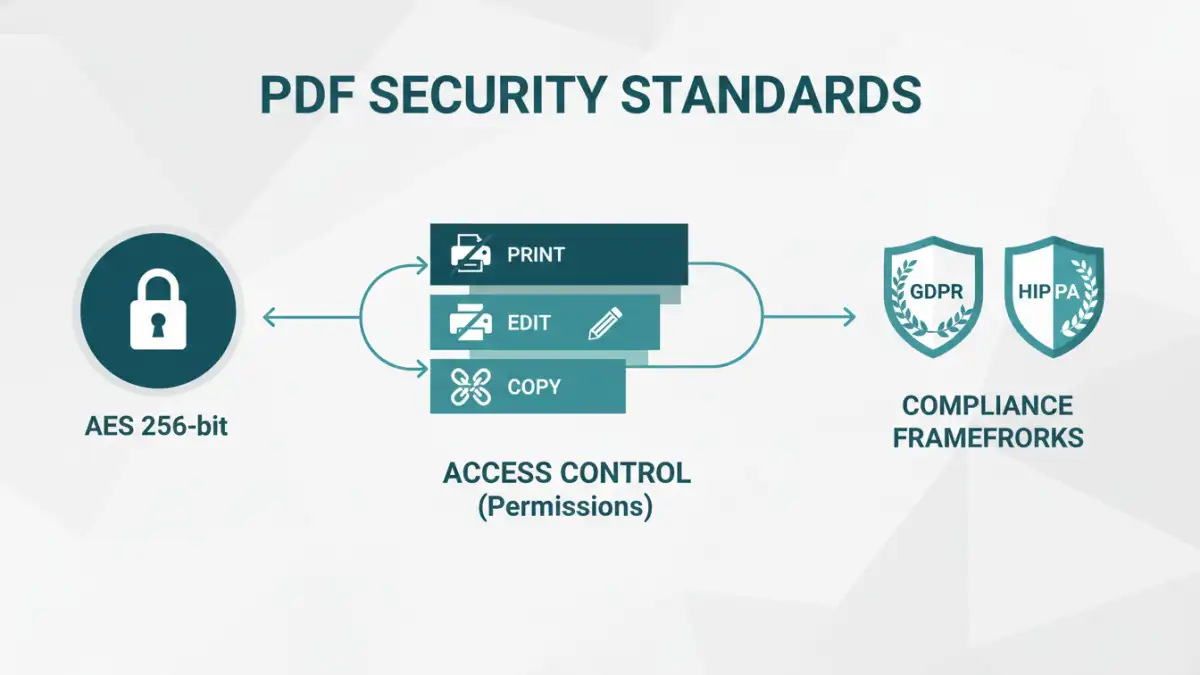
At its core, PDF security involves protecting the content of a PDF document from unauthorized access, modification, or distribution. This typically involves two primary mechanisms: encryption and access control. Encryption scrambles the document's content, making it unreadable without a key (usually a password), while access control defines what actions users can perform, such as printing or editing.
Key Security Features
Modern PDF applications and standards offer several security features. These include password protection for opening the document, restrictions on printing, copying text, modifying content, or even signing. Understanding these features is the first step toward building a comprehensive security strategy for your business documents.
Encryption Methods for Secure PDFs

The strength of your PDF security often hinges on the encryption used. Older PDFs might use 40-bit RC4 encryption, which is now considered weak. Modern standards, like AES (Advanced Encryption Standard) with 128-bit or 256-bit keys, offer significantly stronger protection. When creating or managing secure PDFs, opting for stronger encryption algorithms is crucial for robust data protection standards.
Many software solutions allow you to choose the encryption level. For sensitive business data, utilizing AES 256-bit encryption is generally recommended. This level of security is widely recognized and adopted across various industries for its resilience against brute-force attacks.
Implementing Access Control
Beyond encryption, controlling user permissions is vital for secure pdf business operations. This involves setting specific restrictions on what users can do with the document. For instance, you might allow a client to view a contract but prevent them from printing or editing it.
User Permissions and Restrictions
When setting up password protection, you can often define different passwords for opening the document versus applying restrictions. This granular control allows you to manage access levels effectively, ensuring that only authorized personnel can perform sensitive actions like editing or distributing confidential files.
Navigating Compliance Frameworks
Businesses operate within various regulatory landscapes, such as GDPR, HIPAA, or CCPA, which mandate specific data protection standards. Adhering to these file security regulations is not optional; it's a legal requirement. Implementing strong PDF security measures is a key component of achieving and maintaining compliance.
Each framework has unique requirements regarding data handling, storage, and access. By establishing clear pdf security standards, you can demonstrate due diligence and protect your organization from penalties associated with non-compliance. This proactive approach ensures your document security compliance is robust.
Best Practices for Business Document Security
To ensure your documents are consistently protected, adopting a set of best practices is essential. This includes regularly reviewing and updating your security policies, training employees on secure document handling, and utilizing reliable software for PDF management.
Regular audits of your security protocols can help identify vulnerabilities. Furthermore, encouraging the use of strong, unique passwords and educating your team about phishing attempts that might target document access are critical components of a comprehensive file security strategy.
Comparison Table: PDF Security Methods
| Method | Description | Pros | Cons | Best For |
|---|---|---|---|---|
| Password Encryption (Owner Password) | Sets a password to restrict actions like printing, editing, or copying. | Granular control over user actions. | Requires a PDF editor to set; users can still view the document. | Restricting specific user actions without preventing viewing. |
| Password Encryption (User Password) | Sets a password required to open and view the document. | Prevents unauthorized viewing entirely. | Less granular control over actions once opened (unless combined with owner password). | Securing sensitive documents from general access. |
| Digital Signatures | Verifies the authenticity and integrity of the document and the signer. | Ensures document hasn't been tampered with; confirms sender identity. | Does not prevent viewing or editing if the document is unprotected otherwise. | Authenticating official documents and contracts. |
| Third-Party Security Software | Dedicated software offering advanced encryption, watermarking, and access management. | Comprehensive security features, often with policy enforcement. | Can be costly; requires integration and management. | Enterprises needing robust, scalable document security solutions. |