When dealing with sensitive information, the security of your documents is paramount. PDFs, while convenient for sharing and archiving, can present unique security challenges if not handled properly. A thorough understanding of potential vulnerabilities is the first step towards safeguarding your critical data against unauthorized access or breaches.
Over my years working with digital documents and systems, I've seen firsthand how seemingly innocuous files can become vectors for data loss. It's not just about setting a password; it's about understanding the entire threat landscape and implementing layered defenses. This article aims to guide you through assessing and mitigating these risks.
Table of Contents
Understanding PDF Security Risks
PDFs are ubiquitous in business and personal communication, used for everything from contracts and financial reports to personal identification documents. Their widespread use, however, makes them an attractive target for malicious actors. The primary concern revolves around unauthorized access, data modification, or the extraction of sensitive information embedded within these files.
The inherent nature of PDFs means they can contain a wealth of data, including text, images, form fields, and even embedded scripts. Each of these components can potentially be exploited if not properly secured, leading to significant consequences for individuals and organizations alike. A proactive approach to understanding these threats is essential for effective pdf data protection.
Why PDFs Need Security Attention
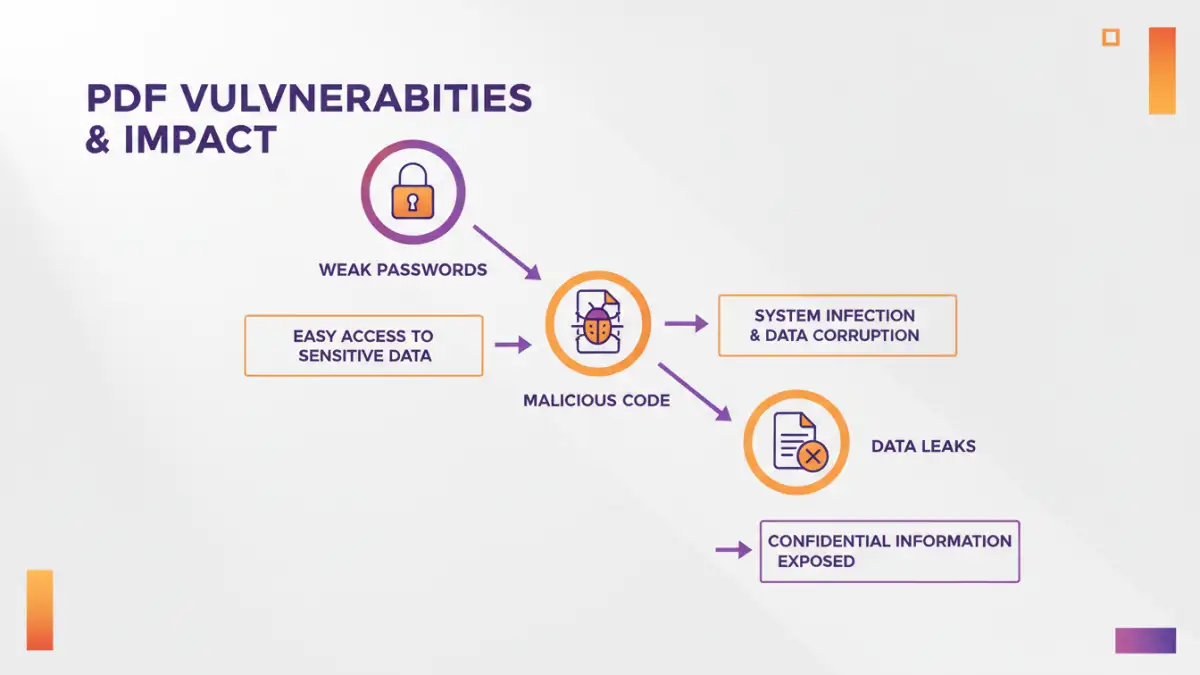
Many users assume that a password-protected PDF is inherently secure. While encryption is a crucial layer, it's not foolproof. Weak passwords, outdated encryption standards, or vulnerabilities in the PDF reader software itself can all compromise security. Furthermore, not all PDFs are password-protected, leaving sensitive content exposed.
Common PDF Vulnerabilities

Several common vulnerabilities can weaken the security posture of PDF documents. These range from simple oversight to more sophisticated exploits designed to bypass security measures.
Weak Passwords and Encryption
The most common vulnerability is the use of weak, easily guessable passwords for PDF encryption. If a password can be cracked using brute-force methods, the encryption becomes useless. Additionally, older PDF encryption standards (like RC4) are less secure than modern ones (like AES-256) and can be vulnerable.
Malicious JavaScript and Embedded Content
Some PDFs can contain embedded JavaScript or other active content that, if exploited, can execute malicious code on a user's system. This can lead to malware infections, data theft, or unauthorized system access. This is a critical aspect of vulnerability analysis.
Unsecured Form Fields and Metadata
PDF forms can sometimes store user input insecurely, and the metadata associated with a PDF file might inadvertently reveal sensitive information about its origin or content. These elements can be targets for information leakage.
Steps for a PDF Security Risk Assessment
Conducting a systematic PDF security risk assessment involves several key steps to identify, analyze, and evaluate potential threats to your documents.
1. Identify Critical Data and Documents
Begin by cataloging all PDF documents that contain sensitive or critical information. This includes financial records, personal identifiable information (PII), intellectual property, legal contracts, and confidential business strategies. Understanding what needs protecting is the foundational step.
2. Analyze Existing Security Measures
Review the current security measures in place for these identified PDFs. Are they password-protected? If so, what encryption standard is used, and how strong are the passwords? Are there access controls on the systems where these files are stored?
3. Identify Potential Threats and Vulnerabilities
Consider the various threats your PDFs might face. This could include insider threats (unauthorized access by employees), external threats (hackers, phishing attacks), accidental data leakage, or malware. Correlate these threats with the identified vulnerabilities in your documents and systems.
4. Evaluate the Risk Level
For each identified risk, assess its likelihood and potential impact. A high-impact risk with a high likelihood requires immediate attention. This evaluation helps prioritize your mitigation efforts, focusing on the most significant threats to critical data security.
Mitigation Strategies and Best Practices
Once risks are identified and assessed, implementing appropriate mitigation strategies is crucial. These practices aim to reduce the likelihood and impact of potential security incidents.
Implement Strong Password Policies
Enforce the use of strong, unique passwords for all encrypted PDFs. This means passwords should be long, complex, and not easily guessable. Regularly update passwords for highly sensitive documents.
Utilize Modern Encryption Standards
When encrypting PDFs, always opt for the strongest available encryption standard, such as AES-256. Ensure the PDF creation or editing software supports these modern standards.
Limit Permissions and Functionality
Many PDF tools allow you to set specific permissions, such as restricting printing, copying text, or editing the document. Utilize these features to control how users can interact with the PDF content.
Secure Storage and Access Control
Store sensitive PDF documents on secure servers with strict access controls. Implement multi-factor authentication for access to these storage locations. Regularly audit access logs.
Advanced PDF Data Protection Techniques
Beyond basic password protection, several advanced techniques can further bolster your PDF security, offering more granular control and enhanced protection against sophisticated threats.
Digital Signatures and Certificates
Digital signatures can verify the authenticity and integrity of a PDF document, ensuring it hasn't been tampered with since it was signed. Using digital certificates adds another layer of trust and authentication.
Document Watermarking
Applying visible or invisible watermarks can deter unauthorized distribution and help track the origin of leaks. Watermarks can include user information, timestamps, or company logos.
Data Loss Prevention (DLP) Solutions
For organizations, DLP solutions can monitor and control the movement of sensitive data, including PDFs, across networks and endpoints. These systems can automatically identify and protect critical documents based on predefined policies.
Comparison Table: PDF Security Measures
| Security Measure | Description | Effectiveness | Complexity | Use Case |
|---|---|---|---|---|
| Password Protection (Basic) | Sets a password to open or edit the PDF. | Moderate (depends on password strength and encryption) | Low | Securing general documents |
| Permissions Control | Restricts actions like printing, copying, editing. | High (for preventing unauthorized actions) | Medium | Controlling document usage |
| AES-256 Encryption | Uses a strong, modern encryption algorithm. | Very High (when combined with strong passwords) | Medium | Protecting highly sensitive data |
| Digital Signatures | Verifies document authenticity and integrity. | High (for ensuring non-tampering) | High | Legal documents, contracts |
| Watermarking | Adds visible or invisible marks to deter misuse. | Moderate (deterrent and tracking) | Medium | Preventing unauthorized sharing |