A few months ago, a small healthcare clinic I was consulting for faced a near-disaster. An employee accidentally emailed a patient's chart to the wrong recipient. Luckily, the file was encrypted, but it highlighted a critical vulnerability many organizations overlook: standard file sharing and email are not built for the stringent demands of healthcare. The incident underscored the absolute necessity of specialized tools for handling Protected Health Information (PHI).
Simply password-protecting a PDF or using a generic cloud service isn't enough. The Health Insurance Portability and Accountability Act (HIPAA) has specific rules about data integrity, access control, and audit trails. Choosing the right software is less about finding a digital lock and more about implementing a comprehensive security strategy that protects patient data at every stage.
Table of Contents
Why Standard Security Fails HIPAA
The HIPAA Security Rule is designed to protect electronic PHI (ePHI). It's not just about preventing a breach; it's about proving you took every reasonable step to do so. Standard tools like a basic Dropbox account or unencrypted email fail because they lack the required technical, administrative, and physical safeguards.
For example, HIPAA demands robust access controls. You must be able to define who can view, edit, or share a specific document. It also requires audit trails—a detailed log of every action taken on a file, including who accessed it and when. Most consumer-grade tools simply don't offer this level of granular control and tracking, leaving a healthcare organization exposed to significant compliance risks and fines.
The Business Associate Agreement (BAA) Requirement
Perhaps the most critical piece is the Business Associate Agreement (BAA). A BAA is a legally binding contract between a healthcare provider (Covered Entity) and a vendor (Business Associate) that handles PHI. This agreement ensures the vendor will appropriately safeguard the data. If a cloud storage or email provider won't sign a BAA, you cannot use their service for PHI, period. It's a non-negotiable part of healthcare document security.
Key Features in HIPAA Compliant Tools
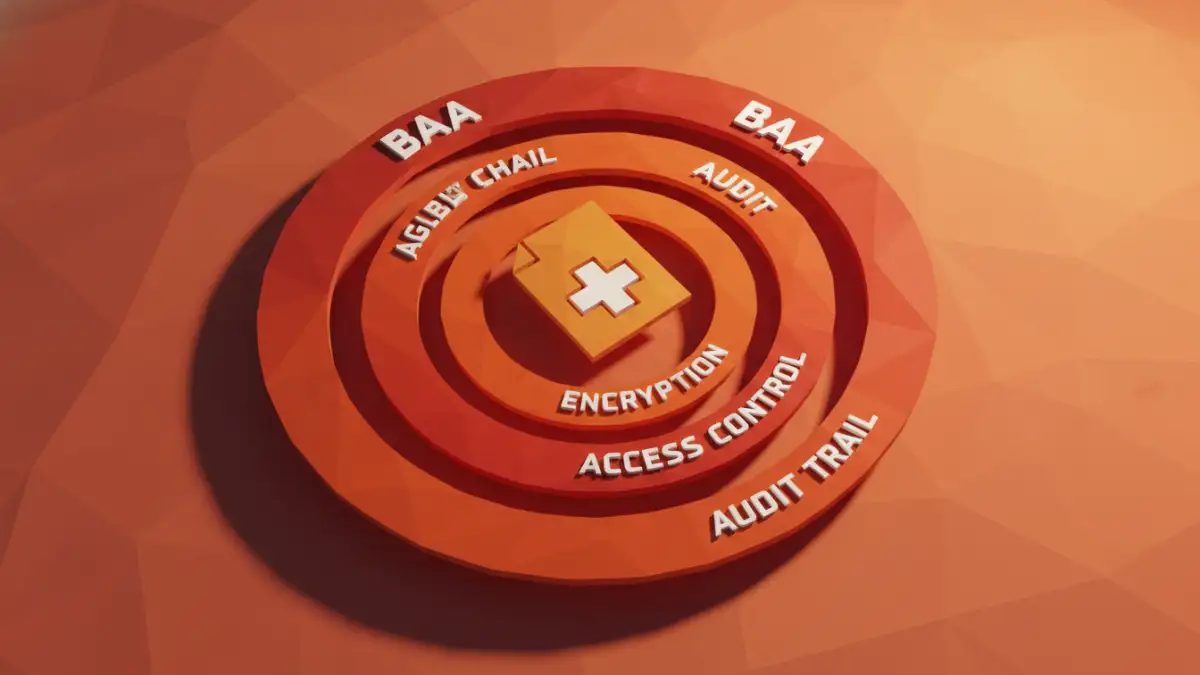
When evaluating solutions, I focus on a core set of features that directly address HIPAA requirements. These are the technical pillars that support true patient data protection and compliance.
- End-to-End Encryption: Data must be encrypted both 'in transit' (while being sent over a network) and 'at rest' (while stored on a server). Look for AES 256-bit encryption as a baseline standard.
- Granular Access Controls: The ability to set specific permissions is vital. You should be able to control who can view, download, print, or edit a document and revoke access at any time.
- Comprehensive Audit Trails: The system must log all activity related to a document. This includes every view, download, and share attempt. This is crucial for security audits and breach investigations.
- Secure Sharing and Expiration: Tools should allow you to share links that are password-protected, have expiration dates, or have download limits to prevent unauthorized proliferation of sensitive information.
Top Document Security Tools Reviewed
Over the years, I've worked with numerous platforms designed for secure data handling. Here are a few that consistently stand out for their strong focus on HIPAA compliance and robust feature sets. This is where a focus on document security for hipaa is paramount.
Virtru: Granular Control for Email and Files
Virtru is excellent because it integrates directly into existing email clients like Gmail and Outlook. It's not a separate platform you have to log into. It provides end-to-end encryption for emails and attachments with very detailed controls. I've set it up for clients who needed to set expiration dates on sensitive attachments and revoke access after the fact, which is a powerful feature. The audit trail is also incredibly detailed, showing you exactly when and where a file was accessed.
Paubox: Seamlessly Encrypted Email
Paubox takes a 'set it and forget it' approach. It encrypts all outbound emails by default, so staff don't have to remember to click an 'encrypt' button. This simplicity is its biggest strength, as it significantly reduces the risk of human error. It's a HITRUST CSF certified solution, which is a gold standard in healthcare security. While it's more focused on email than file storage, its seamless integration makes it a top choice for clinics that primarily communicate via email.
Google Workspace (with proper configuration)
Many are surprised to hear this, but Google Workspace (formerly G Suite) can be HIPAA compliant if configured correctly. Google will sign a BAA, and tools like Google Drive, Docs, and Gmail can be used for PHI. The key is proper administration. You must use tools like Google Vault for audit trails and retention, and correctly configure sharing permissions to restrict access. It requires more manual setup than a dedicated solution, but for organizations already invested in the Google ecosystem, it's a viable and powerful option for secure medical documents.
Implementing a Secure Document Workflow
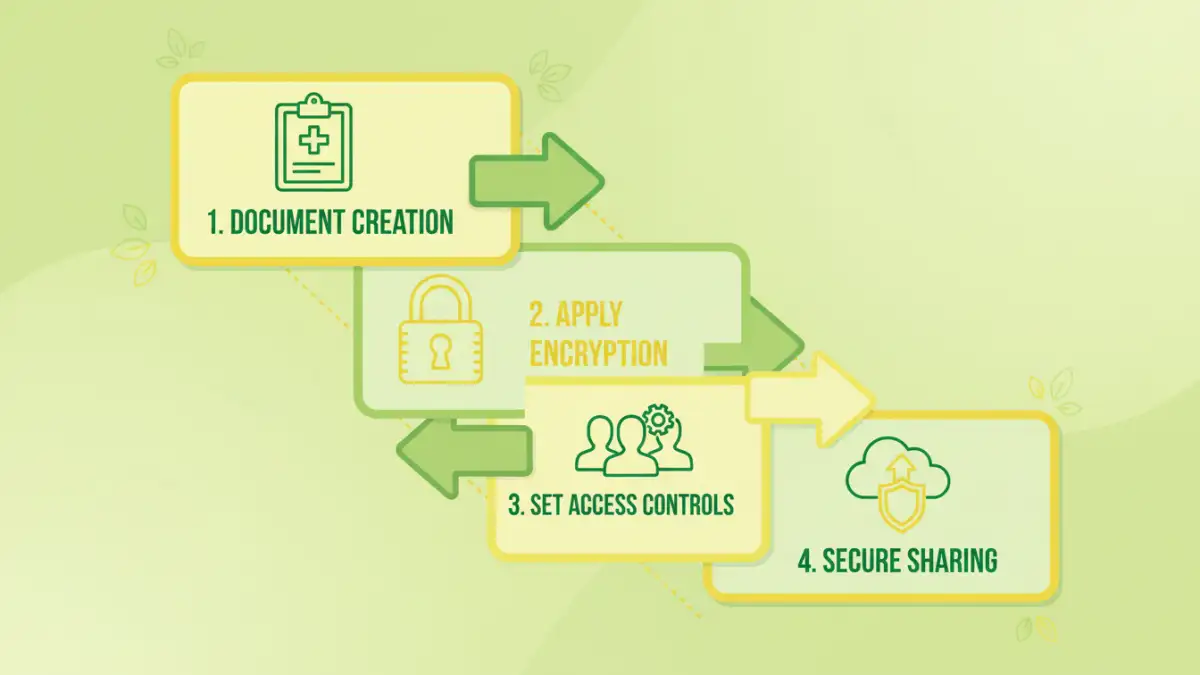
Choosing a tool is only half the battle. Successful implementation requires a clear strategy and staff training. The goal is to make the secure process the easiest process. Start by mapping out how documents flow through your organization—from creation and internal review to external sharing with patients or other providers.
Identify the points where PHI is most vulnerable. Then, configure your chosen tool's policies to address those risks. For instance, create user groups with different permission levels. A billing specialist may only need view-only access to certain records, while a physician needs full editing rights. Finally, conduct regular training. Show your team how to use the tool correctly and explain why these security steps are so important for patient data protection.
Tool Feature Comparison for HIPAA Compliance
| Tool | Primary Use Case | Key Strength | BAA Offered? |
|---|---|---|---|
| Virtru | Email & File Encryption | Granular access controls and revocation | Yes |
| Paubox | Automated Email Encryption | Seamless, 'always-on' encryption | Yes |
| Google Workspace | Integrated Office Suite & Storage | Versatility and ecosystem integration | Yes |
| Dropbox Business | Cloud File Storage & Sharing | User-friendly interface and collaboration | Yes |
| Microsoft 365 | Integrated Office Suite & Email | Deep integration with Windows/Office | Yes |