
A legal team I worked with once faced a massive data breach scare. They thought they had redacted sensitive client information from a PDF by drawing black boxes over the text, but the underlying data was still searchable and could be copied. This highlights a critical, often misunderstood point: not all redaction methods are created equal.
Simply obscuring text visually isn't enough. True redaction involves permanently removing the information—text, images, and even metadata—from the document's code. Without this crucial step, you're leaving a digital backdoor open for anyone with basic tech skills to walk right through.
Table of Contents
What is True PDF Redaction?
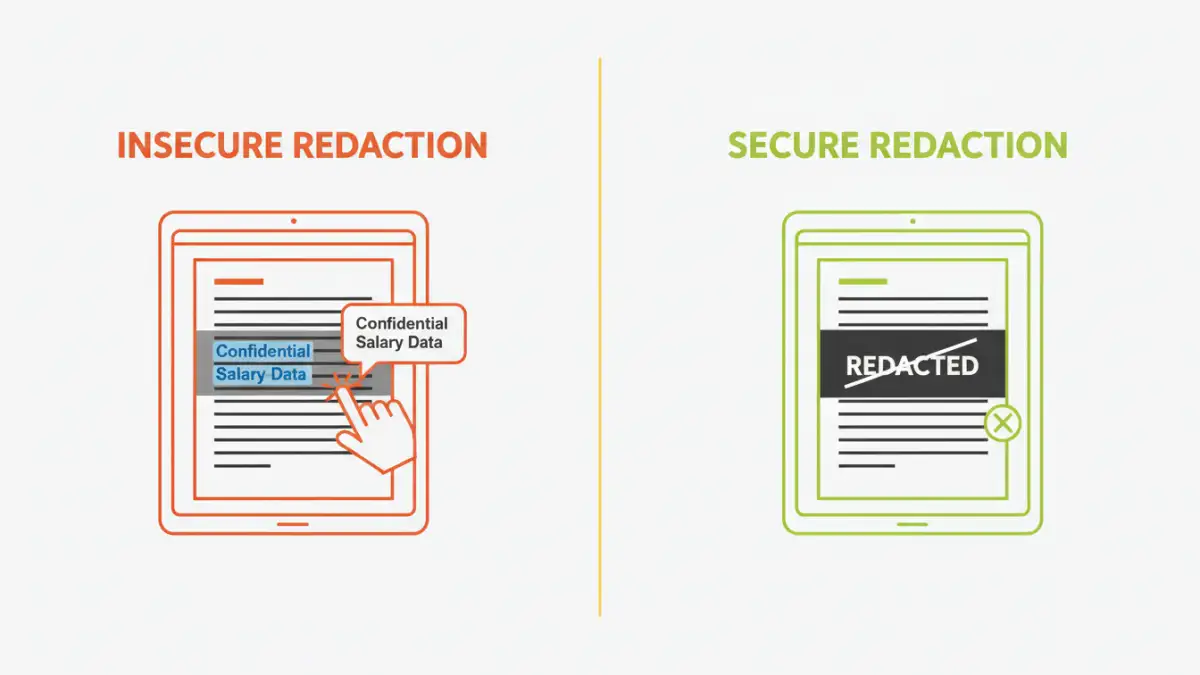
When we talk about secure redaction, we're referring to the process of permanently deleting content from a document. Think of it less like using a marker and more like using a digital scalpel to precisely excise information from the file's structure. Once properly redacted, the data is gone forever and cannot be recovered.
The 'Black Box' Fallacy
The most common mistake I see is people using annotation tools, like a black rectangle or a drawing tool, to cover sensitive text. This is purely cosmetic. The original text still exists in a layer underneath the black box. Anyone can simply select the text under the box, copy it, and paste it elsewhere to reveal the secret.
I've demonstrated this vulnerability countless times to clients. It's a shocking realization for many who believed their documents were secure. This method provides a false sense of security and is completely inadequate for protecting confidential information like social security numbers, financial data, or privileged communications.
The Secure Redaction Process
Proper document redaction software fundamentally alters the file. When you mark an area for redaction and apply it, the tool doesn't just cover the content. It removes the underlying text, vectors, or image pixels from the document's source. It then 'burns' the redaction mark into the document, flattening the layers and ensuring the data is irretrievable.
This process also includes scrubbing associated metadata. Metadata can inadvertently leak information, such as author names, creation dates, or even deleted text fragments. A robust tool cleans this up as part of the final save process.
Key Features of Secure Document Redaction Software

When evaluating privacy tools for PDFs, you need to look beyond the basic black box. Several key features separate consumer-grade editors from professional data protection software that can be trusted with sensitive information.
- Permanent Removal: This is non-negotiable. The software must confirm that it is permanently removing the underlying data, not just hiding it.
- Search and Redact: For large documents, manually finding every instance of a name or account number is tedious and error-prone. This feature allows you to search for specific text patterns (like phone numbers or names) and redact all instances at once.
- Metadata Scrubbing: The tool should automatically remove hidden data like author information, comments, and document history upon saving the redacted version.
- Exemption Codes: In legal and government contexts, it's often necessary to state why information was redacted (e.g., citing a specific law or regulation). This feature lets you overlay custom codes on the redaction marks.
- Batch Processing: If you're dealing with hundreds or thousands of files, the ability to apply redaction rules across an entire set of documents is a massive time-saver.
Reviewing the Top Contenders
The market has several powerful options, but a few consistently stand out for their reliability and feature sets. Your choice will depend on your specific needs, from individual use to enterprise-level deployment.
Adobe Acrobat Pro
As the creator of the PDF format, Adobe's tool is often considered the industry standard. Its redaction tools are robust, secure, and well-integrated into its broader PDF editing suite. The 'Search & Redact' feature is powerful, allowing you to find and remove text, patterns (like credit card numbers), or even entire pages. It also provides thorough metadata cleaning. The main drawback is its subscription cost, which can be high for casual users.
Foxit PDF Editor
Foxit has long been a major competitor to Adobe, offering a similar feature set often at a more competitive price point, including perpetual license options. Its redaction capabilities are just as secure, providing permanent removal of text and images. I've found its interface to be quite intuitive for users transitioning from other office software. It's a solid choice for businesses looking for a powerful yet cost-effective solution.
Redactable
Redactable is a more specialized, cloud-based tool that uses AI to automate the redaction process. You can define what needs to be removed, and its AI will automatically find and redact it across the document. This is incredibly efficient for organizations handling high volumes of standardized forms. Being cloud-based, it also facilitates collaboration, but this may raise data residency concerns for some industries.
How to Choose the Right Tool for Your Needs
Selecting the best pdf redaction tool is less about finding a single 'best' product and more about matching features to your workflow. A solo lawyer has different needs than a multinational corporation's compliance department.
First, consider your volume. If you only redact a few documents a month, a comprehensive suite like Adobe Acrobat Pro or Foxit PDF Editor is perfect, as you also get their other PDF features. For high-volume, repetitive redaction tasks, an AI-powered tool like Redactable could offer a significant return on investment through time savings.
Next, evaluate your compliance requirements. Do you need to adhere to HIPAA, GDPR, or CCPA? If so, look for software that explicitly supports these standards, particularly regarding audit trails and exemption code management. Finally, consider your budget. While free tools exist, I strongly advise against them for sensitive data, as their redaction methods are often unreliable. Investing in a professional tool is a small price to pay for data security.
Tool Feature Comparison
| Tool | Key Feature | Price Model | Best For |
|---|---|---|---|
| Adobe Acrobat Pro | Comprehensive feature set and pattern matching | Subscription | Professionals and enterprises needing an all-in-one PDF solution. |
| Foxit PDF Editor | Perpetual license option and intuitive interface | Subscription or Perpetual | Businesses seeking a cost-effective yet powerful Adobe alternative. |
| Redactable | AI-powered automatic redaction | Subscription (Usage-based) | High-volume redaction of standardized documents and forms. |
| Open Source Tools (e.g., PDF-Redact-Tools) | Free and auditable code | Free | Developers and tech-savvy users with low-volume, non-critical needs. |