Have you ever paused before sending a critical contract for a digital signature, wondering just how protected that document is? It's a valid concern. As businesses move away from paper, the integrity of our digital agreements hinges entirely on the security of the platforms we use. It’s not just about convenience; it’s about legal validity, data privacy, and protecting sensitive information.
Two titans dominate the e-signature landscape: DocuSign and Adobe Sign. I've integrated both into various enterprise systems over the years, and while they seem similar on the surface, their approach to security has nuances that can make a real difference depending on your industry and risk tolerance. Let's break down what really matters under the hood.
Table of Contents
The Core Principles of E-Signature Security
Before comparing tools, it's crucial to understand what makes any e-signature platform secure. It’s not just a simple image of your signature pasted onto a PDF. True security is built on several layers that work together to ensure authenticity, integrity, and non-repudiation (the inability to deny having signed).
At its heart, this involves strong encryption, both for data in transit (as it travels over the internet) and at rest (while stored on servers). It also requires a comprehensive audit trail, which is a detailed, time-stamped record of every action taken on a document. This log tracks who opened, viewed, and signed the document, from which IP address, and at what exact time, creating a legally defensible record.
Compliance and Legal Validity
Top-tier encrypted signature platforms are built to comply with global regulations like the ESIGN Act in the U.S. and eIDAS in the European Union. These laws give electronic signatures the same legal weight as handwritten ones. Compliance with standards like SOC 2, ISO 27001, and HIPAA demonstrates a provider's commitment to maintaining robust security controls, which is a critical factor for any business handling sensitive data.
DocuSign Security Features: A Closer Look

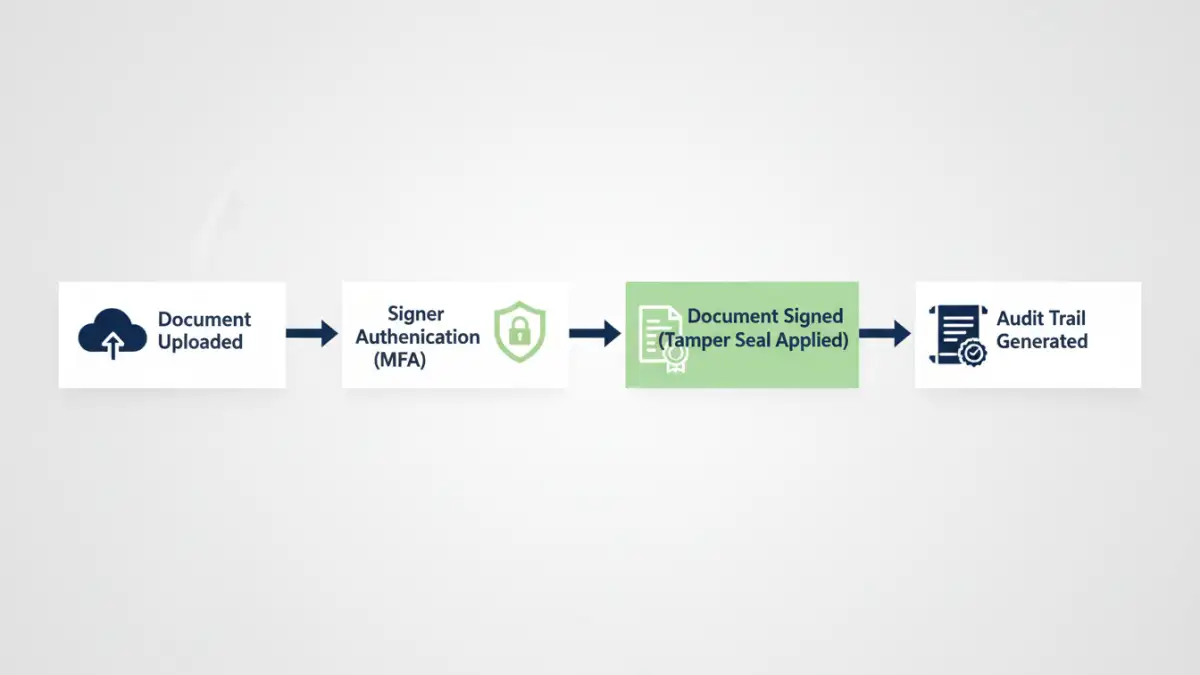
DocuSign is often seen as the industry benchmark, and its security infrastructure is a major reason why. They invest heavily in a multi-layered security approach that starts from the moment a document is uploaded. Their platform uses AES 256-bit encryption for documents at rest, which is a standard trusted by governments and financial institutions worldwide.
One of the standout docusign security features is its robust identity verification system. Beyond simple email-based authentication, it offers multi-factor authentication (MFA) via SMS, voice calls, or authenticator apps. For high-stakes transactions, they provide more advanced options like ID verification (checking a government-issued ID) and knowledge-based authentication (KBA), which asks signers questions based on their public records.
Tamper Seals and Audit Trails
Every document signed through DocuSign is sealed with a tamper-evident seal using Public Key Infrastructure (PKI) technology. This cryptographic seal ensures that any unauthorized change to the document after signing is immediately detectable. Their Certificate of Completion, which is a detailed audit trail, is automatically generated and securely attached to the signed document, providing a comprehensive record of the entire signing process.
Adobe Sign Privacy and Security Measures
As part of the Adobe ecosystem, Adobe Sign benefits from the company's extensive experience with document technology and enterprise-level security. Like DocuSign, Adobe Sign employs strong encryption and is compliant with a wide array of international standards. Adobe's approach to secure document signing is deeply integrated with its Document Cloud, ensuring a seamless and protected workflow.
Adobe Sign provides multiple layers of protection, including certified documents that prevent modification. A key aspect of adobe sign privacy is its granular control over authentication. Administrators can set different authentication requirements for internal versus external signers, or even require different levels of verification based on the document's sensitivity. This flexibility is a significant advantage for complex organizations.
Federated Identity and Integrations
Where Adobe often shines is in its deep integration with enterprise identity systems. It supports federated identity through SAML 2.0, allowing employees to log in using their existing corporate credentials (single sign-on). This not only simplifies the user experience but also centralizes access control under the company's IT security policies, reducing the risk of unauthorized access from orphaned accounts.
Head-to-Head: Key Security Differentiators
When you place them side-by-side, both DocuSign and Adobe Sign offer exceptional security that meets the needs of most businesses. The choice often comes down to specific use cases and existing technology stacks. DocuSign has built its brand almost entirely on trust and security, offering a slightly wider range of pre-built, advanced identity verification methods out of the box.
Adobe Sign, on the other hand, leverages its position within the broader Adobe ecosystem. For companies already heavily invested in Adobe Creative Cloud or Experience Cloud, Adobe Sign offers unparalleled integration and a familiar security framework. Its strength in federated identity management can be a deciding factor for large enterprises looking to streamline user access and enforce consistent security policies across all applications.
Security Feature Comparison: DocuSign vs. Adobe Sign
| Security Feature | DocuSign | Adobe Sign |
|---|---|---|
| Document Encryption (At Rest) | AES 256-bit | AES 256-bit |
| Tamper-Evident Seal | Yes (PKI-based) | Yes (Certified PDF technology) |
| Core Authentication Methods | Email, Access Code, SMS, Phone, KBA | Email, Password, Social Identity, KBA |
| Advanced ID Verification | Yes (ID Check, eID) | Yes (Government ID, Live Photo) |
| Key Compliance Standards | ISO 27001, SOC 2, HIPAA, FedRAMP | ISO 27001, SOC 2, HIPAA, FedRAMP |
| Enterprise SSO | Yes (SAML 2.0) | Yes (SAML 2.0, deeper integrations) |
| Audit Trail | Comprehensive Certificate of Completion | Detailed Audit Report |