
Where should your company's most sensitive documents live? This is a fundamental question that pits the immense scalability of the cloud against the absolute control of on-premise servers. For years, I've helped organizations navigate this decision, and it’s rarely a simple choice. The right answer depends entirely on your specific needs for security, compliance, and operational flexibility.
Choosing a platform isn't just an IT decision; it's a strategic business decision that impacts everything from daily workflows to long-term risk management. Let's break down the critical factors to consider when evaluating these two powerful but very different approaches to protecting your data.
Table of Contents
Defining the Battleground: Cloud vs. On-Premise
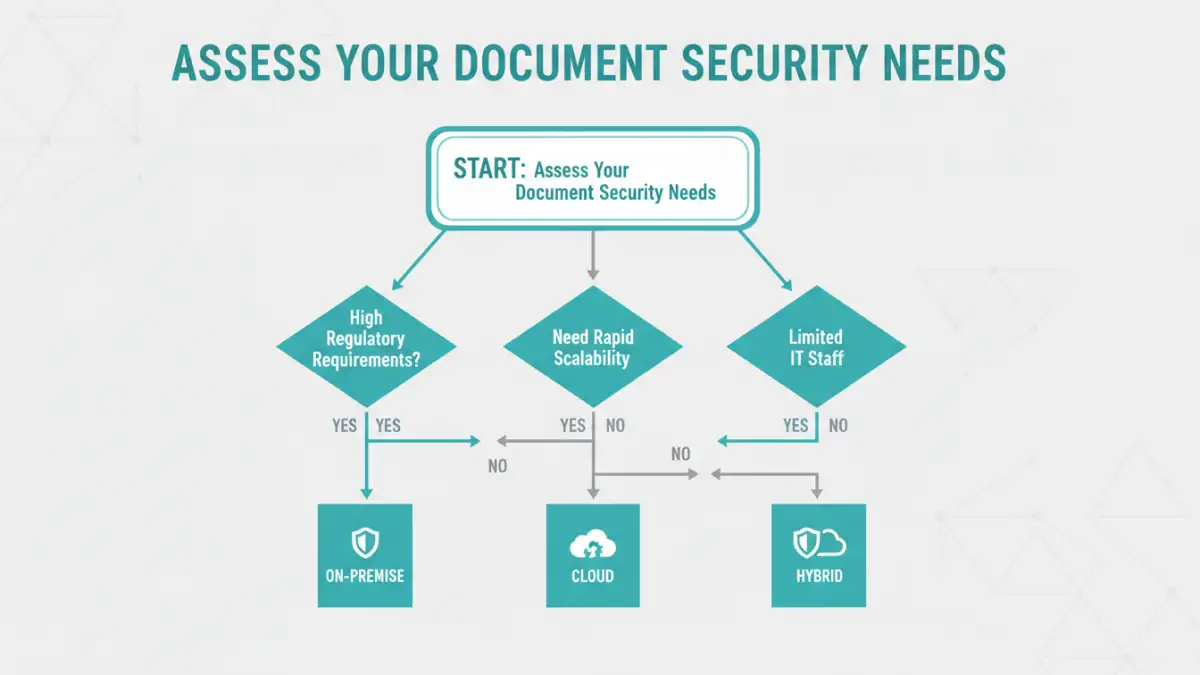
Before we compare, it's essential to understand the core models. On-premise infrastructure means your organization owns, manages, and maintains all the hardware and software in your own physical facilities. You have complete physical and network control over the servers storing your documents.
Cloud infrastructure, on the other hand, involves leasing storage and computing resources from a third-party provider like AWS, Google Cloud, or Azure. The provider manages the physical hardware, and you access your data over the internet. Security becomes a shared responsibility between you and the cloud vendor.
The Case for Cloud Security: Scalability and Convenience

Cloud providers invest billions in security measures that most individual companies could never afford. This includes state-of-the-art physical security for data centers, advanced threat detection systems, and dedicated teams of cybersecurity experts working around the clock.
From a technical standpoint, the ease of implementation is a huge draw. I've seen teams deploy secure document management systems in the cloud in a matter of hours, a process that could take months on-premise. The pay-as-you-go model also eliminates large upfront capital expenditures on hardware.
Understanding Cloud File Encryption
A key feature of cloud storage is robust cloud file encryption. Data is typically encrypted both in transit (while moving between your device and the cloud) and at rest (while stored on the provider's servers). Many services also offer client-side encryption, where you hold the encryption keys, adding a powerful layer of security that even the provider cannot bypass.
The Argument for On-Premise: Ultimate Control
The primary advantage of on premise security solutions is control. Your data never leaves your physical or network perimeter. For organizations in highly regulated industries like finance or healthcare, this is often a non-negotiable requirement. You dictate every aspect of the security protocol, from firewall rules to physical access controls.
This level of control is crucial for meeting strict data sovereignty laws, which require certain types of data to be stored within a specific country's borders. With an on-premise solution, you know exactly where your data is at all times, removing any ambiguity.
Customization and Integration
On-premise solutions offer unparalleled customization. You can tailor the environment to integrate perfectly with legacy systems or proprietary software. While this requires significant in-house expertise, it ensures the security infrastructure is perfectly aligned with your unique operational needs, a level of specificity that public cloud offerings can't always match.
Key Decision Factors: How to Choose
Making the right choice for your enterprise document security strategy involves weighing several critical factors. Your decision should be guided by a clear understanding of your organization's specific requirements.
First, evaluate your compliance and regulatory obligations. Do you handle data subject to GDPR, HIPAA, or other regional data sovereignty laws? If so, the control offered by an on-premise solution might be necessary. Second, assess your IT resources. Do you have the in-house expertise to manage and secure your own servers, or would you benefit from offloading that responsibility to a cloud provider? Finally, consider your budget and growth projections. The OpEx model of the cloud offers scalability, while the CapEx model of on-premise provides predictable long-term costs.
The Hybrid Approach: A Balanced Solution
For many businesses, the answer isn't a strict either/or. A hybrid document management strategy combines both cloud and on-premise solutions. This model allows you to keep highly sensitive or regulated data on-premise while leveraging the cloud's scalability and cost-effectiveness for less critical documents and collaborative workflows.
For example, a law firm might store active case files and client PII on a secure on-premise server but use a cloud platform for marketing materials and internal communications. This balanced approach provides flexibility, allowing you to optimize for both security and efficiency.
Cloud vs. On-Premise Security Comparison
| Factor | Cloud Security | On-Premise Security |
|---|---|---|
| Control | Shared responsibility model; relies on vendor's infrastructure and policies. | Complete control over hardware, software, and physical access. |
| Scalability | High; resources can be scaled up or down on demand. | Limited; requires purchasing and provisioning new hardware. |
| Cost Model | Operational Expense (OpEx); pay-as-you-go subscription model. | Capital Expense (CapEx); significant upfront investment in hardware. |
| Maintenance | Managed by the cloud provider; reduces internal IT workload. | Managed entirely by in-house IT staff; requires significant expertise. |
| Compliance | Providers offer compliance certifications, but data location can be complex. | Easier to prove data sovereignty and meet specific geographic regulations. |
| Deployment Speed | Fast; can be set up in hours or days. | Slow; can take weeks or months to procure and configure hardware. |