Sharing a collection of important documents, like project proposals, client contracts, or academic portfolios, can feel like juggling delicate glass. You need to ensure everyone who needs access gets it, but crucially, that no one who shouldn't, does. This balancing act is at the heart of what I've encountered countless times in my career: the challenge of secure document portfolio sharing.
It's not just about sending a file; it's about controlling who sees what, when, and how. Whether you're collaborating with a team, sending sensitive information to a client, or archiving your own work, understanding the nuances of security is paramount. Let's break down what you need to know to share your documents confidently and safely.
Table of Contents
Understanding the Basics
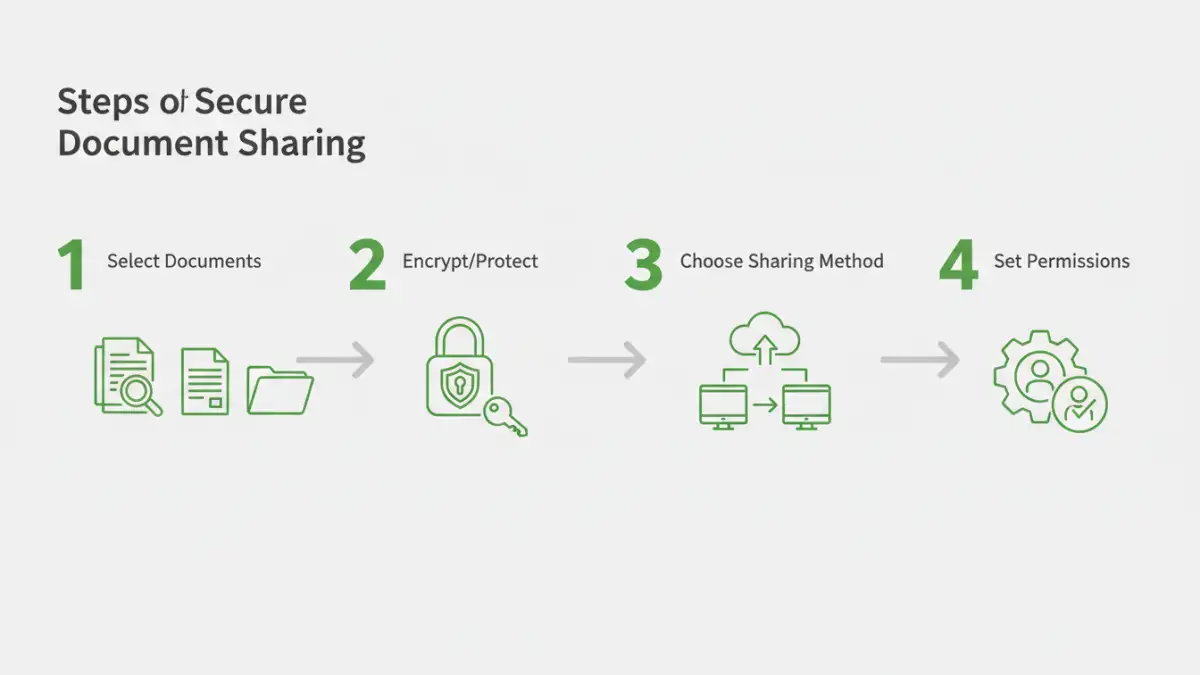
At its core, secure document sharing involves protecting the confidentiality, integrity, and availability of your files. Confidentiality means only authorized individuals can access the documents. Integrity ensures that the documents haven't been altered or corrupted without your knowledge. Availability means that authorized users can access the documents when they need them.
Key Security Concepts
When we talk about securing documents, several concepts come into play. Encryption is the process of scrambling data so it can only be read with a specific key or password. Access control involves setting permissions to dictate who can view, edit, or delete files. Audit trails are records of who accessed what and when, providing accountability.
Choosing Your Sharing Method

There are numerous ways to share documents, each with its own security implications. Simple email attachments, while common, are often the least secure. Cloud storage services offer more robust options, but their security depends heavily on your configuration and the provider's policies. Dedicated file-sharing platforms often provide the most comprehensive security features.
Method One: Cloud Storage with Permissions
Services like Google Drive, Dropbox, or OneDrive allow you to upload entire portfolios and then set granular permissions for each document or folder. You can share a link with specific people, assign view-only or edit rights, and even set expiration dates for access. This method is convenient for collaborative projects.
Method Two: Encrypted Archives
For maximum security, especially when sending files via less secure channels, creating an encrypted archive (like a password-protected ZIP or RAR file) is a strong approach. You'll need to share the password separately, ideally through a different communication channel, to prevent it from being intercepted with the file.
Encryption Techniques Explained
Encryption is a cornerstone of digital security. Different types offer varying levels of protection. Symmetric encryption uses the same key to encrypt and decrypt data, making it fast but requiring secure key exchange. Asymmetric encryption uses a public key for encryption and a private key for decryption, which is more complex but better for secure key management over networks.
For most users sharing document portfolios, password-protecting files or using encrypted archive formats is sufficient. Understanding the strength of the encryption used by your chosen method (e.g., AES-256 is a strong standard) is important.
Best Practices for Secure Sharing
Beyond the tools you use, your practices matter immensely. Always use strong, unique passwords for any encryption or access control. Regularly review who has access to your shared documents and revoke permissions when they are no longer needed. Educate yourself and your collaborators on common security threats like phishing, which can compromise credentials.
Consider using multi-factor authentication (MFA) wherever possible. This adds an extra layer of security by requiring more than just a password to log in, significantly reducing the risk of unauthorized access if your password is compromised. This is crucial for collaborative document security.
Advanced Considerations
For highly sensitive portfolios, you might explore digital rights management (DRM) solutions. These systems offer more sophisticated control, such as preventing printing, copying, or forwarding of documents, even after they've been shared. While often more complex and costly, they provide a high level of assurance for extremely sensitive materials.
Another aspect is data loss prevention (DLP) tools, which can monitor and control the flow of sensitive information to prevent accidental or malicious leaks. Integrating these tools into your workflow can provide an additional safeguard for your document portfolios.
Comparison Table
| Sharing Method | Ease of Use | Security Level | Collaboration Features | Primary Use Case |
|---|---|---|---|---|
| Email Attachments | Very Easy | Low (unless encrypted) | Basic | Small, non-sensitive files |
| Cloud Storage (e.g., Drive, Dropbox) | Easy to Moderate | Moderate to High (with proper settings) | Excellent | Team projects, shared access |
| Encrypted Archives (ZIP, RAR) | Moderate | High (with strong password) | Limited (password shared separately) | Sending sensitive files securely |
| Dedicated Secure File Transfer Services | Moderate | High to Very High | Good | Large files, business-critical data |
| Digital Rights Management (DRM) | Moderate to Complex | Very High | Advanced Control | Highly confidential documents |