
I was once on a team tasked with moving an entire department's document archive—thousands of sensitive files—to a new cloud platform. The scale was daunting, but the real challenge was ensuring every contract, financial report, and client record made the journey without a single security breach. It taught me that a successful migration isn't just about moving data; it's a carefully orchestrated security operation.
Many organizations underestimate the risks involved in a large-scale portfolio transfer. Without a solid plan, you risk data loss, corruption, and unauthorized access. This process requires a proactive approach to data migration security from start to finish.
Table of Contents
The Migration Blueprint: Strategy and Planning
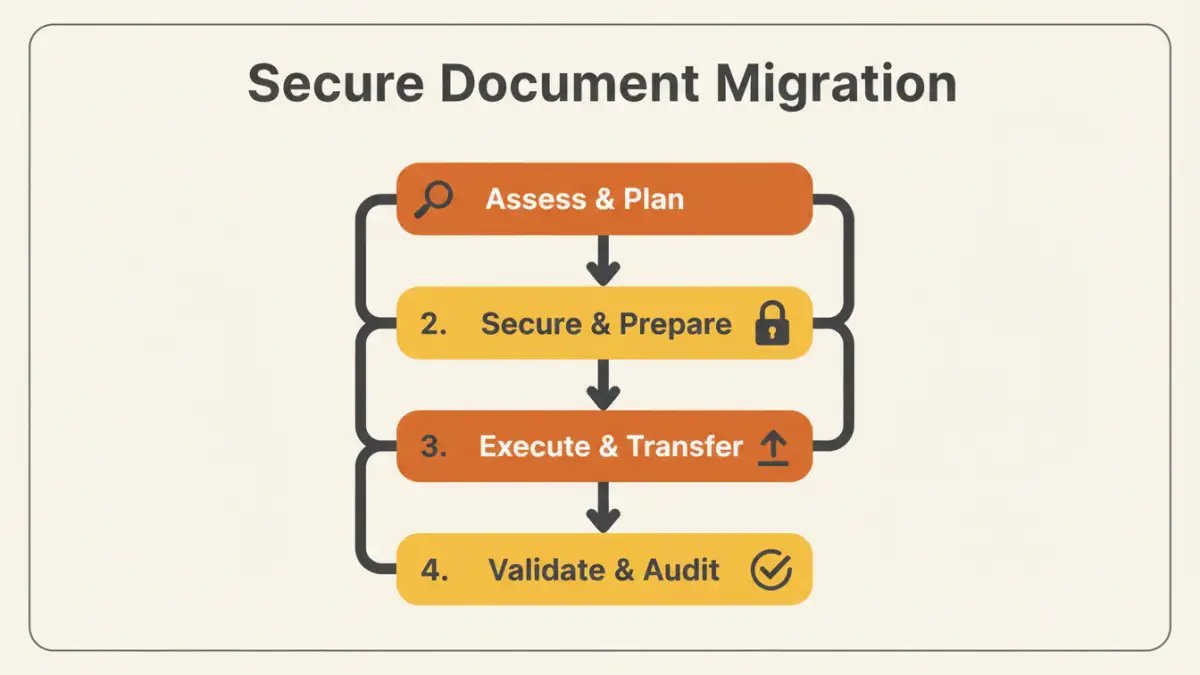
Before you move a single file, you need a comprehensive strategy. The planning phase is the most critical part of any secure document migration. This is where you define the scope, identify stakeholders, and establish your security protocols. A common mistake is jumping straight to the tools without understanding what you're moving and why.
Your blueprint should clearly outline the project goals. Are you migrating for better collaboration, cost savings, or enhanced security? Answering this helps prioritize decisions down the line. You also need to map out the source and destination environments, understanding the technical limitations and security features of each.
Pre-Migration Security Checklist

Once your strategy is in place, it's time to prepare your data. This stage is all about minimizing risk before the transfer begins. It involves a thorough review of your existing document portfolio to ensure you're not migrating vulnerabilities along with your files.
Inventory and Classification
You can't protect what you don't know you have. The first step is to conduct a full inventory of all documents slated for migration. I use scripts to crawl directories and catalog files by type, age, and last access date. This helps identify redundant, obsolete, or trivial (ROT) data that can be archived or deleted instead of migrated.
Next, classify the data based on sensitivity. Public information, internal-only documents, confidential reports, and highly restricted data should all be tagged. This classification will dictate the level of security applied during the cloud document transfer. For example, highly restricted data should have end-to-end encryption, while public data may not require it.
Encryption and Access Control
Never migrate sensitive data in plain text. Encrypting files before they leave your source environment is a non-negotiable step. This is known as encrypting data 'at rest'. Additionally, ensure the transfer process itself is encrypted—this is data 'in transit'. Most modern tools use TLS/SSL for this, but it's crucial to verify.
It's also the perfect time to review and clean up your access permissions. Over the years, permissions can become a tangled mess. Migrating to a new system is an opportunity to implement a clean, role-based access control (RBAC) model. Ensure that only the right people will have access to the right files in the new environment.
The Migration Process: Tools and Techniques
With your data prepped and secured, you can begin the actual migration. The method you choose will depend on the volume of data, your technical resources, and your budget. A small portfolio transfer might be done manually, but larger projects demand more sophisticated solutions.
Choosing the Right Migration Tool
There are three main approaches: manual transfers, custom scripts, and third-party migration services. Manual drag-and-drop is only suitable for very small batches of non-sensitive files. Custom scripts (using PowerShell, Python, or APIs) offer more control and automation but require significant engineering effort.
For most enterprise-level projects, a dedicated third-party migration tool is the best option. These platforms are built for secure file migration at scale. They offer features like delta migrations (only moving changed files), integrity checks, detailed logging, and robust error handling. When evaluating tools, I always prioritize those with strong security credentials and comprehensive audit trails.
Post-Migration Validation and Auditing
The job isn't done once the progress bar hits 100%. The final phase involves validating the migration's success and ensuring the new environment is secure. This step builds trust with stakeholders and confirms that no data was lost or compromised during the move.
Start by performing data integrity checks. This can be done by comparing file counts and sizes between the source and destination. For critical data, using checksums (like MD5 or SHA-256 hashes) provides a more robust validation that the files are bit-for-bit identical. Run tests with end-users to confirm they can access their files and that permissions are correctly configured.
Finally, conduct a thorough security audit of the new environment. Review access logs, confirm encryption settings, and run vulnerability scans. Decommission the old storage system only after you are completely confident that the migration was a success and the new system is secure. This final step officially concludes your secure migration project.
Migration Approach Comparison
| Migration Method | Key Benefit | Primary Risk | Best For |
|---|---|---|---|
| Manual (Drag-and-Drop) | Simple and free | High risk of human error, no audit trail | Small, non-critical file sets |
| Custom Scripts (API/CLI) | High degree of control and automation | Requires development resources, potential for bugs | Tech-savvy teams with specific needs |
| Third-Party Migration Service | High security, detailed logging, scalability | Cost, potential vendor lock-in | Enterprise-level, large-scale portfolio transfer |
| Physical Appliance Shipping | Fast for massive datasets (petabytes) | Physical security risks during transit | Archival data or migrating entire data centers |