
A frantic call from the finance team about a locked quarterly report, with the password creator on vacation, is a scenario I've seen play out too many times. This kind of ad-hoc, individual-led approach to document security creates chaos, wastes time, and, most importantly, leaves sensitive company data vulnerable. Without a unified strategy, you're relying on hope, not security.
Establishing clear, enforceable rules is the only way to move from reactive panic to proactive protection. It ensures that every sensitive file, from HR records to intellectual property, is secured consistently and accessibly for those who need it. This isn't just an IT issue; it's a fundamental business practice for safeguarding your assets.
Table of Contents
Why a Company-Wide Policy is Critical
Relying on individual employees to manage secure file passwords is a recipe for disaster. One person uses a simple password like "Report2024," another uses a complex one but stores it in an unsecured text file, and a third forgets it entirely. This inconsistency creates massive security gaps and operational bottlenecks.
A formal policy standardizes security practices across the board. It removes the guesswork for employees and provides a clear framework for protecting information. This is essential not only for preventing data breaches but also for meeting compliance requirements under regulations like GDPR, HIPAA, or CCPA, which mandate stringent data protection controls.
The Risks of Inaction
Without a centralized policy, you face significant risks. A single weak password on a critical financial spreadsheet could lead to a breach, resulting in financial loss and reputational damage. Furthermore, during an audit, demonstrating compliance becomes nearly impossible when security practices are fragmented and undocumented. Productivity also suffers when employees can't access vital documents because of forgotten or lost passwords.
Benefits of a Standardized Approach
Implementing a uniform document password policy provides immediate and long-term benefits. It enhances your overall security posture, making it harder for unauthorized parties to access sensitive data. It also streamlines workflows by ensuring that authorized personnel can always access the information they need through a defined process. Finally, it simplifies compliance and auditing, as you have a documented, enforceable standard to present.
Core Components of a Strong Policy

A comprehensive policy should be clear, concise, and actionable. It needs to define the rules without being overly technical for the average employee to understand. From my experience, the most effective policies are built on a few key pillars that cover the entire lifecycle of a secured document.
These components work together to create layers of security. Simply mandating a strong password isn't enough if the document is then shared insecurely or stored on an unprotected local drive. Your policy must address the entire process, from creation to archival.
Password Creation and Management
This is the foundation. Your policy must specify minimum password requirements for documents containing sensitive information. This includes:
- Length: A minimum of 12-16 characters.
- Complexity: A mix of uppercase letters, lowercase letters, numbers, and special characters.
- Uniqueness: Prohibit the reuse of passwords across different documents or systems.
- Storage: Mandate the use of an approved enterprise password management tool. Explicitly forbid writing passwords down or storing them in plain text files.
Access Control and Distribution
Defining who can access what is just as important as the password itself. The policy should enforce the principle of least privilege, meaning employees should only have access to documents essential for their job function. It should also outline secure methods for sharing password-protected files, such as using encrypted email or secure file-sharing platforms, and explicitly forbid sharing passwords via insecure channels like instant messaging.
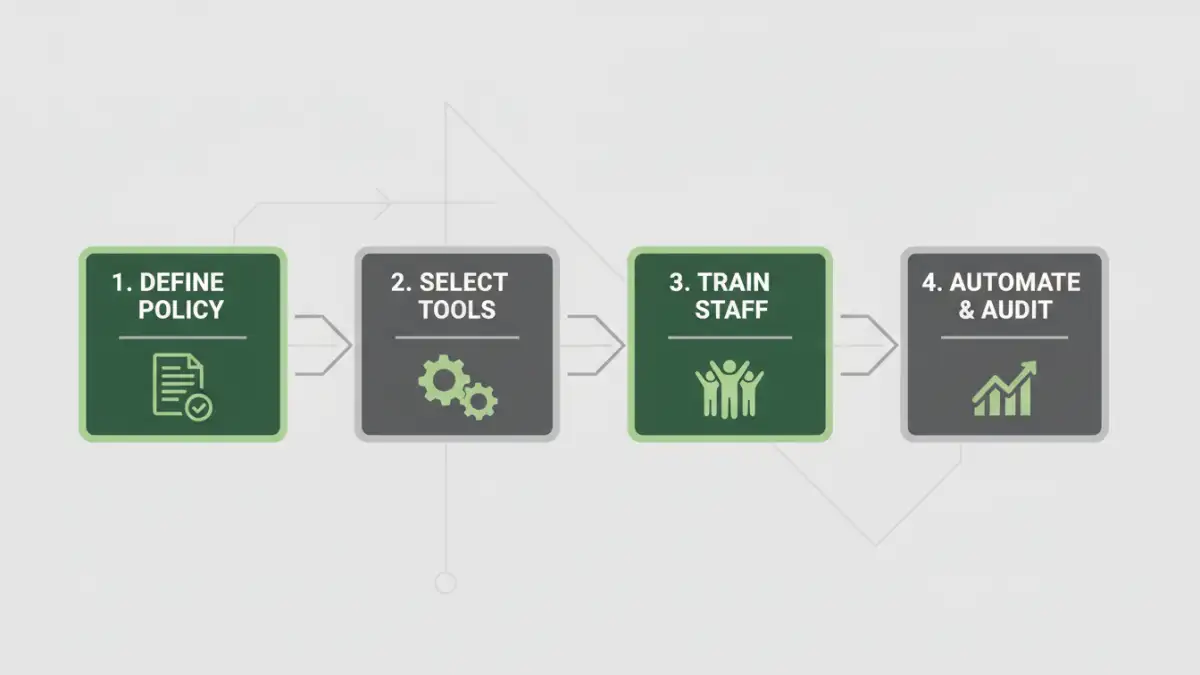
A Practical Implementation Strategy
A policy is just a document until it's put into practice. A successful rollout requires a combination of the right technology, clear communication, and ongoing training. The goal is to make compliance the path of least resistance for employees, not an obstacle to their work.
Start with a phased approach. Begin with a pilot group or a single department to identify any unforeseen challenges before rolling it out company-wide. This allows you to refine the process and gather feedback, which increases the likelihood of broad adoption.
Selecting the Right Tools
Technology is your greatest ally in enforcement. Consider tools that integrate seamlessly into existing workflows. An enterprise password management solution can generate, store, and share credentials securely. For organizations with extensive needs, a Document Management System (DMS) with built-in security features can automate the application of passwords and access controls based on document type or classification. For bulk password protection of existing files, custom scripts can be a powerful, one-time solution.
Training and Communication
You cannot simply email the new policy and expect compliance. Host mandatory training sessions that explain the 'why' behind the rules, not just the 'what.' Demonstrate the approved tools and workflows. Create accessible resources, like a quick-reference guide or an intranet page, that employees can refer to. Ongoing communication, such as security reminders in company newsletters, helps keep the policy top-of-mind.
Automating Enforcement and Auditing
Manual enforcement is time-consuming and prone to error. Where possible, leverage technology to automate compliance. Modern security platforms and DMS can scan file repositories for documents that are unencrypted or use weak passwords, flagging them for remediation. This proactive approach helps you identify and close security gaps before they can be exploited.
Regular audits are also crucial. Automated logging can track who accesses sensitive documents and when, creating an audit trail for compliance purposes. These logs are invaluable for investigating potential security incidents and demonstrating due diligence to regulators. Automation transforms your policy from a static set of rules into a dynamic and active defense mechanism.
Policy Enforcement Tool Comparison
| Tool Type | Key Features | Pros | Cons |
|---|---|---|---|
| Manual Policy & Training | Employee guidelines, manual checks | Low initial cost, raises awareness | Difficult to enforce, inconsistent, not scalable |
| Custom Scripts | Bulk password protection, automated checks | Highly customizable, cost-effective for specific tasks | Requires technical expertise, high maintenance |
| Enterprise Password Manager | Secure password generation, vaulting, secure sharing | Greatly improves password hygiene, easy for users | Doesn't enforce encryption on the document itself |
| Document Management System (DMS) | Automated encryption, access controls, audit logs | Comprehensive, scalable, automates compliance | Higher cost, complex implementation |