When a local municipality I was advising needed to share sensitive planning documents with a federal partner, they hit a wall. Their standard commercial cloud storage wasn't approved for inter-agency use, and emailing large, confidential files was both insecure and impractical. This scenario is incredibly common in the public sector, where the need for collaboration clashes with a non-negotiable demand for security and compliance.
Choosing a tool isn't just about storage capacity or a slick interface; it's about safeguarding public trust and national data. The stakes are simply too high for a misstep. Public agencies handle everything from personally identifiable information (PII) to critical infrastructure data, and the right tool is the first line of defense.
Table of Contents
The Unique Challenges of Public Sector File Sharing
Unlike private companies, public agencies operate under a microscope of regulatory oversight. A simple file transfer is rarely simple. It must adhere to strict legal and security frameworks designed to protect citizen data and government operations. This creates a unique set of challenges that commercial-off-the-shelf tools often fail to address.
The primary hurdle is the web of compliance mandates. Regulations like the Federal Risk and Authorization Management Program (FedRAMP), Criminal Justice Information Services (CJIS) security policies, and HIPAA for health-related agencies are not optional. Any tool handling this data must have the certifications to prove its resilience against threats. Furthermore, the data itself is often highly sensitive, requiring robust controls to prevent unauthorized access, both from external attackers and internal personnel.
Core Features to Demand in a Government File Sharing Tool

When evaluating options, certain features are non-negotiable. These go far beyond basic file storage and are centered on security, compliance, and control. Think of this as your minimum requirements list before you even look at a vendor's demo.
Uncompromising Security and Encryption
At its core, the tool must provide end-to-end encryption (E2EE), ensuring data is encrypted in transit and at rest. This means that even the service provider cannot access your files. Look for support for FIPS 140-2 validated cryptographic modules, which is a key standard for U.S. government security. Multi-factor authentication (MFA) should be mandatory for all user access, adding a critical layer of identity verification.
Compliance and Auditing Capabilities
This is where many generic tools fall short. A suitable platform must have the necessary certifications, with FedRAMP authorization being the gold standard for federal agencies and a strong indicator of security for state and local ones. Beyond certifications, the tool must provide detailed, immutable audit logs. You need to know who accessed what file, from where, and when. This is essential for accountability and forensic analysis in the event of an incident.
Comparing Solution Types: On-Premise vs. Cloud
The decision between hosting a solution yourself (on-premise) or using a cloud provider is a major one. Each has distinct trade-offs in terms of control, cost, and maintenance. The right choice depends entirely on your agency's resources, technical expertise, and specific security posture.
An on-premise solution offers maximum control over your data and infrastructure, as everything resides within your own data centers. However, this comes with significant capital expenditure and the ongoing responsibility of maintenance, patching, and physical security. Cloud solutions, particularly those built for the public sector, offer scalability and reduced overhead. The key is choosing the right cloud. A standard commercial cloud is different from a dedicated government cloud security environment, which is specifically designed to meet stringent public sector requirements.
A Practical Evaluation Framework for Your Agency
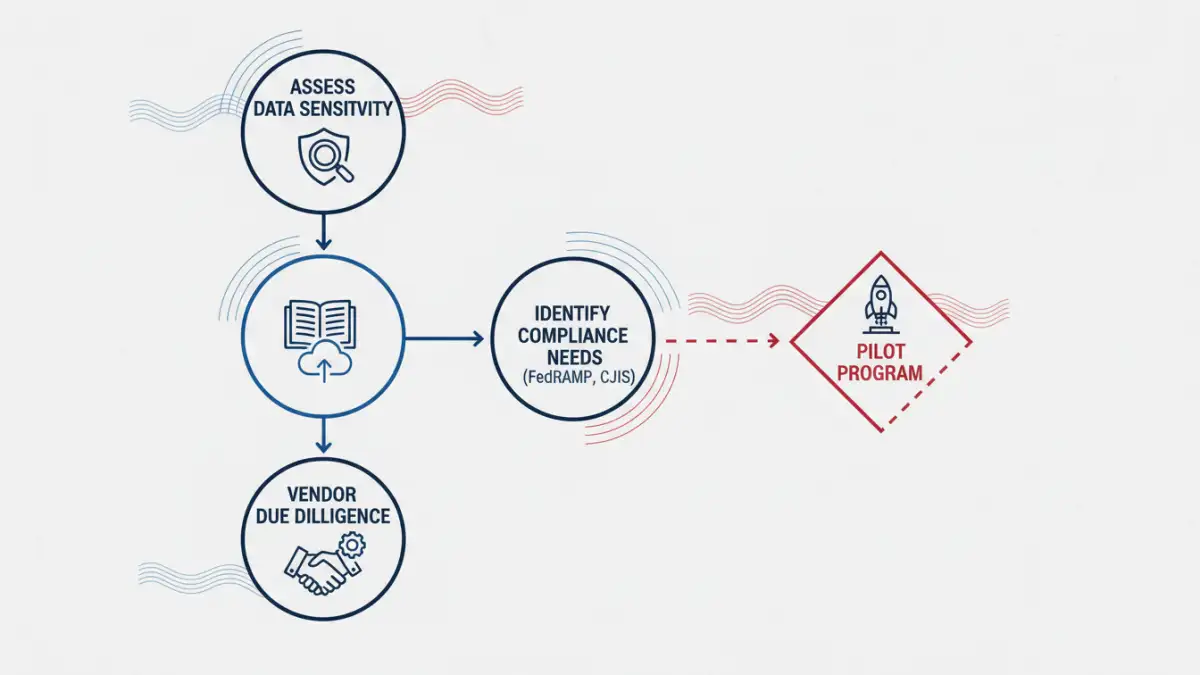
Selecting the right platform for secure file sharing government agencies can depend on requires a methodical approach. I guide teams through a four-step process to ensure they make an informed, defensible decision that aligns with their mission and security requirements.
First, conduct a thorough risk assessment to identify the types of data you'll be handling and the threats associated with them. Second, clearly define your user access needs and collaboration workflows. Who needs access? What level of permission do they require? Third, perform deep vendor due diligence. Ask for their compliance documentation, data residency policies, and breach notification procedures. Finally, before a full rollout, run a pilot program with a small, controlled group to test functionality and security controls in a real-world setting. This helps uncover any gaps before they become critical problems.
Comparison of File Sharing Solution Types
| Solution Type | Primary Benefit | Main Challenge | Best For |
|---|---|---|---|
| Standard Commercial Cloud | Ease of use, low cost | Often lacks FedRAMP and other government-specific compliance | Non-sensitive, public-facing document collaboration |
| On-Premise File Server | Total control over data and hardware | High upfront cost, complex maintenance and security burden | Agencies with large IT teams and strict data sovereignty needs |
| FedRAMP Authorized SaaS | Built-in compliance, high security, scalable | Can be more expensive than commercial options | Most federal, state, and local agencies handling sensitive data |
| Hybrid Cloud Solution | Blends on-premise control with cloud flexibility | Integration complexity and management overhead | Agencies transitioning to the cloud or with unique data residency rules |