
A black marker over a sentence in a paper document seems simple enough, but in the digital world, that approach is a recipe for disaster. I've seen firsthand how seemingly redacted digital files can be easily compromised, exposing sensitive data that was thought to be hidden. Simply changing text color to white or drawing a black box over a paragraph does not actually remove the underlying data.
This is especially critical in legal settings, where improper redaction can lead to sanctions, waived privileges, and catastrophic data breaches. True digital redaction isn't about covering information; it's about permanently and irretrievably removing it from the document's code. Understanding this distinction is the first step toward protecting your client's most sensitive information.
Table of Contents
Why Proper Redaction is Critical
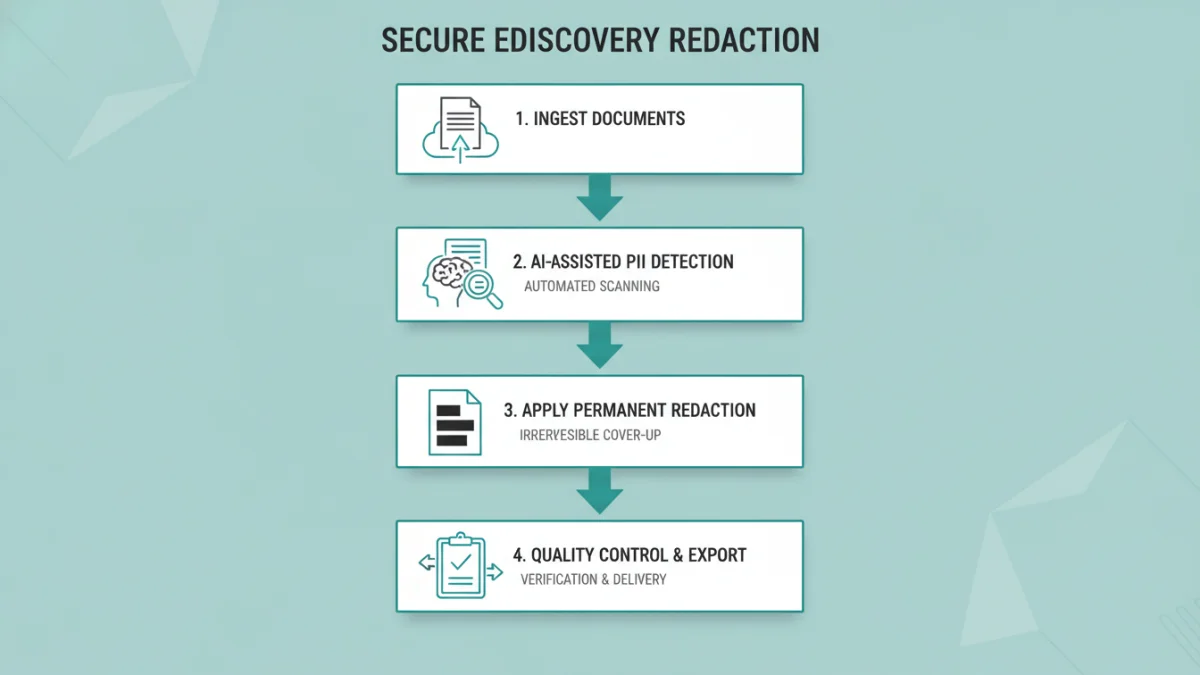
In the legal field, documents are filled with personally identifiable information (PII), trade secrets, financial data, and privileged communications. During litigation and eDiscovery, parties are often required to produce vast quantities of documents while also being obligated to protect this sensitive data. Failure to do so properly can have severe consequences.
A botched redaction can inadvertently disclose information protected by attorney client privilege, potentially waiving that privilege for the entire subject matter. Similarly, exposing a witness's personal details or a company's confidential strategy can damage a case and lead to significant legal and financial penalties. Effective legal document redaction is a non-negotiable part of modern legal practice.
Common Redaction Mistakes to Avoid
Many common methods for hiding text in a document are fundamentally insecure. From a technical standpoint, they only create a visual obstruction, leaving the original data intact and easily accessible to anyone with basic software skills.
The 'Black Box' Fallacy
The most frequent mistake is using a drawing tool in a PDF editor to place a black rectangle over text. While it looks redacted on the screen, the original text still exists in a layer underneath the box. Anyone can simply click and delete the shape or copy and paste the text from the document to reveal the hidden information. This is one of the quickest ways to cause an inadvertent data leak when you need to redact PDF for court.
Metadata: The Hidden Danger
Every digital document contains metadata—information about the file, such as author, creation date, and revision history. Sometimes, this metadata can include comments, notes, or even deleted text that contains sensitive details. A proper redaction process must include scrubbing this metadata from the final version of the document to ensure no residual information is left behind.
The Correct Process for Secure Redaction
A defensible redaction workflow involves more than just a single action. It requires a multi-step process focused on accuracy, verification, and the use of appropriate technology to ensure the removal is permanent and auditable.
Step 1: Identify and Mark for Redaction
First, create a working copy of your original document to preserve it. In this copy, carefully review and identify all information that needs to be removed. Use a dedicated redaction tool to mark these areas. Good software will allow you to apply reason codes (e.g., 'PII', 'Attorney Client Privilege') to each redaction, creating an audit trail that can be crucial for eDiscovery redaction processes.
Step 2: Apply, Burn, and Verify
After marking, you apply the redactions. This is the critical step where the software 'burns' the redaction into the document, permanently removing the underlying text, images, and associated metadata from the marked areas. The result is a new, sanitized version of the document. Always verify the final product by trying to copy and paste text from the redacted areas and searching the document for keywords that should have been removed. If the data is gone, the process was successful.
Choosing Secure Redaction Software
While basic PDF editors might have a 'redact' button, not all tools are created equal. For legal work, you need software specifically designed for this purpose. Look for tools that offer features like text pattern search (to find all instances of social security numbers or names), bulk redaction capabilities, and detailed reporting.
Platforms like Adobe Acrobat Pro, Casepoint, or Relativity are built with defensible eDiscovery redaction in mind. They ensure that when you redact information, it is truly gone forever. Investing in the right tool is investing in risk management and professional diligence, safeguarding both your client's data and your firm's reputation.
Redaction Method Comparison
| Method | How It Works | Risk Level | Best For |
|---|---|---|---|
| Drawing a Black Box | Adds a shape layer over text; data remains. | Very High | Never recommended for sensitive documents. |
| Changing Text Color | Changes text color to match the background; data remains. | Very High | Never recommended for sensitive documents. |
| Commenting/Highlighting | Adds a comment or highlight; data remains fully visible. | Very High | Internal review only, not for production. |
| Professional Redaction Software | Permanently removes underlying text, pixels, and metadata. | Very Low | Any legal document redaction, court filings, and eDiscovery. |
| 'Print to PDF' Trick | Flattens the document, can sometimes remove underlying text. | Medium | Not reliable; can fail and is not a defensible process. |