
I recently needed to send a time-sensitive contract to a vendor. The document contained sensitive commercial terms, and I couldn't risk having a permanent download link floating around on the internet or in someone's inbox indefinitely. The ideal solution was a link that would grant access for a short period—say, 24 hours—and then automatically become invalid. This common scenario highlights a critical need in modern data handling.
Creating a self-destructing or expiring link isn't just a convenience; it's a fundamental security practice. It ensures that access is temporary and controlled, dramatically reducing the window of opportunity for unauthorized access or accidental data leaks long after the intended transaction is complete.
Table of Contents
Why Expiring Links Are Essential for Security
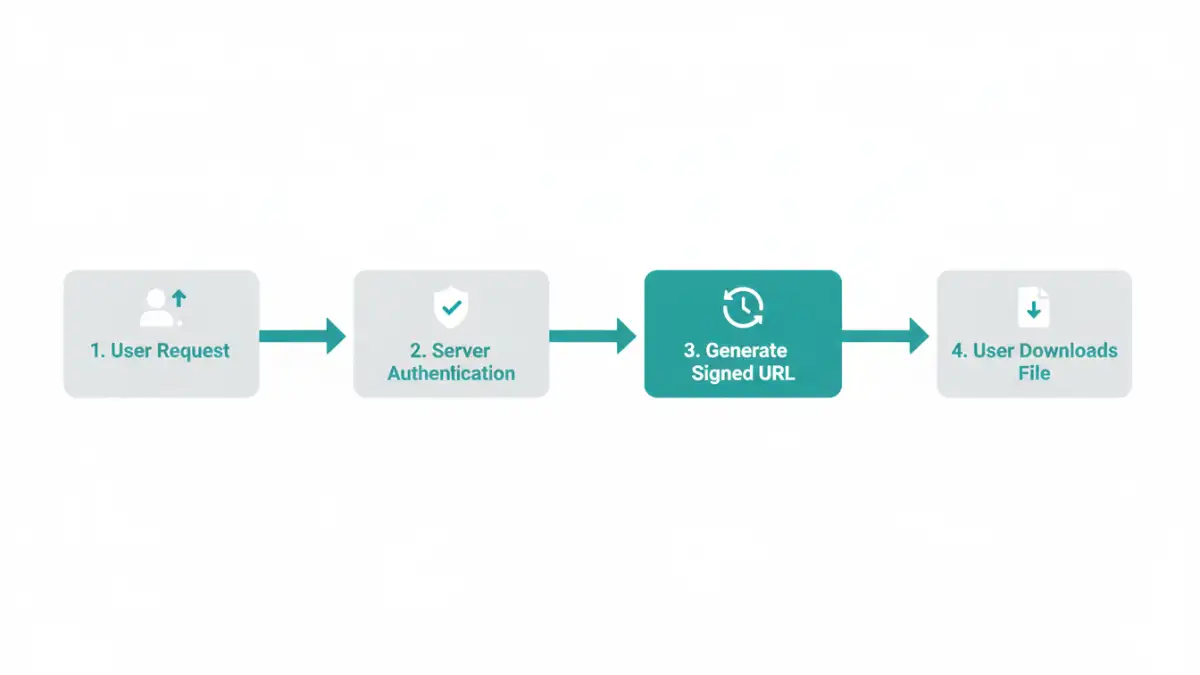
A standard public link to a file is a permanent key to that data. Once shared, you lose control over who accesses it, when, and how many times it's copied. Expiring links fundamentally change this dynamic by embedding a time-to-live (TTL) policy directly into the access mechanism. This approach is a core component of a robust secure document sharing strategy.
The primary benefit is a reduced attack surface. If a link is only valid for a few hours or days, the opportunity for a malicious actor to discover and exploit it is significantly diminished. This is crucial when you need to share encrypted file archives or sensitive reports. Furthermore, it enforces data hygiene by preventing old, irrelevant links from cluttering systems and creating potential backdoors to your files.
Access Control and Compliance
For businesses operating under regulations like GDPR or HIPAA, proving control over personal or sensitive data is non-negotiable. Using a time limited download link provides a clear, auditable mechanism for managing data access. You can demonstrate that data was only available for a specific, justifiable period, which can be a critical part of a compliance audit trail.
Common Methods for Secure Link Generation

You don't always need to build a complex system from scratch. Many popular platforms offer built-in tools for creating expiring links, each with its own set of advantages and limitations.
Using Cloud Storage Providers (Google Drive, Dropbox, OneDrive)
Most major cloud storage services have integrated this functionality directly into their sharing options. When you generate a shareable link in Google Drive, for example, you can often click into the settings to set an expiration date. Dropbox offers similar features, often bundled with password protection, in its premium plans.
This method is incredibly convenient for individuals and small teams already using these platforms. The user interface is straightforward, requiring no technical knowledge. However, the customization options can be limited, and reliance on a third-party's infrastructure means you are subject to their security model and terms of service.
Leveraging Dedicated File Sharing Services (WeTransfer, Tresorit)
Services like WeTransfer are built specifically for temporary file sharing. Their entire model is based on the idea that files are available for a limited time (e.g., seven days) and then automatically deleted. Secure-focused services like Tresorit take this a step further, offering end-to-end encryption and granular controls over link expiration, download limits, and access revocation.
These platforms are excellent for ad-hoc sharing of large files. Their main drawback is that the files are hosted on their servers, which may not be suitable for organizations with strict data residency or internal hosting policies.
The Developer's Approach: Building Your Own Solution
For complete control, integrating link generation into your own application is the way to go. This is where an expiring file links api comes into play. The most common and effective method for this is using pre-signed URLs, a feature offered by cloud storage providers like Amazon S3, Google Cloud Storage, and Azure Blob Storage.
A pre-signed URL is a temporary URL that grants time-limited access to a private object in your storage bucket. Your application server generates this URL using its secure credentials. The URL itself contains an authentication signature and an expiration timestamp. Anyone with the URL can access the file until it expires, without needing your application's secret keys.
How Pre-Signed URLs Work: A Practical Example
Let's consider a workflow using AWS S3:
- A user requests to download a private file (e.g., `invoice-123.pdf`) from your application.
- Your application backend verifies that the user is authorized to access this file.
- Using the AWS SDK, your server makes a request to S3 to generate a pre-signed URL for `invoice-123.pdf`. You specify an expiration time—for example, 5 minutes.
- S3 returns a unique, long URL containing the file path, access keys, a signature, and the expiration timestamp.
- Your application sends this URL back to the user's browser, which then initiates the download directly from S3.
- After 5 minutes, the signature in the URL becomes invalid, and any further attempts to use it will result in an access denied error.
This approach is highly secure because your secret credentials are never exposed to the client, and access is automatically revoked. It's also highly scalable, as the file download is offloaded from your server directly to the cloud provider's robust infrastructure.
Best Practices for Sharing Links Securely
Regardless of the method you choose, following a few best practices for secure link generation can significantly improve your security posture.
- Use the Shortest Possible Expiration Time: If a user only needs to download a file immediately, set the expiration to 5 or 10 minutes. Avoid setting long expiration periods like 30 days unless absolutely necessary.
- Combine with Password Protection: For an extra layer of security, password-protect the link or the file itself. This ensures that even if the link is intercepted, the data remains inaccessible without the password.
- Implement Download Limits: Where possible, limit the link to a single use. This prevents the link from being shared and used multiple times.
- Log and Monitor Access: Keep a log of who requested a link and when. Monitoring access attempts can help you detect unusual activity, such as multiple failed attempts to use an expired link.
Link Generation Method Comparison
| Method | Ease of Use | Security Control | Best For |
|---|---|---|---|
| Cloud Storage (Google Drive, etc.) | Very High | Basic (Expiration, Passwords) | Personal use, internal team collaboration. |
| Dedicated Sharing Services (WeTransfer) | High | Moderate (Auto-expiration) | Ad-hoc sharing of large, non-critical files. |
| Secure Sharing Services (Tresorit) | Moderate | High (E2EE, granular controls) | Businesses needing compliance and high security. |
| DIY Pre-Signed URLs (AWS S3) | Low (Requires coding) | Very High (Full customization) | Integrating secure downloads into custom applications. |