
A few years back, my team was preparing to hand over a project deliverable that included hundreds of sensitive design documents and contracts. Encrypting each one manually was not just tedious; it was a recipe for human error. This is a classic scenario where automation isn't just a convenience—it's a necessity for robust security.
Manually processing files one by one introduces risks like inconsistent password strengths, missed files, or insecure key handling. Setting up a simple script to handle this process ensures every document receives the same level of protection consistently and efficiently. It's a foundational step in building a secure workflow.
Table of Contents
Why Automate Document Encryption?
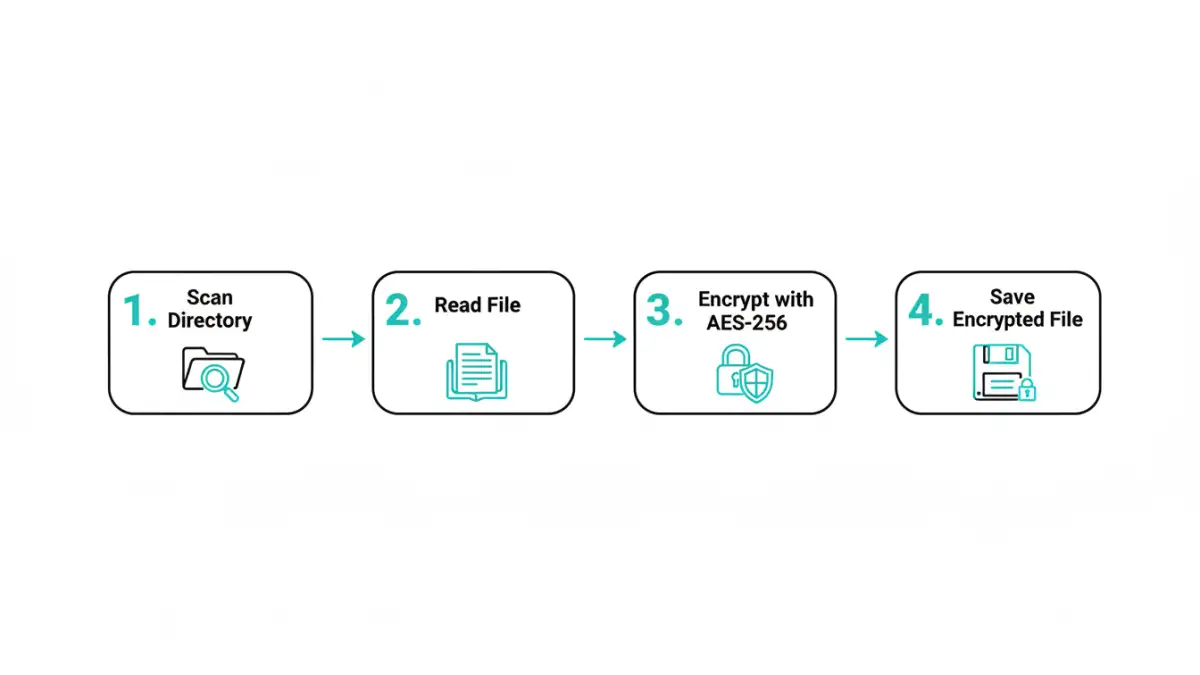
The core reason for automating encryption is to eliminate the bottlenecks and risks associated with manual processing. When you need to encrypt multiple files, doing so individually is slow and prone to mistakes. An engineer might forget a file, use a weak password on one, or store a key improperly under pressure.
Document security automation removes these variables. A script executes the same logic every time, ensuring that every designated file is encrypted with a strong, pre-defined algorithm and key management practice. This creates a reliable, auditable process that scales effortlessly, whether you're securing ten files or ten thousand.
Choosing the Right Encryption Method

Before writing any code, it's important to understand the fundamental choices in encryption. The decisions you make here will impact the security and performance of your solution.
Symmetric vs. Asymmetric Keys
Encryption relies on keys. Symmetric encryption uses a single secret key to both encrypt and decrypt data. It's incredibly fast and efficient, making it ideal for processing large volumes of data, such as in batch operations.
Asymmetric encryption, on the other hand, uses a key pair: a public key to encrypt and a private key to decrypt. While extremely secure for sharing data with others (you can distribute your public key freely), it's computationally slower. For a self-contained process of batch encrypting documents for storage, symmetric encryption is often the more practical choice.
Selecting a Strong Algorithm
Not all encryption algorithms are created equal. The current industry standard is the Advanced Encryption Standard (AES), specifically AES-256. The '256' refers to the key length, which provides a massive keyspace that makes it resistant to brute-force attacks by even the most powerful computers. For any new development, AES-256 should be your default choice.
A Practical Code Example: PHP Batch Encryption
Let's get into a practical implementation. Here’s a simple PHP script that scans a directory and encrypts every file within it using AES-256. This is a great starting point for building more complex document security automation.
First, ensure your PHP installation has the OpenSSL extension enabled, as it's required for the cryptographic functions.
Here is the core logic:
<?php
// WARNING: This is a simplified example. Key management must be handled securely.

function batchEncryptFiles($sourceDir, $outputDir, $encryptionKey) {
    if (!is_dir($outputDir)) {
        mkdir($outputDir, 0777, true);
    }

    $files = new DirectoryIterator($sourceDir);
    $cipher = "aes-256-cbc";

    foreach ($files as $file) {
        if ($file->isFile()) {
            $filePath = $file->getPathname();
            $fileContents = file_get_contents($filePath);

            // Generate a unique Initialization Vector (IV) for each file
            $ivLength = openssl_cipher_iv_length($cipher);
            $iv = openssl_random_pseudo_bytes($ivLength);

            // Encrypt the file content
            $encryptedData = openssl_encrypt($fileContents, $cipher, $encryptionKey, 0, $iv);

            // Prepend the IV to the encrypted data for decryption later
            $finalPayload = $iv . $encryptedData;

            // Save the new encrypted file
            $newFileName = $file->getFilename() . '.enc';
            file_put_contents($outputDir . '/' . $newFileName, $finalPayload);
            echo "Encrypted: {$file->getFilename()}\n";
        }
    }
}

// --- Configuration ---
$sourceDirectory = './sensitive-docs';
$outputDirectory = './encrypted-docs';
// IMPORTANT: NEVER hardcode keys. Use a secure method like environment variables or a key vault.
$key = 'your-super-secret-32-character-key'; // Must be 32 bytes for AES-256

batchEncryptFiles($sourceDirectory, $outputDirectory, $key);
?>
In this script, we iterate through a source directory, read each file, and encrypt its contents using `openssl_encrypt`. A crucial step is generating a unique Initialization Vector (IV) for each encryption operation. The IV ensures that even if two files have identical content, their encrypted outputs will be different. We then prepend this IV to the encrypted data so it can be used for decryption later.
A critical note on key management: Never hardcode keys directly in your script as shown in the example. In a production environment, use a secure secret management tool like HashiCorp Vault, AWS KMS, or store them in protected environment variables.
When to Use a Bulk File Encryption API
While a custom script offers full control, it also means you are responsible for maintenance, security, and scalability. For larger, more complex systems, a dedicated bulk file encryption api can be a better solution.
An API-based service offloads the cryptographic heavy lifting. These services are built and maintained by security experts, ensuring that best practices are followed. They often provide additional features like key management as a service, support for a wide range of file types, and detailed logging for compliance and auditing. If your application handles files from various sources or needs to scale rapidly, integrating with an API can save significant development time and reduce security risks.
Comparison: Custom Script vs. Bulk Encryption API
| Feature | Custom PHP Script | Bulk File Encryption API |
|---|---|---|
| Setup Complexity | Low to moderate; requires server environment and coding. | Low; typically involves signing up and using an API key. |
| Control & Customization | Full control over logic, algorithms, and workflow. | Limited to the features provided by the API. |
| Maintenance | Requires ongoing maintenance, security patching, and updates. | Handled by the service provider. |
| Scalability | Depends on your server infrastructure. | Designed for high scalability and concurrent processing. |
| Key Management | Developer is fully responsible for secure key storage. | Often includes secure, managed key vault services. |
| Cost | Primarily development and server time. | Typically subscription-based (per API call or monthly fee). |