
A client recently asked how we could guarantee that documents uploaded via our API were secure from the moment they left the user's browser. This wasn't just about transport layer security (TLS); they needed end-to-end, at-rest encryption for the files themselves. This common requirement moves security from a network-level concern to an application-level responsibility.
Simply relying on HTTPS encrypts data in transit, but once it lands on your server, it's often stored in its original, unencrypted state. For sensitive information like financial records, legal contracts, or healthcare data, this is a significant risk. Integrating encryption directly into the file handling logic of your API is the solution.
Table of Contents
Why Bother with API-Level Document Encryption?
Many developers assume that HTTPS is sufficient protection. While TLS is essential for securing data in transit, it does nothing to protect data at rest. If a server is compromised, an S3 bucket is misconfigured, or a database is breached, any unencrypted files are completely exposed.
Implementing a dedicated document encryption API provides layered security. Each file is individually encrypted with its own key, making a bulk data breach far less catastrophic. This approach is also critical for meeting compliance standards like GDPR and HIPAA, which have stringent requirements for protecting personal and sensitive data both in transit and at rest.
Core Encryption Strategies for APIs

When building a secure file API, you generally have two primary approaches for handling the encryption process: server-side or client-side. The choice depends on your security model and trust boundaries.
Server-Side Encryption
In this model, the client uploads the raw, unencrypted document to your API over a secure TLS connection. The server is then responsible for generating an encryption key, encrypting the document, and storing the encrypted result. The server also manages the encryption key, often storing it in a secure vault.
This is the simpler approach for the client application, as it offloads all cryptographic complexity to the backend. However, it means you, the service provider, have access to the unencrypted data, even if only for a moment. It requires your clients to trust your infrastructure completely.
Client-Side Encryption
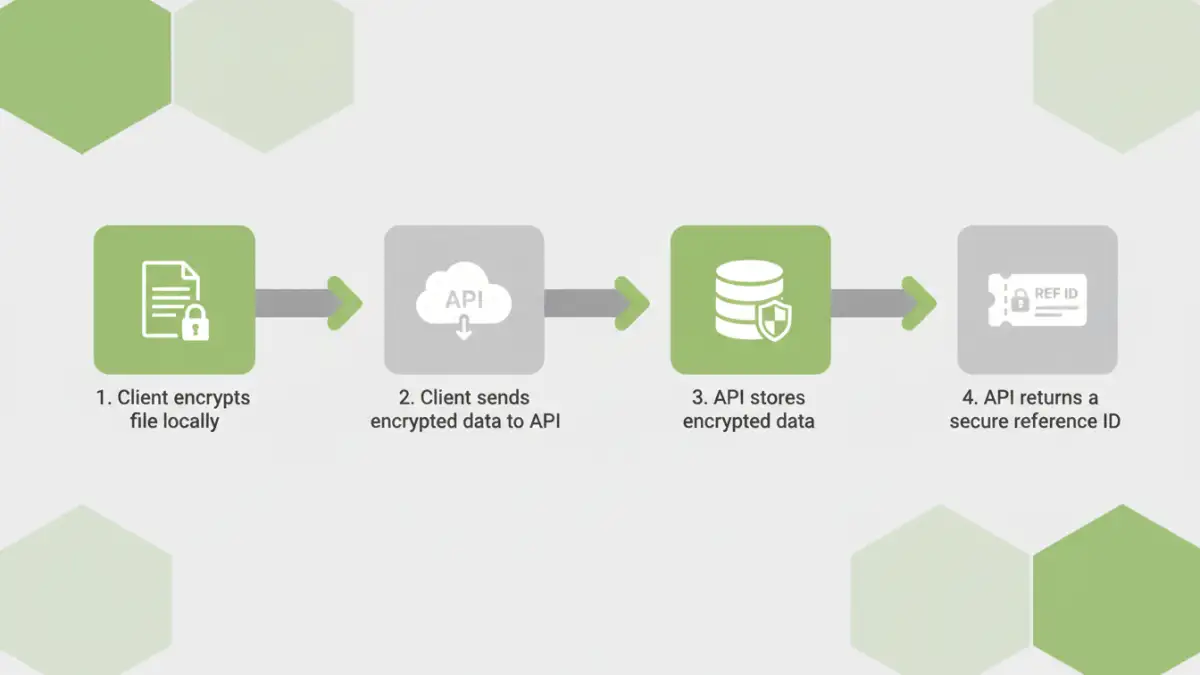
For a zero-knowledge architecture, client-side encryption is the gold standard. The client application encrypts the file on the user's device *before* uploading it. The API receives a pre-encrypted blob of data and never has access to the plaintext content or the encryption key.
This method provides the strongest security and privacy guarantees, as you cannot access your users' data. The main challenge is implementation complexity. You need to provide robust SDKs or clear documentation to help your clients perform the encryption correctly, and you must design a system for them to manage their own keys.
Designing the Encrypt Document Endpoint
Let's focus on a practical server-side encryption model, as it's a common starting point. A well-designed `encrypt document endpoint` is the heart of this system. We typically use a `POST` request, often with a `multipart/form-data` content type to handle the file upload.
The request would go to an endpoint like `/v1/documents`. The body would contain the file itself along with any relevant metadata. Upon success, the server performs the encryption, stores the file in a secure location (like a private S3 bucket), and records the key information in a secure key management service (KMS).
The API response should never return the raw encryption key. Instead, it should return a unique identifier for the document and perhaps a key identifier that can be used to request decryption later (with proper authorization). A checksum (e.g., SHA-256) of the original file can also be useful for verifying integrity.
A sample successful response might look like this:
{
  "documentId": "doc_abc123xyz789",
  "keyReference": "key_ref_456def",
  "size": 2048576,
  "checksum": "e3b0c44298fc1c149afbf4c8996fb92427ae41e4649b934ca495991b7852b855",
  "createdAt": "2023-10-27T10:00:00Z"
}
Key Management: The Critical Component
Cryptography is more about key management than complex algorithms. How you generate, store, rotate, and grant access to your encryption keys is arguably the most important part of your system's security. Storing keys in a config file or database is a recipe for disaster.
Using a dedicated Key Management Service (KMS) like AWS KMS, Azure Key Vault, or Google Cloud KMS is non-negotiable for a production system. These services handle the lifecycle of cryptographic keys for you. Your application requests the KMS to generate a data key, uses it to encrypt the file, and then stores the *encrypted* data key alongside the encrypted document. To decrypt, your application sends the encrypted data key back to the KMS, which decrypts it (after checking permissions) and returns the plaintext key for temporary use.
Common Pitfalls and How to Avoid Them
Over the years, I've seen a few common mistakes when teams first implement REST API encryption. The most frequent is hardcoding keys or storing them insecurely. Always use a proper KMS and manage access with strict IAM policies.
Another pitfall is using outdated or weak cryptographic algorithms. Stick with modern, well-vetted standards like AES-256 for symmetric encryption. Also, don't forget about key rotation. Your security policy should define a schedule for rotating keys to limit the impact of a potential compromise.
Finally, insufficient logging and monitoring can be a blind spot. You need to know who is accessing which keys and when. Proper audit trails are essential for security analysis and compliance.
Key Management Strategy Comparison
| Strategy | Pros | Cons | Best For |
|---|---|---|---|
| Application-Managed Keys | Full control over the key lifecycle. | Extremely high risk; easy to make mistakes. | Not recommended for most production systems. |
| Cloud KMS (e.g., AWS KMS) | Secure, managed, auditable, and scalable. | Vendor lock-in; requires cloud infrastructure. | Most modern cloud-native applications. |
| Bring Your Own Key (BYOK) | Client maintains control over their master key. | Increased complexity for both client and provider. | Enterprise clients with strict compliance needs. |
| Hardware Security Module (HSM) | Highest level of physical and logical security. | Expensive and complex to manage. | Financial services, government, and high-security environments. |