
Sharing a sensitive document, like a pre-release financial report or a confidential legal contract, always comes with a bit of anxiety. You send it off and hope for the best, but what if it leaks? Standard watermarks that just say "Confidential" or "Draft" are a good first step, but they're static. They don't tell you *who* leaked the document, which is the critical piece of information you need to prevent it from happening again.
This is where dynamic watermarking changes the game entirely. Instead of a generic stamp, we can programmatically embed unique, user-specific information into the document at the moment it's accessed or downloaded. This creates a powerful deterrent and a clear audit trail, transforming a simple document into a traceable asset.
Table of Contents
Why Static Watermarks Fail in Modern Workflows
For years, the standard approach was to apply a single, uniform watermark to a batch of documents before distribution. You might have a version for internal review and another for external partners. While better than nothing, this method has significant limitations in today's fast-paced, collaborative environments.
The Problem with a One-Size-Fits-All Approach
A static watermark doesn't offer any real traceability. If a document watermarked "For Partner ABC Only" appears online, you know it came from that partner company, but you don't know which individual was responsible. It provides a starting point for an investigation, but it's far from a definitive link. This lack of granularity makes accountability nearly impossible to enforce.
Furthermore, static watermarks are often obtrusive and can degrade the readability of the document. Since they have to be visible enough to act as a deterrent, they can interfere with the content itself, which is a frustrating experience for the legitimate user.
What Is Dynamic Watermarking?

Dynamic watermarking addresses these shortcomings by generating a unique watermark for each user session or download request. This isn't just a static piece of text; it's a layer of data injected directly into the document that is specific to the person viewing it. It’s a fundamental shift in how we approach secure document sharing.
What Makes a Watermark "Dynamic"?
The "dynamic" part comes from the data it contains. Instead of a generic label, the watermark can include a variety of user-specific identifiers. Common examples include:
- The viewer's full name or username
- Their email address or employee ID
- The IP address from which they accessed the file
- The precise date and time of access (timestamp)
- A unique transaction or session ID
Implementing Dynamic Watermarks with an API
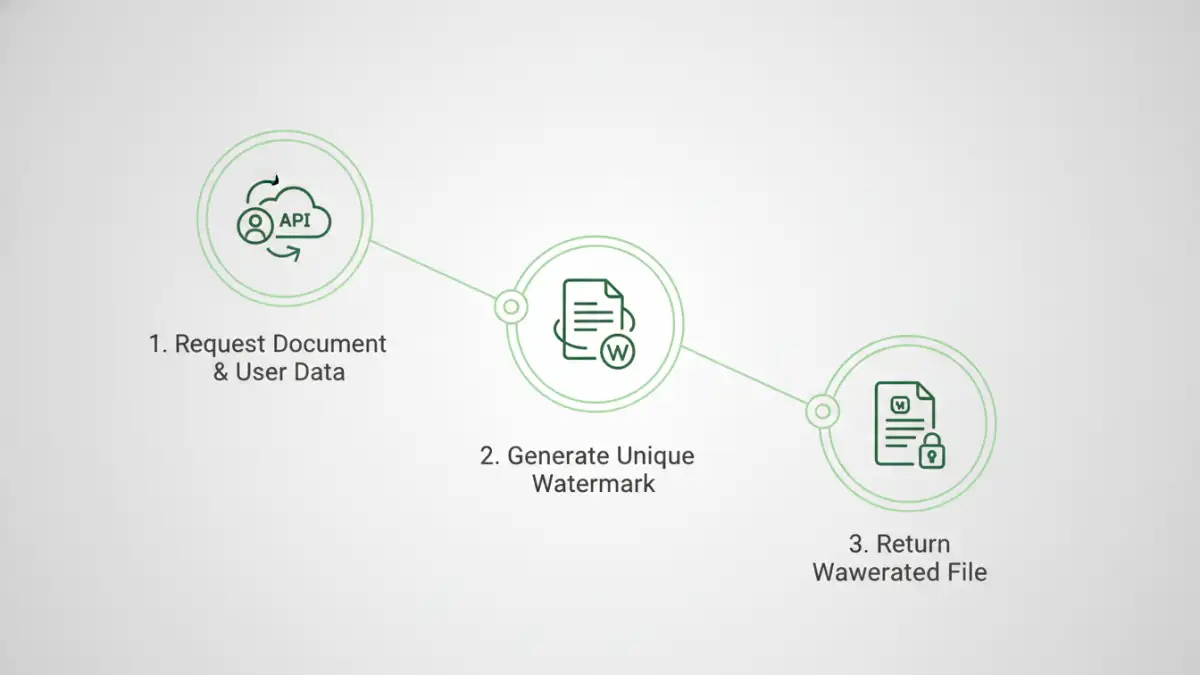
The most efficient way to implement this is through an API. Manually creating a custom watermark for every single download is not scalable. An API allows you to integrate this functionality directly into your existing applications, document management systems, or data rooms. The process is seamless for both the developer and the end-user.
When a user requests a document, your application's backend makes a call to the watermarking API. In this call, you pass two key things: the document itself (or a pointer to it) and the dynamic data you want to embed. The API then processes the file, adds the personalized watermark, and returns the secured document for the user to view or download.
Here’s a simplified look at what an API call might look like in JSON format:
{
  "source_document": "/path/to/original.pdf",
  "watermark_text": "Viewed by: {{user_email}} on {{timestamp}} from {{ip_address}}",
  "data": {
    "user_email": "alex.chen@example.com",
    "timestamp": "2023-10-27T10:00:00Z",
    "ip_address": "203.0.113.54"
  },
  "output_format": "pdf",
  "font_size": 10,
  "opacity": 0.3
}
In this example, the API would take `original.pdf`, replace the placeholders like `{{user_email}}` with the provided data, and generate a new PDF. The ability to control properties like opacity and font size ensures the watermark is present but not overly distracting.
Real-World Use Cases for Dynamic Watermarks
The applications for this technology span numerous industries where document confidentiality is paramount. By creating effective security watermark documents, organizations can protect their intellectual property and maintain compliance.
From Legal to Media
In the legal field, law firms can share sensitive case files with clients or opposing counsel, with each copy watermarked with the recipient's details. In finance, investment banks can distribute confidential M&A documents to potential bidders, ensuring any leaks can be traced. Media companies can send pre-release movie scripts or press materials to reviewers, with each copy uniquely identifying the recipient to prevent unauthorized distribution before an embargo lifts.
This technology is also invaluable for internal use. When sharing sensitive internal memos or strategic plans with employees, dynamic watermarks create a strong psychological deterrent against leaking information to the press or competitors. It fosters a culture of accountability and respect for company information.
Comparison: Static vs. Dynamic Watermarking
| Feature | Static Watermark | Dynamic Watermark | Impact on Security |
|---|---|---|---|
| Content | Generic text (e.g., "Confidential") | User-specific data (Name, IP, Timestamp) | Dynamic provides individual traceability. |
| Application | Applied once to all copies | Generated on-the-fly for each access | Prevents easy removal and provides real-time context. |
| Traceability | Low (Identifies the group, not the individual) | High (Pinpoints the exact user and session) | Dramatically reduces investigation time for leaks. |
| Deterrent Effect | Moderate | Very Strong | Users are less likely to leak a document tied to their identity. |
| Scalability | Easy for small batches | Requires an API for automation | API-driven approach is highly scalable for any number of users. |