
A friend of mine who runs a small law practice called me in a bit of a panic last week. He'd just read a summary of a new American Bar Association (ABA) formal opinion on data security and realized his firm's current practices were falling short. He asked, "Is just having a password on my laptop enough anymore?" The simple answer, I told him, is no. The ground has fundamentally shifted underneath the legal profession when it comes to technology.
For years, the standard for protecting client data was based on "reasonable efforts." This vague guideline left a lot of room for interpretation. But with the rise of sophisticated cyberattacks targeting law firms, the ABA has clarified its stance. Protecting client information with robust security measures, specifically encryption, is no longer just a recommendation; it's a core component of a lawyer's ethical duty.
Table of Contents
The Ethical Shift: From 'Reasonable' to Required
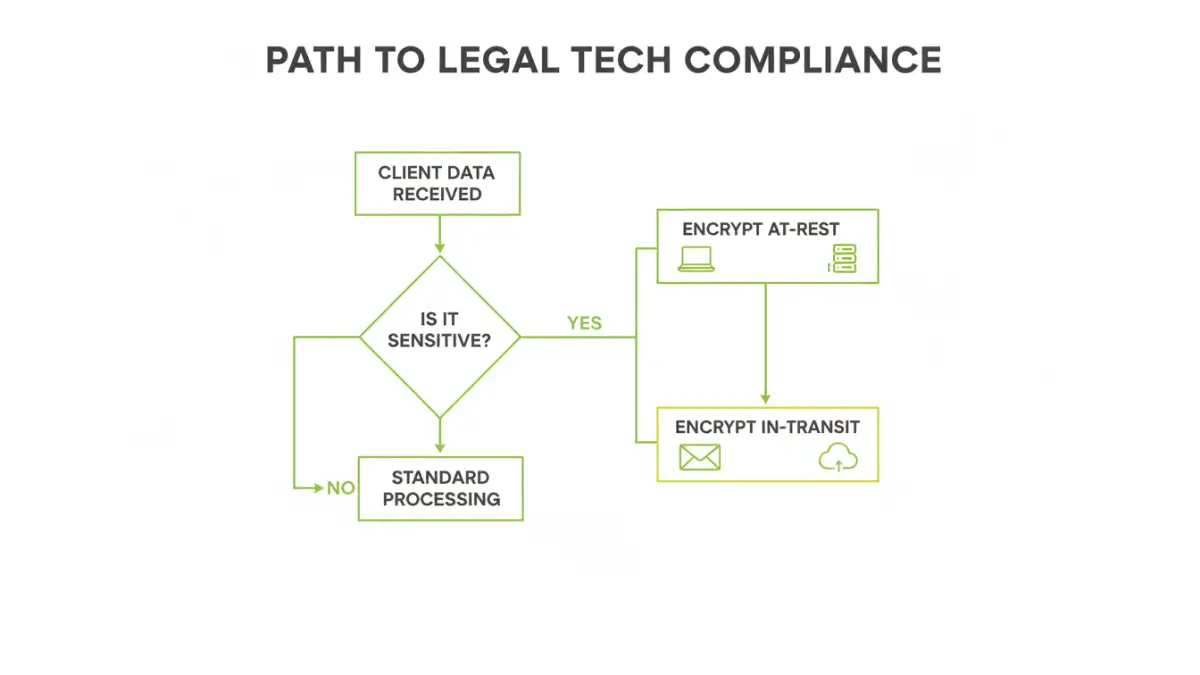
The core of this change revolves around the ABA's Model Rules of Professional Conduct, particularly Rule 1.6 concerning confidentiality of information. Recent formal opinions have made it clear that in the current threat landscape, failing to use strong encryption for sensitive client data is likely a failure to make "reasonable efforts." The interpretation has tightened considerably.
This isn't just about preventing data breaches. It's about upholding the sanctity of the attorney client privilege. When client data is unencrypted, it's vulnerable during transmission over the internet or if a device is lost or stolen. This exposure can inadvertently waive privilege, creating a catastrophic situation for both the client and the attorney. The new guidance effectively makes data security a pillar of modern legal ethics.
What Data Needs to Be Encrypted?
The duty applies to any sensitive client information. This includes, but is not limited to, case files, discovery documents, financial records, communication logs, and personal identifying information (PII). Essentially, any data that is confidential or could harm a client if exposed must be protected. The expectation is that data is encrypted both "at-rest" (when stored on a hard drive, server, or in the cloud) and "in-transit" (when sent via email or other sharing methods).
Encryption Demystified for Legal Professionals

From my perspective as an engineer, encryption is simply the process of scrambling data into an unreadable format using a complex algorithm. Only someone with the correct "key" can unscramble and read the information. Think of it as a digital safe for your files. Even if a thief steals the safe, they can't access what's inside without the combination.
The industry standard today is AES-256 (Advanced Encryption Standard with a 256-bit key), which is used by governments and major corporations worldwide. It's considered virtually unbreakable by brute force. When you see a tool or service that offers AES-256 encryption, you can be confident it meets a high security benchmark.
Encryption At-Rest vs. In-Transit
It's crucial to understand these two states of data. Encryption at-rest protects files stored on your devices. If your laptop is stolen from your car, full-disk encryption means the thief gets a useless metal box, not your entire case history. Tools like BitLocker (Windows) and FileVault (macOS) handle this automatically.
Encryption in-transit protects data as it travels across the internet. This is vital for email and file sharing. When you send a standard email, it's like sending a postcard—anyone who intercepts it can read it. Using a secure client portal or an end-to-end encrypted email service ensures the message is protected from sender to recipient.
Practical Steps for Compliance in Your Firm
Achieving compliance doesn't have to be an overwhelming technical overhaul. It's about implementing layers of security. Start with the basics and build from there. As a first step, every device in your firm that stores client data should have full-disk encryption enabled. It's built into modern operating systems and is easy to turn on.
Next, evaluate how you share files. Stop emailing sensitive documents as standard attachments. Instead, adopt a secure document sharing for lawyers platform. These client portals provide a secure, encrypted environment where you can share files, communicate, and collaborate with clients without exposing data to the open internet. Many legal practice management software suites have this functionality built-in.
Finally, consider your data backups. Are they encrypted? An unencrypted backup drive is a goldmine for data thieves. Ensure your backup solution, whether physical or cloud-based, encrypts the data it stores. This closes a common but often overlooked security gap.
Common Security Pitfalls and How to Avoid Them
In my work, I've seen a few common mistakes trip people up. The most frequent is weak password management. Your encryption is only as strong as the password protecting the key. Using complex, unique passwords—managed by a password manager—is non-negotiable.
Another pitfall is using consumer-grade cloud storage like the free versions of Dropbox or Google Drive for primary file storage. While convenient, their terms of service and security models may not align with the strict duties of legal tech compliance. Opt for business-grade services or those designed specifically for industries with high confidentiality requirements.
Properly managing your **client file encryption legal** strategy is about more than just technology; it's about process. Losing an encryption key can mean losing your data forever. Ensure you have a secure key recovery plan in place. Forgetting this step can be just as devastating as a data breach.
Encryption Solutions Comparison for Law Firms
| Solution Type | Primary Use | Security Level | Implementation Effort |
|---|---|---|---|
| Full-Disk Encryption (BitLocker/FileVault) | Protecting data 'at-rest' on laptops and desktops | High | Low (Built into OS) |
| Encrypted Email Service (e.g., ProtonMail) | Securing email communications 'in-transit' | High | Medium (Requires user adoption) |
| Secure Client Portal | Secure document sharing and collaboration | Very High | Medium (Part of practice management software) |
| Encrypted USB Drives | Physically transporting sensitive files | Medium-High (Device can be lost) | Low |
| Encrypted Cloud Storage (e.g., Sync.com) | Securely storing and backing up files in the cloud | High | Low to Medium |