
A client in the legal tech space once approached me with a daunting challenge. They had to process thousands of discovery documents daily, redacting personally identifiable information (PII) before sharing them. The manual process was not only incredibly slow but also dangerously prone to human error, where a single missed name or account number could have serious consequences. This is a classic scenario where manual effort simply doesn't scale and introduces unacceptable risk.
The solution was to automate the process entirely. By integrating a specialized API, we could build a workflow that would systematically find and permanently remove sensitive data from PDFs without any manual intervention. This approach is faster, more accurate, and infinitely more scalable, making it ideal for any application dealing with confidential documents.
Table of Contents
What is Programmatic PDF Redaction?
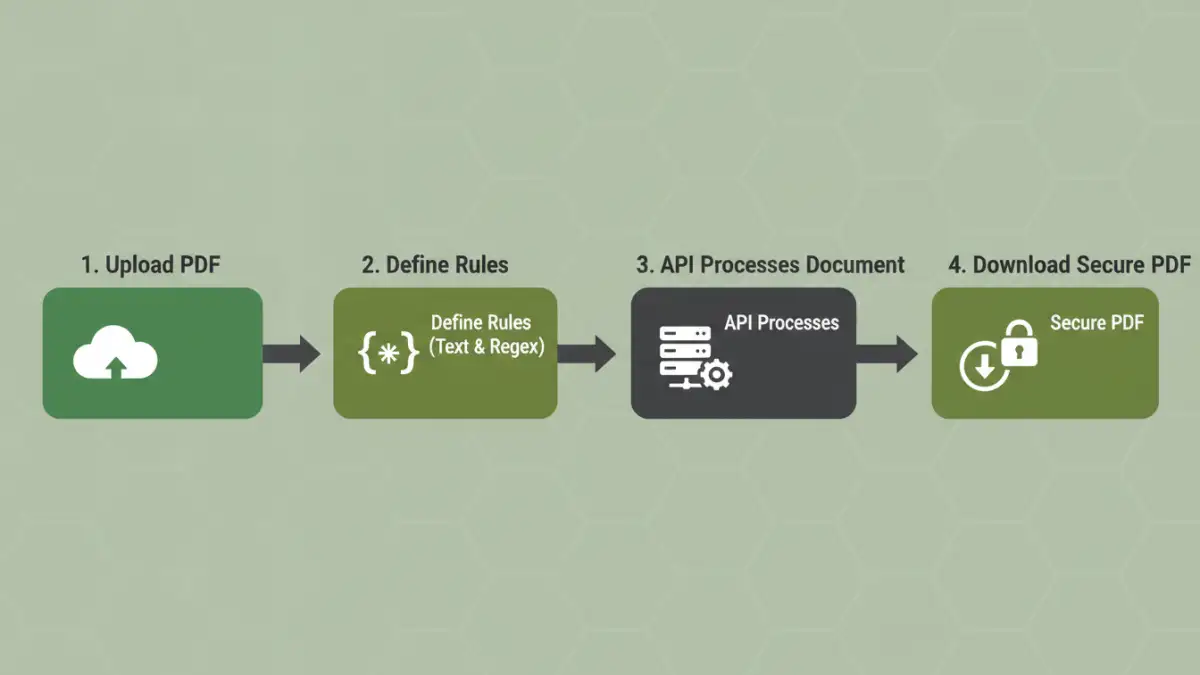
Programmatic redaction is the process of using code to automatically find and permanently obscure or remove information from a document. Unlike manually drawing a black box over text in a PDF editor, true programmatic redaction alters the underlying document content. This distinction is critical; a simple black overlay can often be removed, exposing the supposedly hidden data.
When you use a proper pdf redaction api, it doesn't just cover the text. It actively removes the text, image, or data from the document's structure and replaces it with a solid colored block. This ensures the information is irretrievable. This method is essential for compliance with regulations like GDPR, HIPAA, and CCPA, which mandate the secure handling and removal of personal data.
Choosing the Right PDF Redaction API

Not all APIs are created equal. When your goal is to securely remove sensitive data pdf files contain, you need to evaluate potential services based on a few key criteria. I've found that focusing on these areas helps avoid integration headaches and security vulnerabilities down the line.
Key API Features to Look For
- True Redaction: The API must permanently remove the data, not just hide it. Check the documentation to confirm it performs content removal rather than simple annotation or layering.
- Pattern Recognition: A powerful API should allow you to redact content based on more than just exact text matches. Look for support for regular expressions (regex) to find patterns like Social Security numbers, credit card numbers, email addresses, and phone numbers.
- Image and Area Redaction: Sometimes sensitive data isn't text. You might need to redact signatures, logos, or specific sections of a scanned document. The ability to specify coordinates for redaction is a valuable feature.
- Security and Privacy Policy: How does the service handle your files? Ensure they use end-to-end encryption and have a clear policy stating that your documents are deleted from their servers immediately after processing.
A Practical Code Example for Redacting Content
Let's walk through a hypothetical code snippet to illustrate how you might use an API for redacting sensitive pdf documents. For this example, we'll use Python and the popular `requests` library to interact with a fictional redaction API endpoint. The logic remains similar regardless of the programming language you choose.
Step 1: Setting Up Your Environment
First, you'll need to install the necessary library if you don't already have it. This is a simple command line instruction.
pip install requestsYou would also need to sign up for the API service to get your unique API key, which you'll use to authenticate your requests. Be sure to store this key securely as an environment variable rather than hardcoding it into your application.
Step 2: Building the API Request
The core of the process involves sending a POST request to the API's endpoint. This request will contain the PDF file you want to process and the rules for what to redact. The rules are often sent as a JSON payload.
import requests
import os

# Securely get your API key from environment variables
API_KEY = os.getenv('REDACTION_API_KEY')
API_URL = 'https://api.example-redactor.com/v1/redact'

# Define what you want to redact
redaction_rules = {
    'text_to_redact': ['John Doe', 'Confidential Project X'],
    'regex_patterns': [
        '\\d{3}-\\d{2}-\\d{4}',  # SSN pattern
        '[a-zA-Z0-9._%+-]+@[a-zA-Z0-9.-]+\\.[a-zA-Z]{2,}' # Email pattern
    ]
}

headers = {
    'Authorization': f'Bearer {API_KEY}'
}

file_path = 'path/to/your/document.pdf'

with open(file_path, 'rb') as f:
    files = {'file': (os.path.basename(file_path), f, 'application/pdf')}
    data = {'rules': str(redaction_rules)}

    response = requests.post(API_URL, headers=headers, files=files, data=data)

# Handle the response
if response.status_code == 200:
    with open('redacted_document.pdf', 'wb') as out_file:
        out_file.write(response.content)
    print('Successfully redacted and saved the document.')
else:
    print(f'Error: {response.status_code} - {response.text}')
In this script, we open the source PDF in binary mode (`'rb'`) and send it as a multipart form data request. We also include our redaction rules, which specify both literal strings and regex patterns to find and censor document text.
Beyond Basic Text: Advanced Redaction
Modern workflows often require more than just text redaction. Scanned documents, forms, and reports can contain sensitive information within images or in specific, predictable locations on a page. A robust API should support these advanced use cases.
For example, some APIs allow you to specify rectangular coordinates (x, y, width, height) on a specific page to redact a fixed area, which is perfect for obscuring signatures or stamps on a standardized form. Others are beginning to incorporate machine learning to identify and redact faces or other objects within images embedded in the PDF.
Security and Best Practices
When handling sensitive documents, security is paramount. Always choose an API provider that prioritizes data privacy. Ensure your connection to the API is over HTTPS to encrypt data in transit. Furthermore, review the provider's data retention policy; ideally, your files should be permanently deleted from their servers as soon as the redaction process is complete.
Internally, manage your API keys with care. Use environment variables or a secrets management system instead of embedding them directly in your source code. This prevents accidental exposure in version control systems like Git. By following these best practices, you can leverage the power of programmatic redaction while maintaining a strong security posture.
Comparison of Redaction Methods
| Method | Pros | Cons | Best For |
|---|---|---|---|
| Manual Redaction (Editor) | Simple for one-off documents; no coding required. | Extremely slow, prone to errors, not scalable, often not secure (data can be recovered). | Redacting a single page in a non-critical document. |
| Desktop Software | More features than basic editors; good for batch processing. | Requires licensing fees; can be complex to configure; still requires manual oversight. | Small businesses with moderate but regular redaction needs. |
| Programmatic Redaction (API) | Highly scalable, extremely fast, consistent and accurate, easily integrated into workflows. | Requires development resources; dependent on a third-party service. | Automated, high-volume document workflows where accuracy and security are critical. |