
A few months back, a client in the financial sector faced a serious issue. They shared a sensitive quarterly report, protected by a password, with a small group of external auditors. Days later, screenshots of key pages were circulating internally at a competitor. They had no way of knowing who was responsible. This scenario highlights a critical gap in traditional document protection: once a file is legitimately accessed, control is often completely lost.
Standard watermarks are a good first step, but they're often static and easily removed. That's why we've been working on a more intelligent solution. This isn't just about stamping a logo on a page; it's about embedding accountability directly into the document itself. Our goal was to create a system that could not only deter leaks but also trace them back to the source if they happened.
Table of Contents
The Problem with Static Watermarks
For years, the standard approach has been to apply a static watermark—like a company logo or a "CONFIDENTIAL" stamp—to a document. While this communicates the sensitive nature of the information, it does little to prevent a determined leaker. These static images are often placed on a separate layer in a PDF, making them trivial to remove with the right software.
The bigger issue is the lack of traceability. A static watermark is the same for every single recipient. If a document watermarked "Company Confidential" appears online, you know it's yours, but you have no idea which of the twenty people you sent it to is responsible. This makes them a weak deterrent for internal threats or breaches through trusted third parties.
Security and Accountability Gaps
This lack of personalization is the core failure of traditional methods. They establish ownership but not accountability for individual recipients. This is a significant blind spot in any organization's file sharing security strategy. You're essentially relying on trust alone after the file leaves your control, which isn't a viable security posture for high-value information.
Introducing Our New Dynamic Watermarking Feature

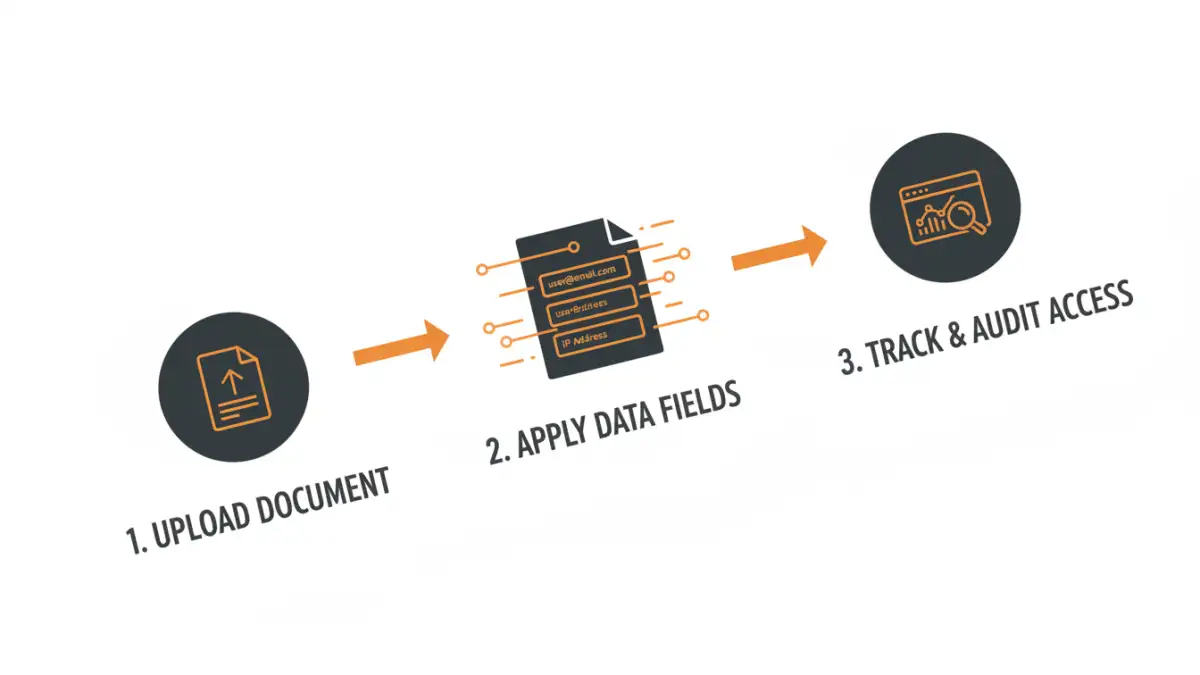
This is the problem our new document control release is designed to solve. Instead of a one-size-fits-all stamp, our system generates dynamic watermarks for each unique viewing session. When a user opens a protected document, the system instantly overlays information that is specific to them.
This information can include the viewer's email address, their IP address, and the exact date and time of access. Because this watermark is generated on-the-fly and tied to a specific user's session, it creates a powerful and personal deterrent. A person is far less likely to screenshot or share a document that has their own identifying information plastered all over it.
Key Benefits of Dynamic Marks
The primary benefit is immediate accountability. Each recipient gets a uniquely marked copy, making any leak instantly traceable. This significantly enhances your file sharing security. Furthermore, these watermarks are rendered as part of the document content itself, not as a separate layer, making them much more difficult to tamper with or remove compared to their static counterparts.
How Our PDF Tracking Feature Works
Implementing this new feature is straightforward. From an engineering perspective, we focused on making it seamless. When you share a file through our platform, you simply enable the 'Dynamic Watermark' option. There are no complex configurations required.
Once enabled, the system takes over. Instead of sending a static file, we provide a secure link to our viewer. When the recipient clicks the link and authenticates, our server generates the personalized document in real-time. This process ensures that the original, unmarked file is never directly exposed to the end-user's device, adding another layer of security.
Tracking and Auditing Access
Beyond the visible deterrent, this feature provides a comprehensive audit trail. The dashboard gives you a full view of who has accessed the document, when they viewed it, and from what location. This pdf tracking feature moves beyond simple read receipts, giving you actionable intelligence on how your shared information is being consumed. If a document is accessed from an unexpected location, you'll know immediately.
Best Practices for Implementation
To get the most out of this technology, I recommend a tiered approach. Use dynamic watermarking for your most sensitive documents: unannounced financial reports, intellectual property, legal contracts, and pre-release marketing materials. For less sensitive internal communications, a standard password may suffice.
It's also crucial to communicate this policy to your team and external partners. Informing recipients that documents are individually tracked is part of the deterrent. The goal isn't just to catch leaks, but to prevent them from ever happening. This new layer of security fosters a culture of responsibility around sensitive data, which is a win for everyone involved.
Comparison: Static vs. Dynamic Watermarking
| Feature | Static Watermark | Dynamic Watermark |
|---|---|---|
| Personalization | None; same for all users. | Unique per user (email, IP, timestamp). |
| Traceability | Very low; cannot identify the source of a leak. | High; leaks can be traced back to a specific user and session. |
| Deterrence | Low; easily ignored or removed. | High; users are less likely to share a file with their name on it. |
| Security | Low; often easy to remove with PDF editing software. | High; rendered as part of the document content and harder to remove. |
| Implementation | Applied once before distribution. | Applied in real-time for each viewing session. |
| Best For | General branding, copyright notices. | Sensitive data, confidential reports, and secure document watermarking. |