I recently helped a marketing team that was constantly fumbling with complex passwords for their confidential campaign briefs. Every forgotten password meant a helpdesk ticket and lost time, not to mention the security risk of credentials written on sticky notes. This is a common scenario, and it highlights a fundamental weakness in traditional security models. This is where biometric access becomes a game-changer, replacing something you know (a password) with something you are (a fingerprint, a face).
Shifting to biometrics isn't just about convenience; it's a significant upgrade in corporate file protection. It virtually eliminates issues like password sharing, phishing attacks that target credentials, and the administrative overhead of constant password resets. For teams handling sensitive data, this modern approach provides a more robust and user-friendly security layer.
Table of Contents
Why Shift to Biometrics for Document Security?
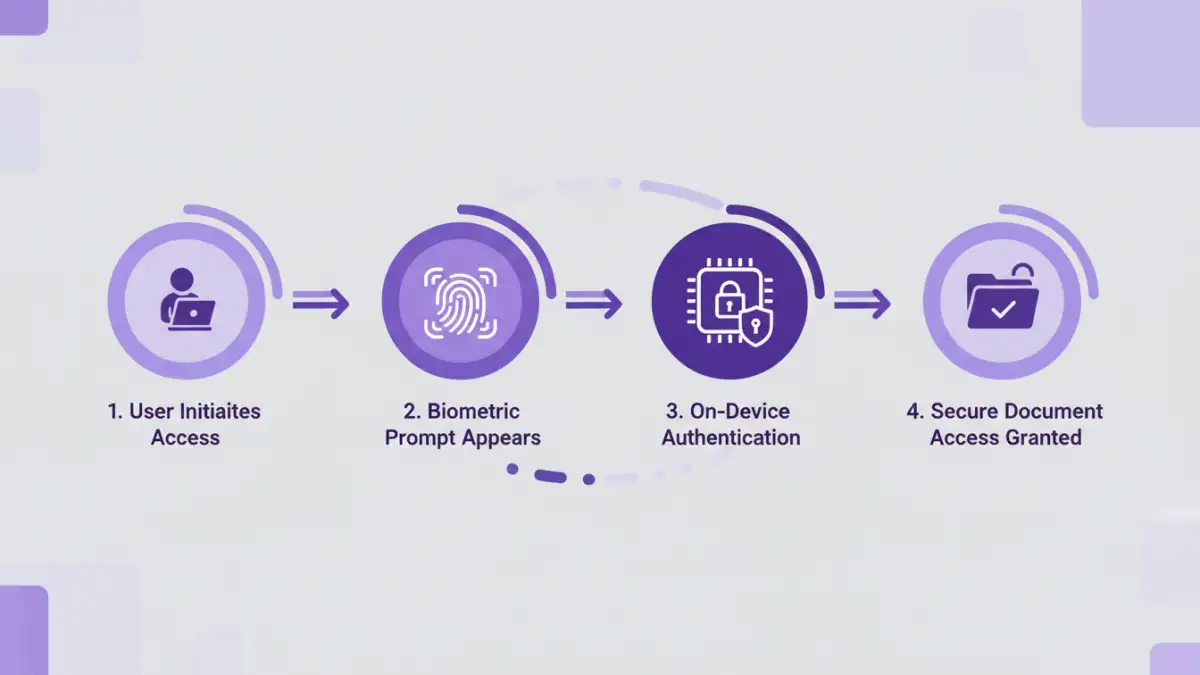
The core problem with passwords is that they are a form of shared secret. They can be stolen, guessed, or socially engineered. Multi-factor authentication (MFA) adds a layer of protection, but the password remains the weakest link. Biometrics fundamentally changes this by tying access directly to an individual's unique biological traits.
From an engineering perspective, the appeal lies in creating a frictionless yet highly secure user experience. When an employee can access a critical financial report with a simple fingerprint scan on their laptop, you've removed a point of friction while simultaneously increasing the difficulty for an unauthorized user to gain access. This improves productivity and strengthens overall team document security posture.
Key Advantages Over Traditional Passwords
The benefits are clear. Firstly, there's the enhanced security; biometric markers are incredibly difficult to replicate or steal compared to a password. Secondly, the user experience is vastly improved. No more remembering complex character combinations or going through tedious reset procedures. Finally, it provides a clear, non-repudiable audit trail. You know precisely who accessed a document and when, as the biometric identifier is unique to them.
Choosing the Right Biometric Modality

Not all biometric solutions are created equal. The right choice depends on your team's specific needs, the sensitivity of the documents, and the hardware you have available. The most common modalities in a corporate setting are fingerprint and facial recognition, largely due to their integration into modern laptops and smartphones.
Fingerprint Scanners (Touch ID)
This is one of the most mature and widely adopted biometric technologies. Modern fingerprint sensors are fast, accurate, and integrated into many business-grade laptops. They are excellent for environments where users need quick, frequent access to secure files. The primary data is typically stored locally on a secure enclave on the device, minimizing the risk of a central data breach.
Facial Recognition (Windows Hello, Face ID)
Facial recognition offers a truly hands-free authentication experience. Advanced systems use infrared cameras and depth sensors to create a 3D map of a user's face, making them resilient to spoofing attempts with photographs. This is ideal for a seamless login experience on supported devices and works well for securing access to both local files and cloud-based document management systems.
A Practical Implementation Framework
Deploying biometric access across a team requires a structured approach. It's not just about flipping a switch; it involves assessing your needs, choosing the right platform, and managing the rollout carefully. Proper planning is key to a successful implementation of secure documents biometric access.
First, start with a pilot group. Identify a small, tech-savvy team to test the solution. This allows you to gather feedback, identify potential hardware compatibility issues, and refine your training materials before a company-wide deployment. Their experience will be invaluable in smoothing out the process for everyone else.
Next, focus on policy and communication. Update your security policies to include the use of biometrics. Clearly communicate the benefits to your team, addressing any privacy concerns head-on. Explain how the data is stored (usually on-device) and that the company doesn't have access to the raw biometric information. Transparency is crucial for user adoption.
Integrating with Existing Systems and Ensuring Compliance
The true power of biometrics is realized when it's integrated into your existing workflows. Many modern Document Management Systems (DMS) and cloud storage providers (like Google Workspace, Microsoft 365) support authentication via platform-level biometrics like Windows Hello or Touch ID. This is often managed through Single Sign-On (SSO) providers that can leverage these device-level authenticators.
For custom applications or on-premise solutions, you might need to use APIs or SDKs provided by a biometric solutions vendor. This allows you to embed authentication prompts directly into your software. When going this route, always prioritize vendors who are compliant with standards like FIDO (Fast Identity Online), which promotes secure, passwordless authentication. Also, ensure your implementation adheres to data privacy regulations like GDPR, which have strict rules regarding the collection and storage of biometric data.
Biometric Method Comparison
| Biometric Type | Security Level | Common Use Cases | Potential Drawbacks |
|---|---|---|---|
| Fingerprint | High | Device unlock, application login, document access | Can fail with wet or dirty fingers; physical sensor required. |
| Facial Recognition | Very High (with 3D) | Hands-free device unlock, secure payments, access control | Requires specific camera hardware; performance can vary in low light. |
| Iris Scan | Extremely High | High-security government and corporate facilities | Requires specialized, expensive hardware; can be intrusive. |
| Voice Recognition | Medium | Phone-based authentication, accessibility features | Susceptible to background noise and replay attacks. |
| Behavioral Biometrics | Medium-High | Continuous authentication, fraud detection | Passive and less intrusive, but can have higher error rates. |