
A few years ago, a client in the financial sector faced a recurring nightmare. Highly sensitive M&A documents, stamped with a generic 'CONFIDENTIAL' watermark, were somehow ending up in the wrong hands. The problem wasn't the watermark itself, but its static nature. It told you the document was sensitive, but it gave zero clues as to who leaked it. This is the exact gap where modern security solutions are making a significant impact.
We've moved past the era where a simple, one-size-fits-all security stamp is enough. The challenge today is not just about labeling information but about creating a traceable, accountable trail for every user who interacts with it. This is where the concept of smart, on-the-fly personalization comes into play.
Table of Contents
The Limitations of Static Watermarks
Traditional watermarks are like a car alarm that goes off but doesn't have a camera. You know something is wrong, but you lack the critical information to act. A generic watermark applied to a document before distribution is identical for every recipient. If that document is photographed with a phone or shared illicitly, there is no way to trace it back to the source of the leak.
This lack of traceability is a major vulnerability. Static watermarks serve as a visual deterrent but offer no forensic value. They fail to address the core problem of accountability in document sharing, making them an outdated tool for preventing document leaks in a sophisticated threat landscape.
What is Dynamic Document Watermarking?

This is where a more intelligent approach changes the game. Dynamic document watermarking is a security method where unique, identifying information is superimposed onto a document in real-time, just before it is viewed or downloaded by a user. Instead of a generic label, the watermark contains specific data tied to that individual session.
This process ensures that no two users ever receive the exact same version of a file. Each copy is uniquely fingerprinted, creating a powerful deterrent and an invaluable forensic tool.
How the Technology Works
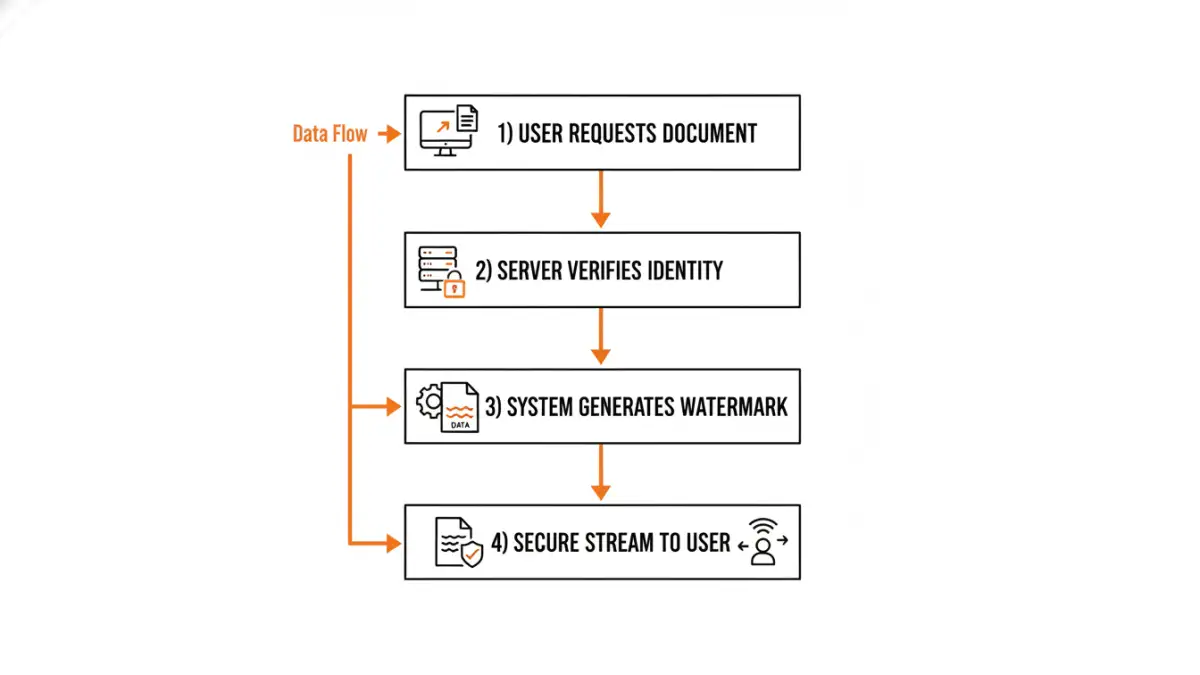
From a technical standpoint, this is typically handled by a secure document viewer or a server-side rendering engine. When a user requests access to a document, the system intercepts the request. Before delivering the file, it generates a watermark layer containing user-specific data and merges it with the document. The final, watermarked version is then streamed to the user's browser without ever saving a permanently watermarked copy on the server.
Common data points embedded as user specific watermarks include:
- The user's full name or username
- Their email address
- The company they work for
- Their IP address
- The exact date and time of access
Key Benefits for Businesses
The primary benefit is accountability. When employees know that any document they view is personally watermarked, the psychological barrier to leaking it increases dramatically. It transforms security from a passive measure into an active deterrent. Furthermore, it enables intelligent document tracking. If a watermarked document appears outside the organization, you know exactly who accessed it and when, drastically reducing investigation time and helping to plug security gaps.
Practical Applications Across Industries
The use cases for this technology are extensive, particularly in sectors dealing with high-value information. I've seen it implemented effectively in several fields to solve specific, critical security challenges.
Protecting Intellectual Property in R&D
In research and development, pre-patent filings, and proprietary formulas are the crown jewels. By watermarking these documents with the viewing researcher's credentials and a timestamp, companies can confidently share information within teams while mitigating the risk of industrial espionage. If a design schematic leaks, the watermark immediately identifies the point of failure.
Securing Legal and Financial Documents
During due diligence for a merger or acquisition, vast amounts of sensitive financial data are shared in virtual data rooms (VDRs). Dynamic watermarks ensure that every document reviewed by external legal teams, accountants, or potential buyers is tagged. This prevents unauthorized sharing and provides a clear audit trail of who has seen what, which is critical for compliance and legal security.
Implementing a Dynamic Watermarking System
When considering implementation, the classic 'build vs. buy' decision comes up. Building a custom solution requires significant engineering effort, including a robust rendering engine and secure identity management. For most organizations, leveraging a third-party solution is more practical.
Look for platforms that offer strong APIs for seamless integration into existing document management systems or intranets. Key features should include customization of watermark text and appearance (opacity, position, font), comprehensive audit logs, and support for a wide range of file types, from PDFs and Office documents to images and CAD files. A robust system makes preventing document leaks an automated, background process rather than a manual chore.
Feature Comparison: Static vs. Dynamic Watermarking
| Feature | Static Watermarking | Dynamic Watermarking |
|---|---|---|
| Traceability | None. All copies are identical. | High. Each copy is unique to the user and session. |
| Deterrent Effect | Low. Easy to claim a leak wasn't from you. | High. Users are aware their access is tracked. |
| Generation | Applied once before distribution. | Generated in real-time for each viewing session. |
| Information Embedded | Generic text (e.g., 'CONFIDENTIAL', 'DRAFT'). | User-specific data (name, IP, email, timestamp). |
| Forensic Value | Very low. Cannot identify the source of a leak. | Very high. Pinpoints the exact source of a leak. |
| Best For | General classification of non-critical documents. | Securing sensitive, high-value intellectual property. |