I was recently working on a project that required sending a batch of sensitive financial documents to an external auditor. The immediate question wasn't just how to compress them, but how to do so securely. It's a common scenario: you need to bundle files, but you also need to ensure only the intended recipient can open them. This brings up the classic debate between the most common archive formats: ZIP, 7z, and RAR.
While all three can compress and password-protect files, their approaches to security and encryption are vastly different. Choosing the wrong one can leave your data surprisingly vulnerable. Let's break down the specifics of file compression and encryption for each format to see which one truly stands up to modern security standards.
Table of Contents
The Basics of Secure Archiving
Before comparing formats, it's essential to understand that compression and encryption are two separate processes, even though they happen in one step in an archiving tool. Compression reduces file size by removing redundant data, making files easier to store and transfer. Encryption scrambles the data using an algorithm and a key (your password), making it unreadable without that key.
The strength of your archive's security depends almost entirely on the encryption algorithm used. An archive with a weak, outdated encryption standard is like locking a bank vault with a cheap suitcase lock. It might deter a casual attempt, but it won't stop a determined attacker.
Key Encryption Standards
The gold standard for encryption today is the Advanced Encryption Standard (AES). It's a symmetric-key algorithm used by governments and security-conscious organizations worldwide. AES typically comes in key sizes of 128, 192, or 256 bits. The larger the key size, the more computationally intensive it is to crack, with AES-256 being the strongest and most common choice for high security.
A Closer Look at ZIP Encryption

The .zip format is the most universally recognized and supported archive format. It's built into Windows and macOS, meaning anyone can create or extract a ZIP file without installing third-party software. This convenience, however, comes with a major security caveat.
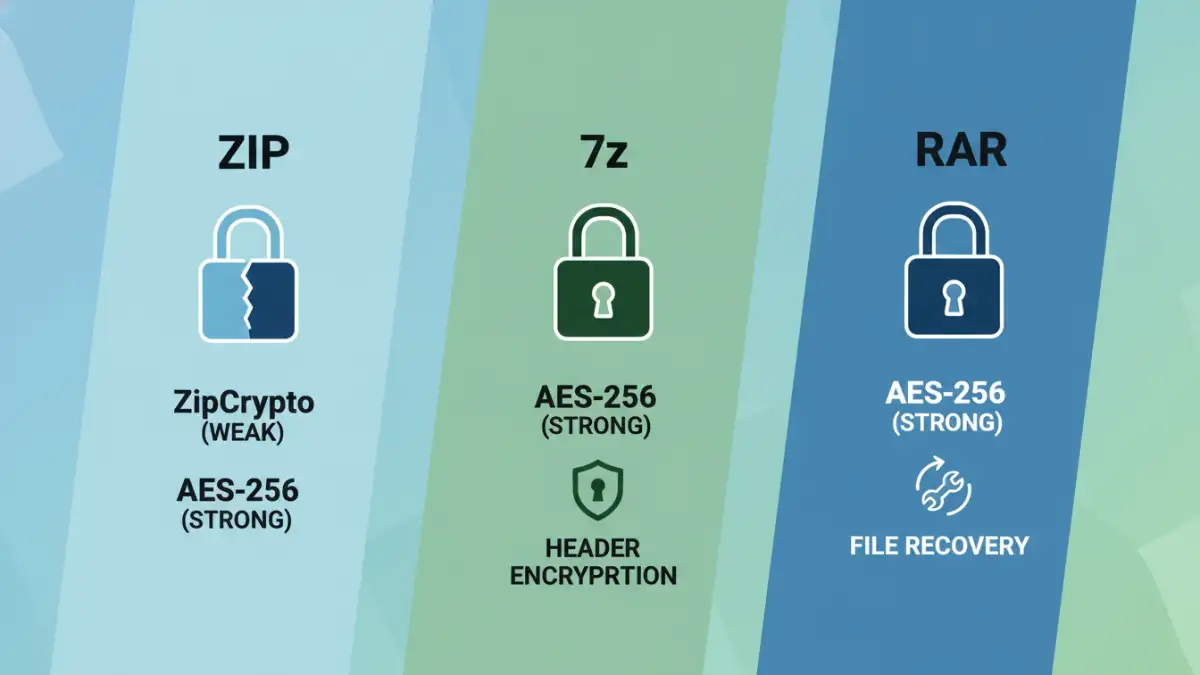
The original ZIP specification uses a proprietary encryption method called ZipCrypto. Unfortunately, ZipCrypto is fundamentally broken by modern standards. It has known vulnerabilities that allow attackers with the right tools to recover the password or data relatively easily, a process sometimes called a known-plaintext attack. It provides a false sense of security and should never be used for sensitive information.
The Saving Grace: AES-256 in ZIP
Recognizing the weakness of ZipCrypto, newer implementations of the ZIP format (supported by tools like 7-Zip, WinRAR, and the built-in Windows utility) now support AES-256 encryption. When you create a password-protected ZIP file, you must ensure you are selecting the AES-256 option. If the tool doesn't specify the encryption type, it may default to the insecure ZipCrypto. The main weakness of ZIP remains that it does not encrypt file metadata, meaning anyone can see the names, sizes, and timestamps of the files inside the archive even without the password.
Analyzing 7-Zip (.7z) for Security
The .7z format, developed for the open-source 7-Zip archiver, was designed with modern capabilities in mind. From a security perspective, its biggest advantage is that it uses AES-256 encryption by default. There is no legacy, insecure option to accidentally choose. When you password-protect a .7z file, you are getting strong, reliable encryption every time.
I often recommend 7z to colleagues for internal projects precisely for this reason. It removes the guesswork and potential for human error. The open-source nature of the 7-Zip program also means its code is available for public scrutiny, which generally leads to more robust and trustworthy software.
The Advantage of Header Encryption
A standout feature of 7z is its ability to encrypt the archive's headers. This is a crucial privacy feature that ZIP lacks. When you enable header encryption, the entire file structure—including filenames, sizes, and modification dates—is scrambled. An unauthorized person cannot even see what files are inside the archive without the password. This prevents information leakage and provides a much higher level of confidentiality, making it one of the better secure document archiving formats available.
Evaluating RAR's Security Features
RAR, a proprietary format from the creators of WinRAR, has long been a popular choice known for its strong compression ratios. In terms of security, it has a solid track record. Modern versions of RAR (RAR 5.0 and later) use AES-256 encryption, which is a significant upgrade from the older AES-128 used in previous versions.
Like 7z, RAR offers the option to encrypt file names, preventing outsiders from viewing the archive's contents. One unique feature of RAR is its 'recovery record.' This allows the archive to sustain a certain amount of physical damage or data corruption and still be repairable, which can be a valuable feature for long-term archiving, though it doesn't directly relate to cryptographic security.
The Verdict: Choosing Your Secure Format
When it comes to pure security, the choice is clear. For situations demanding the highest level of confidentiality and integrity, **7z is the superior choice**. Its mandatory AES-256 encryption and header encryption feature provide a robust defense against unauthorized access. You eliminate the risk of accidentally using a weak cipher.
However, **ZIP (with AES-256)** remains the king of compatibility. If you need to send a secure file to someone and you're not sure what software they have, a ZIP file encrypted with AES-256 is your safest bet. Just be sure your archiving tool is explicitly using AES and not the legacy ZipCrypto. **RAR** is a competent and secure alternative, sitting somewhere between the two, offering strong encryption and unique recovery features, but it requires specific software (like WinRAR) to create and sometimes to extract.
Archive Format Security Comparison
| Feature | ZIP | 7z (.7z) | RAR |
|---|---|---|---|
| Default Encryption | ZipCrypto (Insecure) or AES-256 | AES-256 (Always) | AES-256 (RAR5) |
| Header/Filename Encryption | No | Yes (Optional) | Yes (Optional) |
| Compatibility | Excellent (Native OS support) | Good (Requires 7-Zip or compatible tool) | Good (Requires WinRAR or compatible tool) |
| Software License | Open Standard | Open Source (LGPL) | Proprietary |
| Best For | Maximum compatibility when AES-256 is used | Highest security and confidentiality | Good security with file recovery options |