
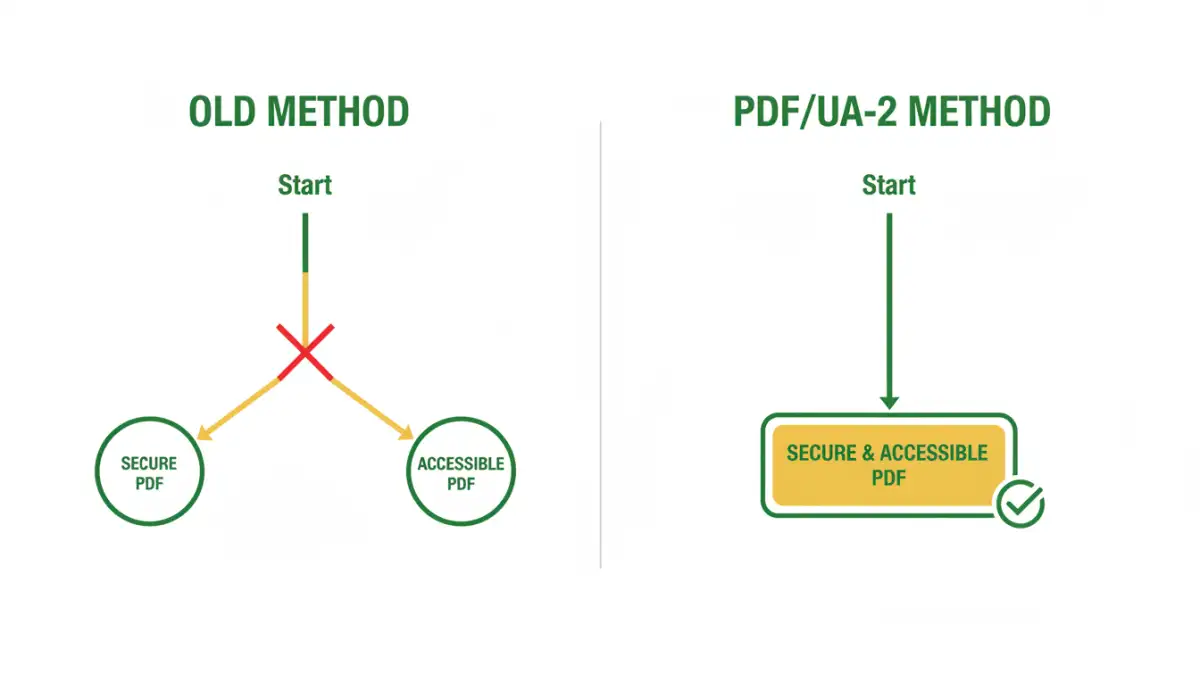
Have you ever faced the dilemma of needing to secure a sensitive PDF while also ensuring it's fully accessible to users with disabilities? For years, this has been a significant challenge in digital document management. Applying strong password protection often inadvertently breaks compatibility with screen readers and other assistive technologies, forcing organizations to choose between security and inclusivity.
This long-standing conflict is finally being addressed with the introduction of PDF/UA-2 (ISO 14289-2). This updated standard represents a major step forward, harmonizing the requirements for both security and accessibility. It's not just a minor update; it fundamentally changes how we can create and distribute universal access documents without compromising on protection.
Table of Contents
What is PDF/UA-2? A Quick Overview
PDF/UA, which stands for PDF/Universal Accessibility, is an ISO standard (ISO 14289) that defines the requirements for creating accessible PDF files. The goal is to ensure that people with disabilities, such as blindness, low vision, or mobility impairments, can access content using assistive technology (AT) like screen readers, screen magnifiers, or voice command software.
The newly published PDF/UA-2 (ISO 14289-2:2024) is the next evolution of this standard. It's built upon the foundation of PDF 2.0 (ISO 32000-2) and aligns more closely with modern web accessibility guidelines, specifically the Web Content Accessibility Guidelines (WCAG) 2.1. This update brings more clarity, stricter requirements, and, most importantly, new capabilities for handling document security.
Key Changes from PDF/UA-1
One of the most significant changes in PDF/UA-2 is its direct alignment with the PDF 2.0 specification. This allows it to leverage newer features natively, including improved logical structure tags, better handling of mathematical notations (MathML), and more sophisticated metadata. For developers like me, this means we have a more robust and logical framework to build tools upon, leading to more reliable accessible document creation.
The Core Challenge: Security vs. Accessibility
Historically, securing a PDF meant applying password protection that encrypted the entire document. You could set a password to open the file or a permissions password to restrict actions like printing, copying, or editing. While effective for security, this was a disaster for accessibility. Encryption often prevented assistive technologies from accessing the document's content stream and structural tags.
A screen reader needs to parse the text, understand the heading structure, identify tables, and read out alternative text for images. When a permissions password restricts content copying or extraction, it effectively blocks the AT from doing its job. This has left many organizations in a bind, particularly in sectors like government, finance, and healthcare, where both data security and WCAG compliance are legally mandated.
Why Standard Encryption Fails Accessibility
The core issue lies in how older PDF encryption models work. They use an all-or-nothing approach. If you restrict content extraction to prevent unauthorized copying, you also block the legitimate extraction required by a screen reader. There was no middle ground. I've seen projects where teams had to maintain two separate versions of a document: one secure version for general distribution and one unsecured, accessible version for specific user requests—a workflow that is inefficient and prone to error.
How PDF/UA-2 Solves the Security-Accessibility Puzzle
This is where PDF/UA-2, by leveraging PDF 2.0's capabilities, truly shines. The PDF 2.0 specification introduced a more granular and intelligent security handler. Instead of a blunt instrument, it provides surgical precision, allowing creators to set specific permissions that protect the document while enabling accessibility.
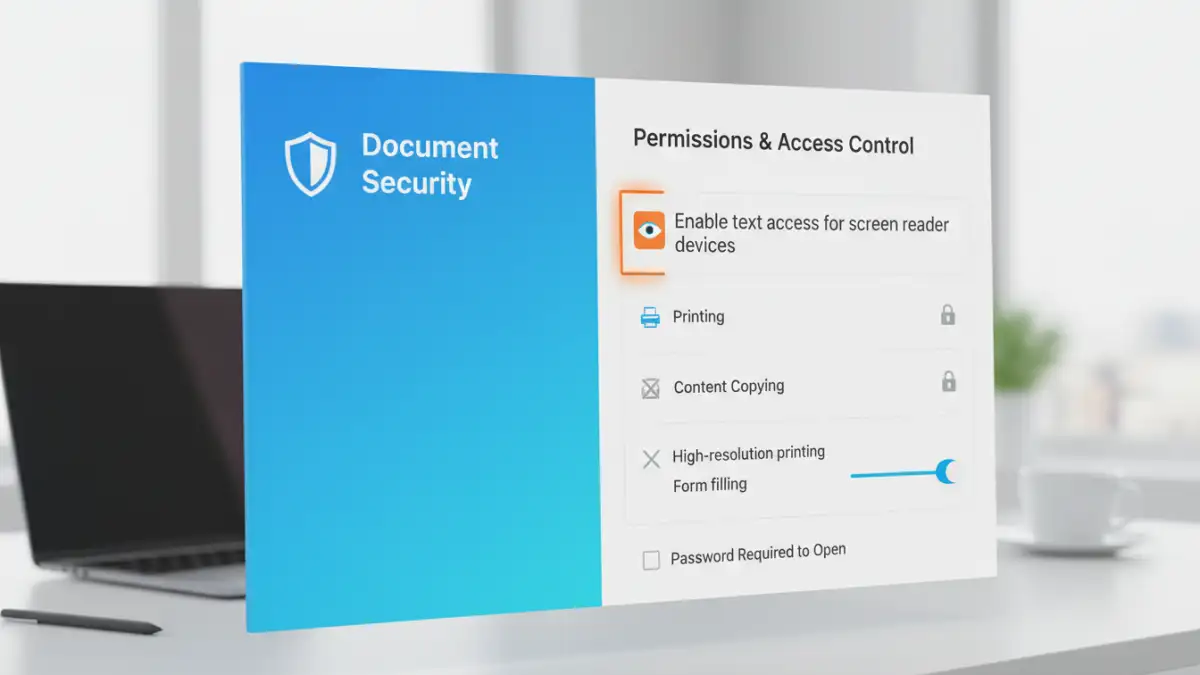
With the new security handler, you can now disallow printing, copying, and editing while explicitly *allowing* content extraction for accessibility purposes. This single feature is a game-changer. It means a document can be locked down to prevent intellectual property theft or unauthorized modifications, but a user relying on a screen reader can still access and navigate the content seamlessly. This finally makes it possible to implement truly secure accessible pdf standards.
This resolves the central conflict. Organizations no longer have to compromise. They can produce a single, universally accessible document that meets stringent security requirements and complies with accessibility mandates like Section 508 and the ADA.
Practical Steps for Implementing PDF/UA-2
Adopting PDF/UA-2 requires a combination of modern tools and updated workflows. While the standard is new, the ecosystem is quickly catching up. Here’s a high-level look at what implementation involves.
First, you need an authoring tool that supports PDF 2.0 and PDF/UA-2. Major vendors like Adobe and Foxit are integrating these standards into their flagship products, such as Adobe Acrobat Pro. When creating a document, you must ensure it has a proper tag structure, which provides the semantic roadmap for assistive technologies.
Next, when applying security, you must use the PDF 2.0 security handler and configure the permissions correctly. This means unchecking boxes for printing and copying but ensuring the "Enable text access for screen reader devices for the visually impaired" option is checked. Finally, use a validation tool that is updated to check for PDF/UA-2 conformance, such as the upcoming versions of the PAC (PDF Accessibility Checker).
PDF/UA-1 vs. PDF/UA-2 Feature Comparison
| Feature | PDF/UA-1 (ISO 14289-1) | PDF/UA-2 (ISO 14289-2) |
|---|---|---|
| Underlying PDF Standard | Based on PDF 1.7 | Based on PDF 2.0 |
| WCAG Alignment | Aligned with WCAG 2.0 | Aligned with WCAG 2.1 |
| Security Handling | Limited; often conflicts with accessibility | Granular permissions allow security and accessibility to coexist |
| Structure Tags | Standard set of structure tags | Adds new structure tags for improved semantics (e.g., <H7>, <H8>) |
| Math/Formulas | No standardized support (often uses images) | Official support for MathML |
| Clarity | Some ambiguities in requirements | Provides clearer, more precise technical requirements |