
Working with password-protected documents can be a double-edged sword. While encryption is crucial for sensitive data, it can become a real bottleneck in a collaborative workflow. I've seen teams struggle with compiling reports from multiple secured vendor files, where entering a password for each document adds unnecessary friction to their day.
The key is knowing when it's appropriate to remove that protection and how to do it without compromising the document's integrity or violating access rights. It's not just about finding a tool that works; it's about understanding the 'why' and 'when' behind the process.
Table of Contents
Understanding PDF Passwords: Owner vs. User
Before you try to decrypt a PDF file, it’s essential to understand that PDFs can have two types of passwords. This distinction dictates what you can do with the file and how you can remove its protections.
The User (or Document Open) Password
This is the most common type of password. It's what you're prompted for the moment you try to open the file. Without this password, you cannot view the document's content at all. It effectively locks the entire file from unauthorized access.
The Owner (or Permissions) Password
This password is more nuanced. You might be able to open and view a PDF without it, but the owner password restricts certain actions like printing, copying text, editing the document, or adding comments. If you have a file that you can read but can't print, it's protected by an owner password.
When Is It Safe and Legal to Remove a Password?
This is the most critical question to ask. Simply having the technical ability to unsecure a PDF doesn't mean you should. From both an ethical and a legal standpoint, you should only remove document encryption under specific circumstances.
The golden rule is authorization. If you are the creator of the document, or if you have been explicitly given the password and permission by the owner to use the file without restrictions, you are in the clear. For instance, if a client sends you a protected financial report for analysis, they have implicitly given you the right to access it. Removing the password on your local copy to streamline your work is generally acceptable. However, attempting to bypass a password on a document you don't have rights to is a serious breach of privacy and can have legal consequences.
Methods to Remove a PDF Password (If You Know It)
If you have the password and the right to remove the protection, several straightforward methods are at your disposal. These techniques are designed for legitimate users who want to make a document more accessible for their own use.
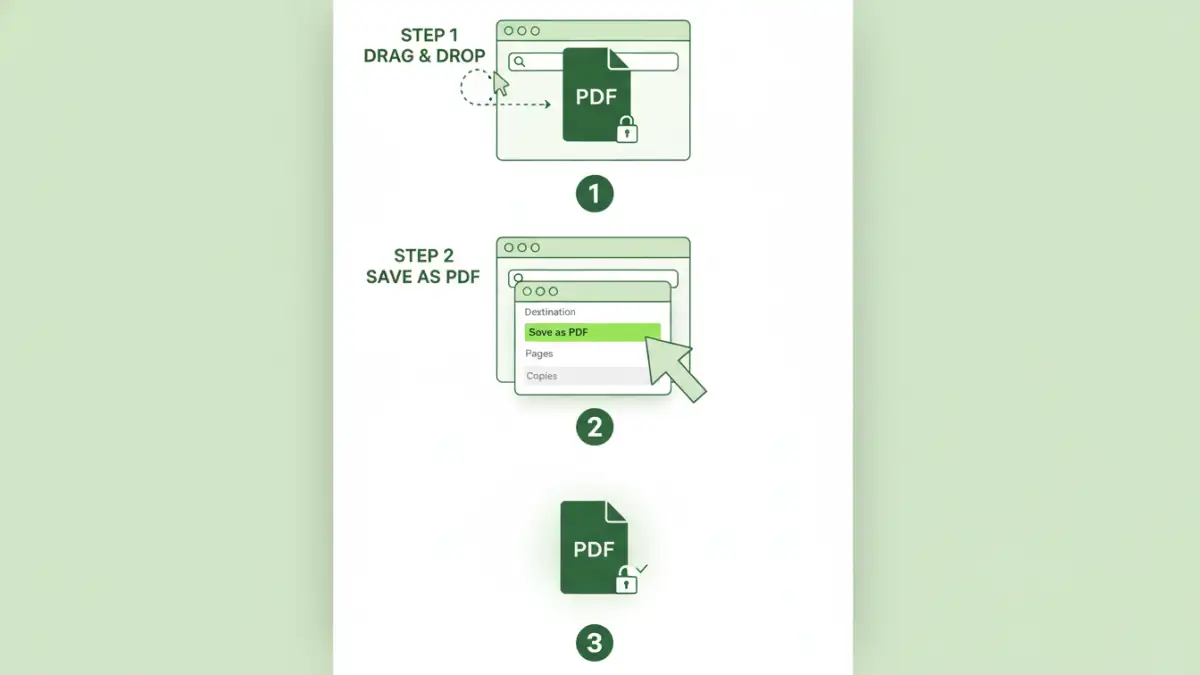
Using a Web Browser (The 'Print to PDF' Trick)
This is my go-to method for its simplicity and the fact that it requires no special software. It works perfectly for PDFs with an owner password that restricts printing or editing, as long as you can open the file.
- Open the password-protected PDF in a modern web browser like Google Chrome or Microsoft Edge. You will need to enter the user password if one is set.
- Once the document is open, go to the 'Print' menu (usually Ctrl+P or Cmd+P).
- In the print destination dialog, instead of selecting a physical printer, choose 'Save as PDF'.
- Click 'Save' and choose a new name for the file. This new version will be an identical copy of the original but completely free of any password restrictions.
This process essentially creates a brand new, clean PDF from the viewable content, leaving the old encryption behind. It's a clever and effective way to unlock a PDF permanently.
Using Adobe Acrobat Pro
If you have a subscription to Adobe Acrobat Pro, you have a direct and official way to manage security settings. This is the most robust method, as it deals with the file's metadata directly.
- Open the protected PDF in Adobe Acrobat Pro and provide the password when prompted.
- Go to 'File' > 'Properties', and then select the 'Security' tab.
- In the 'Security Method' dropdown, select 'No Security'.
- A dialog box will ask you to confirm that you want to remove security. Click 'OK'.
- Save the file. The document will now be saved without any password protection.
Using Online PDF Unlocker Tools
Numerous websites offer to remove password from pdf files. You simply upload your document, enter the password, and the tool processes it and provides a decrypted version for download. While convenient, I advise caution here. Uploading a sensitive document to a third-party server carries inherent privacy risks. Only use these tools for non-confidential files.
What About PDFs When You've Forgotten the Password?
Losing a password to your own document is frustrating. In this case, recovery becomes more complex. For user passwords that lock the file completely, recovery often involves brute-force or dictionary attacks, which can take an immense amount of time and computational power, with no guarantee of success. For owner passwords, some specialized desktop software can often remove the restrictions without needing the password itself, as this type of protection is generally weaker.
Best Practices for Managing Secured PDFs
Instead of constantly removing passwords, a better long-term strategy is effective management. If you handle many secured documents, consider using a password manager to store the credentials securely. This prevents you from forgetting them and eliminates the need to remove document encryption just for convenience. Always communicate with the document owner about permissions and ensure you're handling their data responsibly.
PDF Password Removal Method Comparison
| Method | Requirement | Pros | Cons |
|---|---|---|---|
| Web Browser 'Print to PDF' | Known password to open the file | Free, no extra software needed, fast | Only works if printing is allowed by owner password |
| Adobe Acrobat Pro | Subscription to Adobe Acrobat Pro | Official method, highly reliable, secure | Requires paid software |
| Online Unlocking Tools | Internet connection | Convenient, quick for simple files | Major privacy and security risks for sensitive data |
| Specialized Desktop Software | Software purchase | Can handle forgotten owner passwords | Can be expensive, potential for malware if from untrusted sources |