In today's digital landscape, safeguarding our important files is paramount. Whether it's sensitive business data, personal financial records, or cherished family photos, ensuring their safety involves more than just saving them to a hard drive. A proactive approach, guided by a reliable document safety checklist, can prevent data loss, unauthorized access, and costly recovery efforts.
I've seen firsthand how a lack of preparedness can lead to significant problems. Colleagues have faced frustrating situations where crucial files became inaccessible due to hardware failures, accidental deletions, or even cyberattacks. Establishing a clear set of steps for digital file protection isn't just good practice; it's essential for peace of mind and business continuity.
Table of Contents
Understanding the Basics of Digital File Protection
At its heart, digital file protection is about creating multiple layers of defense for your data. This means considering threats from various angles, including accidental damage, hardware failure, malware, and human error. The goal is to make your files resilient and recoverable under almost any circumstance.
Effective digital file protection involves a combination of prevention, detection, and recovery strategies. Think of it like securing your home: you lock doors and windows (prevention), install an alarm system (detection), and have insurance or a backup plan (recovery). Applying this mindset to your digital assets is crucial.
Key Concepts
Several fundamental concepts underpin robust file safety. These include data redundancy (having multiple copies), access control (limiting who can see or modify files), encryption (scrambling data so it's unreadable without a key), and regular backups. Understanding these building blocks is the first step toward creating a comprehensive document safety checklist.
Core Elements of Your Document Safety Checklist

A well-structured document safety checklist should cover several critical areas. Each point addresses a different facet of protecting your valuable information. It's about creating a systematic approach that leaves no stone unturned in your quest to secure your documents.
Backup Strategy
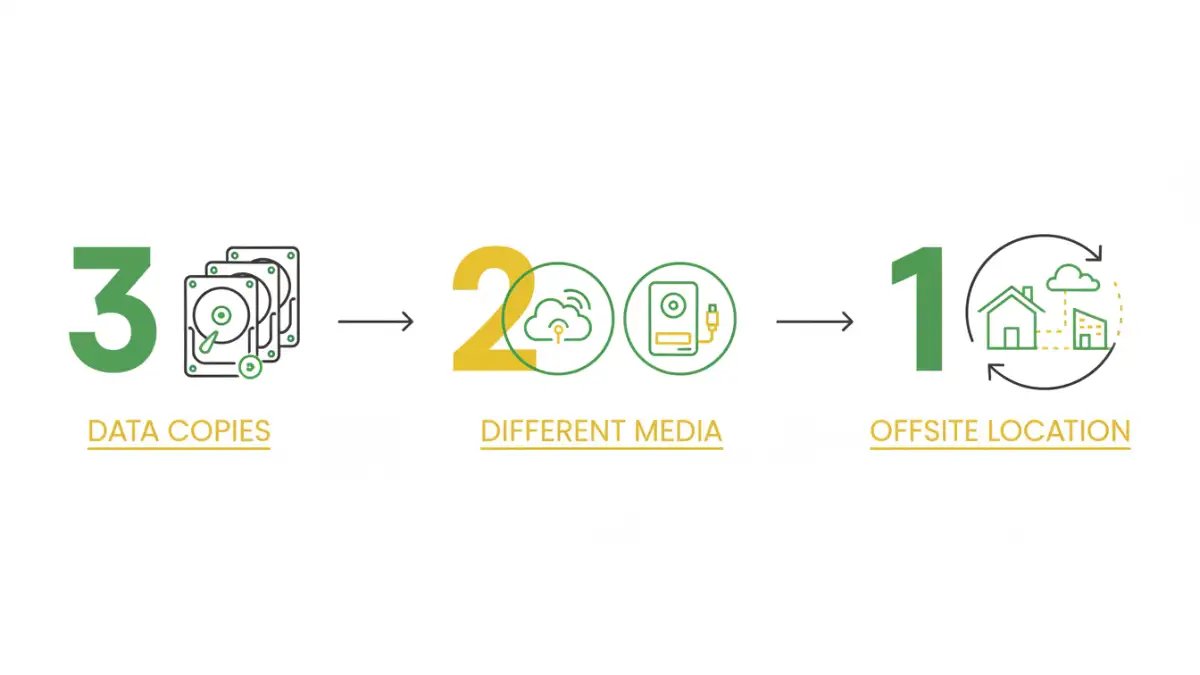
A solid backup strategy is non-negotiable. This involves deciding what data needs backing up, how often, and where the backups will be stored. A common recommendation is the 3-2-1 rule: at least three copies of your data, on two different types of media, with one copy offsite. This ensures that even if one or two locations are compromised, your data remains safe.
Access Control and Permissions
Who has access to your files? Implementing strong access controls is vital, especially in shared environments or when dealing with sensitive information. This means setting appropriate permissions on folders and files, ensuring only authorized individuals can view, edit, or delete them. Regularly reviewing these permissions is also a key step.
Encryption
Encryption transforms your data into an unreadable format that can only be deciphered with a specific key or password. This is essential for protecting sensitive data both at rest (when stored on a device) and in transit (when being sent over a network). Many operating systems and applications offer built-in encryption features.
Physical Security
Don't forget the physical aspect. If your digital files are stored on devices like laptops, external hard drives, or USB drives, their physical security is also important. Protecting these devices from theft, damage, or loss is an integral part of your overall digital file protection plan.
Implementing Your Checklist: Step-by-Step
Creating a checklist is one thing; putting it into practice is another. A phased approach can make the process manageable and effective. Start with the most critical aspects and gradually incorporate more advanced measures.
Begin by identifying your most sensitive and critical files. Then, evaluate your current storage and backup methods. Are they sufficient? Do they align with best practices for digital file protection? This initial assessment will highlight areas needing immediate attention.
Setting Up Backups
Automate your backups wherever possible. Use cloud backup services or network-attached storage (NAS) devices for convenience and reliability. Ensure you test your backups periodically to confirm they are restorable. A backup that can't be restored is effectively useless.
Configuring Encryption
For sensitive files, enable full-disk encryption on your laptops and mobile devices. For individual files or folders, use built-in tools like BitLocker (Windows) or FileVault (macOS), or third-party encryption software. Store your encryption keys or passwords securely, perhaps in a password manager.
Advanced Strategies for Enhanced Security
Beyond the basics, several advanced techniques can further bolster your document safety. These methods offer deeper protection and are particularly useful for businesses or individuals handling highly sensitive information.
Consider implementing version control systems for documents that undergo frequent changes. This allows you to revert to previous versions if errors are introduced or if data becomes corrupted. For businesses, implementing robust access control policies and regular security audits can significantly reduce risk.
Secure Sharing Practices
When sharing files, especially externally, use secure methods. Encrypted email attachments, secure file-sharing platforms, or password-protected links are preferable to standard email. Always verify the recipient's identity before sending sensitive information.
Regular Review and Maintenance
A document safety checklist is not a set-it-and-forget-it tool. Technology evolves, threats change, and your own data needs may shift. Regularly reviewing and updating your checklist ensures it remains effective and relevant.
Schedule periodic reviews, perhaps quarterly or annually, to assess your current security measures. Test your backup restoration process, update passwords, and stay informed about new security threats and best practices. This ongoing vigilance is key to maintaining strong digital file protection.
Comparison Table: Document Security Measures
| Security Measure | Description | Pros | Cons | Best For |
|---|---|---|---|---|
| Regular Backups | Creating copies of data on separate media or locations. | Prevents data loss from hardware failure, deletion, or corruption. | Requires storage space, potential for data to be outdated if not frequent. | All users, essential for disaster recovery. |
| File Encryption | Scrambling data to make it unreadable without a key/password. | Protects data confidentiality even if storage is compromised. | Can be complex to manage keys; performance overhead. | Sensitive personal and business data. |
| Access Control | Restricting who can view, edit, or delete files/folders. | Prevents unauthorized modification or access. | Requires careful configuration; can be cumbersome if too strict. | Shared systems, collaborative environments. |
| Secure Sharing Platforms | Using dedicated services for sending files securely. | Ensures data privacy during transit; often includes tracking. | May involve subscription costs; requires recipient to use the platform. | Sharing sensitive documents externally. |