It's a scenario I've seen play out countless times: a colleague unearths a critical project archive from years ago, only to be met with a password prompt they can't bypass. The original creator is long gone, and the data inside is invaluable. That feeling of being locked out of your own data is incredibly frustrating, but thankfully, not always a dead end.
Specialized software can often come to the rescue. These tools don't magically reveal the password; instead, they use computational power to systematically guess it. Depending on the password's complexity and the encryption used, this can take anywhere from minutes to months. Let's look at some of the most effective options available.
Table of Contents
Understanding Password Recovery Methods
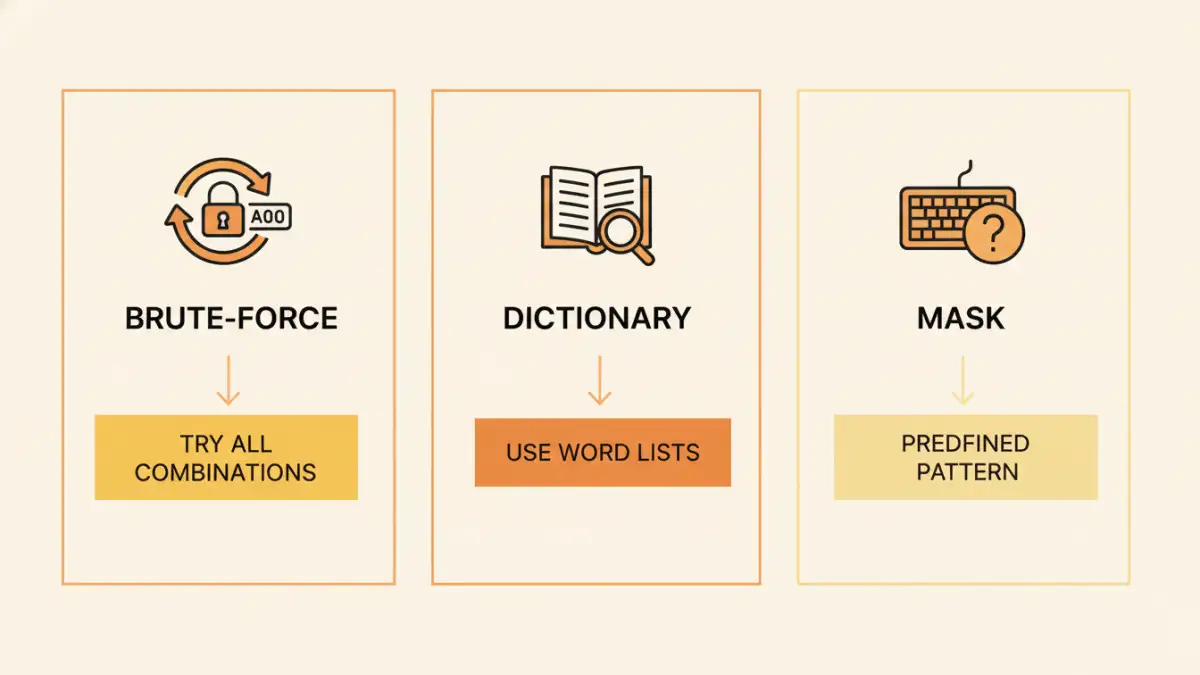
Before diving into the tools, it's helpful to understand the core techniques they employ. The success of any attempt to recover a lost archive password hinges on these methods. Most modern password recovery software uses a combination of three primary attack types to maximize efficiency.
Brute-Force and Mask Attacks
The brute-force attack is the most straightforward method: the software tries every possible combination of characters until it finds the correct one. This is exhaustive but can be incredibly time-consuming for long, complex passwords. A Mask attack refines this process. If you remember parts of the password—for example, that it started with 'Project' and ended with a '2'—you can provide a 'mask' (e.g., 'Project????2'), significantly reducing the number of combinations the tool needs to test.
Dictionary Attacks
A dictionary attack works by trying words from a list, or 'dictionary.' These lists can contain common words, famous phrases, leaked passwords from data breaches, and common variations (like 'password123'). This method is much faster than a brute-force attack if the password is a common word or a simple modification of one. Many tools allow you to use custom dictionaries, which is useful if you suspect the password is related to a specific topic or company name.
Top 5 Archive Password Recovery Tools
Here are some of the most reputable and effective tools on the market, ranging from professional-grade forensic software to more accessible consumer applications. Each has its strengths and is suited for different scenarios.
1. Passware Kit Forensic
This is the Swiss Army knife of password recovery. Passware Kit Forensic is a professional-grade tool used by law enforcement and corporations. It supports over 300 file types, including all major archive formats like ZIP, RAR, and 7z. Its key feature is distributed computing and hardware acceleration, using multiple computers and GPUs to dramatically speed up the recovery process. It's overkill for a single lost file but invaluable for enterprise environments.
2. Elcomsoft Advanced Archive Password Recovery
Elcomsoft is another major player in the digital forensics space. Their Advanced Archive Password Recovery tool is highly optimized for performance, offering robust support for ZIP and RAR archives. It provides all the standard attack types and excels at leveraging NVIDIA and AMD GPUs for hardware acceleration. I've seen this tool make short work of moderately complex passwords that would take days on a CPU alone.
3. John the Ripper
For those comfortable with a command-line interface, John the Ripper (JTR) is a legendary open-source tool. It's incredibly flexible and powerful, but it's not user-friendly for beginners. It requires some technical know-how to configure properly, but its community support and extensive customization options make it a favorite among security professionals and developers. It's one of the best rar password cracker options for those who prefer a hands-on, scriptable approach.
4. KRyLack Archive Password Recovery
This tool strikes a good balance between functionality and ease of use. It focuses specifically on ZIP and RAR archives, offering a clean graphical interface that guides you through setting up a brute-force, mask, or dictionary attack. It's a solid choice for individuals or small businesses who need a reliable solution without the steep learning curve or high cost of forensic-grade software.
5. Accent RAR Password Recovery
As the name suggests, this tool specializes in RAR archives, which often use stronger AES-256 encryption. It's known for its highly optimized code that maximizes recovery speed on both CPUs and GPUs. It offers a straightforward interface and is particularly effective for newer versions of the RAR format. If you primarily work with RAR files, this specialized tool can offer a performance edge over more general-purpose utilities.
How to Choose the Right Software
Selecting the right tool depends on your specific needs. A large corporation dealing with legacy data has different requirements than an individual who forgot the password to a personal ZIP file. Consider these factors before making a choice.
Key Selection Criteria
First, check the supported archive formats (ZIP, RAR, 7z, etc.). Second, evaluate the available recovery methods and your ability to use them—if you remember part of the password, a tool with a good mask attack is essential. Finally, consider performance. If you have a powerful gaming PC with a high-end GPU, a tool that supports hardware acceleration will be exponentially faster. For most users, a tool like KRyLack or Accent offers the best blend of features, usability, and price.
Preventative Measures for the Future
While recovery tools are useful, the best strategy is to avoid needing them in the first place. For any new archives you create, I strongly recommend using a password manager. These applications can generate long, random, and secure passwords and store them safely for you. You only need to remember one master password to access all your others. This practice virtually eliminates the risk of forgetting a password for an important file. Also, consider storing a secure note with a password hint in a separate, safe location.
Tool Feature Comparison
| Tool | Primary Use Case | Supported Formats | GPU Acceleration | Ease of Use |
|---|---|---|---|---|
| Passware Kit Forensic | Corporate & Law Enforcement | 300+ (ZIP, RAR, 7z) | Yes (Distributed) | Moderate |
| Elcomsoft AAPR | Professional & Power Users | ZIP, RAR, 7z | Yes (NVIDIA/AMD) | Moderate |
| John the Ripper | Technical Experts & Developers | Many (via modules) | Yes (Customizable) | Difficult (CLI) |
| KRyLack APR | Home & Small Business | ZIP, RAR | Yes | Easy |
| Accent RAR Recovery | RAR-focused Users | RAR | Yes (Highly Optimized) | Easy |