
That sinking feeling when a password prompt appears for an archive you created months ago is all too familiar. A colleague recently faced this exact issue with a critical project backup stored in a password-protected ZIP file. He had completely forgotten the password, and the data was irreplaceable. It’s a modern-day digital lockbox with a lost key.
Fortunately, all is not necessarily lost. While modern encryption on formats like ZIP and RAR is incredibly strong, there are systematic approaches you can take to regain access. This isn't about magic; it's about logic, patience, and using the right tools for the job.
Table of Contents
The Reality of Archive Encryption
Before diving into solutions, it's important to understand what you're up against. Modern archives, especially those using AES-256 encryption, are designed to be computationally infeasible to break without the password. There are no known backdoors or simple exploits for this level of encryption. When you forgot archive password credentials, you're not looking for a shortcut; you're looking for a way to systematically rediscover the original password.
The entire process of encrypted file password recovery hinges on trying potential passwords until you find the correct one. The efficiency and success of this process depend entirely on the strategy you employ, the complexity of the original password, and the computational power at your disposal.
Foundational Recovery Steps

Before you download any specialized software, it’s crucial to exhaust the simplest possibilities. I’ve seen these basic checks resolve the issue more often than you'd think, saving hours of computational effort.
Check Your Common Passwords
Start with the obvious. We are creatures of habit. Think about the passwords you commonly use or used around the time the file was created. Consider variations that include capitalization, numbers, or special characters. Did you use a pet's name, a significant date, or a standard formula? Write down every possibility and try them manually.
Consult Your Digital and Physical Notes
Check your password manager if you use one. It's the first place a complex, unique password should be stored. Also, look through any text files, notes apps, or even physical notebooks where you might have jotted it down. If the archive was shared, ask colleagues if they have the password recorded anywhere. A simple email or message can sometimes be the quickest solution.
Leveraging Password Recovery Software
If the simple methods fail, it's time to turn to specialized tools. A dedicated RAR password recovery tool or a general archive cracker automates the process of testing thousands or millions of password combinations per second. These applications provide several methods to narrow down the search and improve your chances of success.
Popular options range from open-source command-line tools like John the Ripper and Hashcat, which are powerful but have a steep learning curve, to commercial GUI-based applications that are more user-friendly. The choice depends on your technical comfort level and the urgency of the recovery. These tools don't 'break' the encryption; they rapidly guess the password using different strategies.
Understanding the Attack Methods
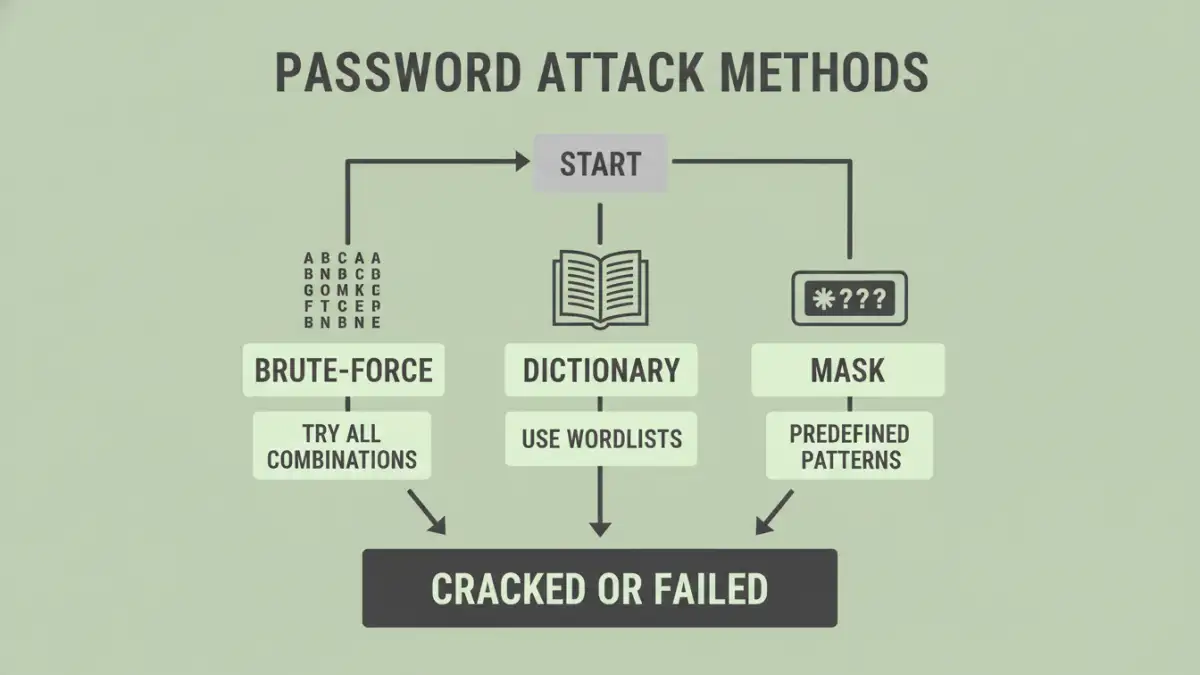
Password recovery software isn't just about raw power; it's about intelligent guessing. These tools use several core techniques, and knowing which one to use can dramatically reduce the recovery time.
Brute-Force and Mask Attacks
A pure brute force attack file recovery method is the most comprehensive but also the slowest. It attempts every possible combination of characters (e.g., 'a', 'b', 'c'... 'aa', 'ab', etc.). For any password longer than a few characters, this could take years. However, you can refine this with a 'Mask Attack'. If you remember parts of the password—for instance, that it started with 'ProjectX' and ended with a four-digit year—you can instruct the tool to only try combinations that fit that pattern (e.g., 'ProjectX????'). This drastically cuts down the search space.
Dictionary Attacks
Many people use common words, phrases, or names as passwords. A dictionary attack uses a wordlist—a text file containing thousands or millions of common words, names, and even leaked passwords from data breaches—and tries each one. You can often find specialized wordlists online or create your own based on what you know about the password's creator. This is far more efficient than a brute-force attack if the password is not a random string of characters.
Best Practices for Password Management
Once you (hopefully) recover your file, the experience should serve as a valuable lesson in password management. To avoid this situation in the future, adopt a more robust strategy for handling critical credentials.
The single most effective tool is a reputable password manager. Applications like Bitwarden, 1Password, or KeePass generate and securely store complex, unique passwords for all your needs. When you create an encrypted archive, you can generate a 20+ character random password, use it to lock the file, and save it directly in your vault. This way, you only need to remember one master password to access all your others.
Archive Password Recovery Method Comparison
| Method | Description | Pros | Cons |
|---|---|---|---|
| Manual Guessing | Trying common or remembered passwords by hand. | Free, no software needed, fast if successful. | Extremely low success rate for complex or forgotten passwords. |
| Dictionary Attack | Uses a predefined list of words and common passwords. | Much faster than brute-force for common word-based passwords. | Ineffective if the password is a random string of characters. |
| Mask Attack | A targeted brute-force where you define parts of the password structure. | Drastically reduces recovery time compared to a full brute-force. | Requires you to remember some details about the password. |
| Brute-Force Attack | Attempts every possible combination of characters. | Guaranteed to find the password eventually. | Impractically slow for passwords over 8-10 characters. |