
A manufacturing client recently approached me with a common but critical problem. They needed to share detailed product blueprints with third-party vendors for quoting and production, but were extremely concerned about their intellectual property. The risk of a sensitive design leaking to a competitor was keeping their engineering lead up at night. This situation perfectly illustrates the need for robust, yet simple, engineering file protection.
Their core challenge was finding a balance between collaborative access and tight security. They needed a method for secure design document sharing that was easy for their vendors to use but difficult for unauthorized parties to breach. This is where we landed on a targeted strategy that went beyond a simple lock-and-key approach.
Table of Contents
The Challenge: High-Stakes Intellectual Property Security
The client, a specialist in high-performance automotive parts, invests millions in research and development. Their blueprints contain proprietary material specifications, precise tolerances, and unique design features that give them a competitive edge. Sending these files unprotected was not an option. Previous methods, like watermarking, were easily bypassed and didn't prevent the file from being opened or copied.
They needed a solution that could prevent unauthorized viewing, copying, and printing. The goal was to ensure that only the intended recipient at the vendor company could access the file for its specific purpose—and nothing more. This is a classic case where effective intellectual property security is paramount to business survival.
Defining the Specific Threats
We worked together to outline the primary risks. The first was accidental sharing; an employee at the vendor might forward the email to the wrong person. The second was malicious intent; a disgruntled employee or a competitor could actively try to steal the design. A third, less obvious risk was scope creep; a vendor might try to print physical copies for unapproved uses or attempt to reverse-engineer the design from the file.
Identifying the Right Tool for the Job

We decided that the PDF format was the ideal container for these blueprints. It's a universal standard, preserves design integrity, and, most importantly, has built-in security features. The native ability to apply passwords was the key. However, not all passwords are created equal, and this is a distinction I find many people miss.
Most users are familiar with a 'user' or 'open' password, which is required to simply view the document. But the real power for this use case came from the 'owner' or 'permissions' password. This second layer of security allows you to control pdf access by restricting specific actions like printing, copying text and images, or editing the document, even after it has been opened.
Implementing a Layered Security Strategy
Our solution was to use both types of passwords to create a two-tiered defense system. This approach to pdf password protection provided granular control over the documents, addressing all the client's primary concerns.
Our Step-by-Step Process
Here is the exact process we implemented for their engineering team:
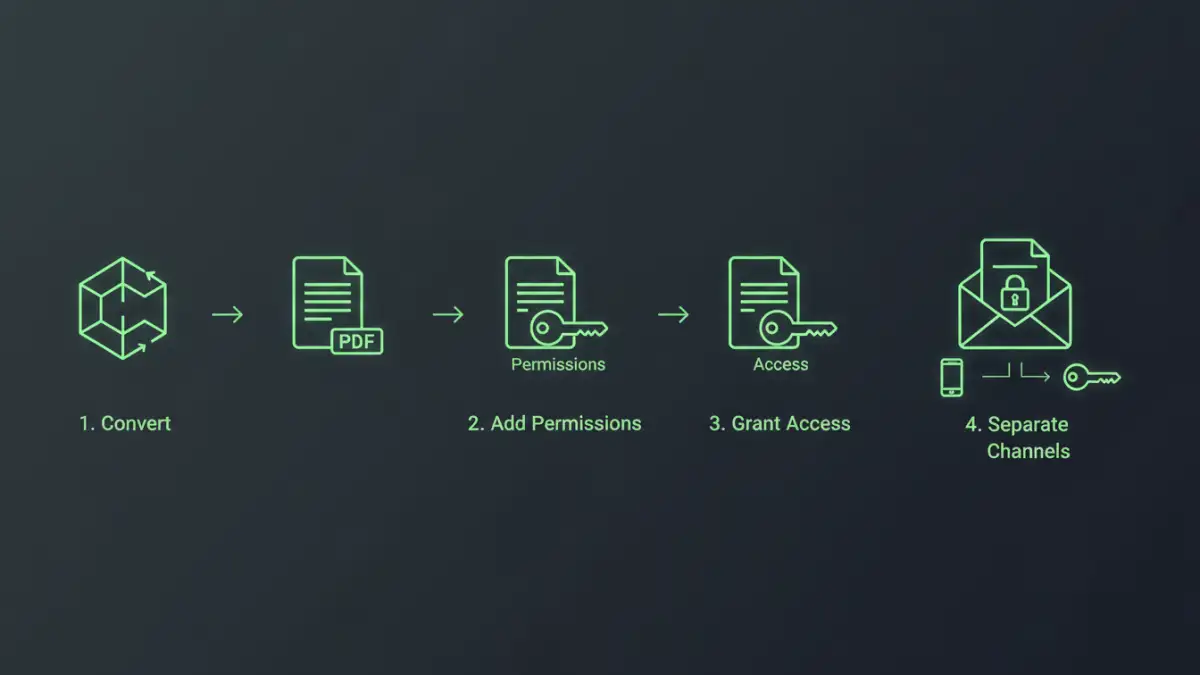
- Document Finalization: The engineers would finalize their design in their native CAD software and export a high-fidelity PDF.
- Applying the Permissions Password: Using Adobe Acrobat Pro, they would first set a strong, randomly generated 'owner' password. With this password set, they disabled permissions for printing, copying, and editing. This immediately prevented unauthorized reproduction.
- Applying the User Password: Next, they applied a unique 'user' password for each specific vendor and project. This password was required just to open the file. This ensured that even if the file was intercepted, it remained unreadable.
- Secure Password Distribution: This was a critical step. The PDF file was sent via one channel (email), while the unique user password was communicated through a separate, secure channel (a phone call or a secure messaging app). This separation prevents a single compromised email account from giving an attacker both the file and the key.
The Rollout, Onboarding, and Positive Results
We created a simple one-page guide for the engineering team on how to apply the security settings and a separate guide for vendors on how to access the files. The initial friction was minimal, as most vendors were familiar with password-protected PDFs. The extra step of receiving the password via a separate channel was quickly accepted once the reason for the enhanced security was explained.
The results were immediate and impactful. The client gained complete confidence in their secure design document sharing process. They could track which vendor had access to which blueprint via their password management system. Most importantly, they eliminated the risk of casual or intentional IP leakage. This simple, low-cost security measure directly protected their most valuable assets, allowing them to collaborate with external partners without compromising their competitive advantage.
PDF Security Feature Comparison
| Security Feature | Primary Function | Pros | Cons |
|---|---|---|---|
| User (Open) Password | Restricts opening and viewing the file. | Simple to apply; strong first line of defense. | Does not prevent actions once the file is open. |
| Owner (Permissions) Password | Restricts printing, copying, and editing. | Granular control over document usage. | Can be complex to manage across many documents. |
| Digital Signatures | Verifies the author's identity and document integrity. | Provides non-repudiation; ensures file hasn't been altered. | Doesn't prevent viewing or copying. |
| Watermarking | Visibly marks the document with text or an image. | Discourages sharing; can identify the source of a leak. | Can be removed with advanced software; doesn't encrypt. |
| Redaction | Permanently removes sensitive content. | Highest level of security for specific data points. | Irreversible; requires careful application. |