
Security software often faces a tough balancing act. On one hand, it needs to be powerful and robust enough to handle serious threats. On the other, if it's too complex, people simply won't use it correctly, defeating its purpose. For years, I've seen teams struggle with clunky interfaces that hide powerful features behind confusing menus. This friction was the primary motivation behind our latest redesign.
We went back to the drawing board with a single goal: to make robust security feel effortless. We wanted to create an experience where protecting your most sensitive files is as simple as dragging and dropping. This product interface update is more than just a new coat of paint; it's a fundamental rethinking of how users interact with security tools.
Table of Contents
The Motivation Behind the Redesign
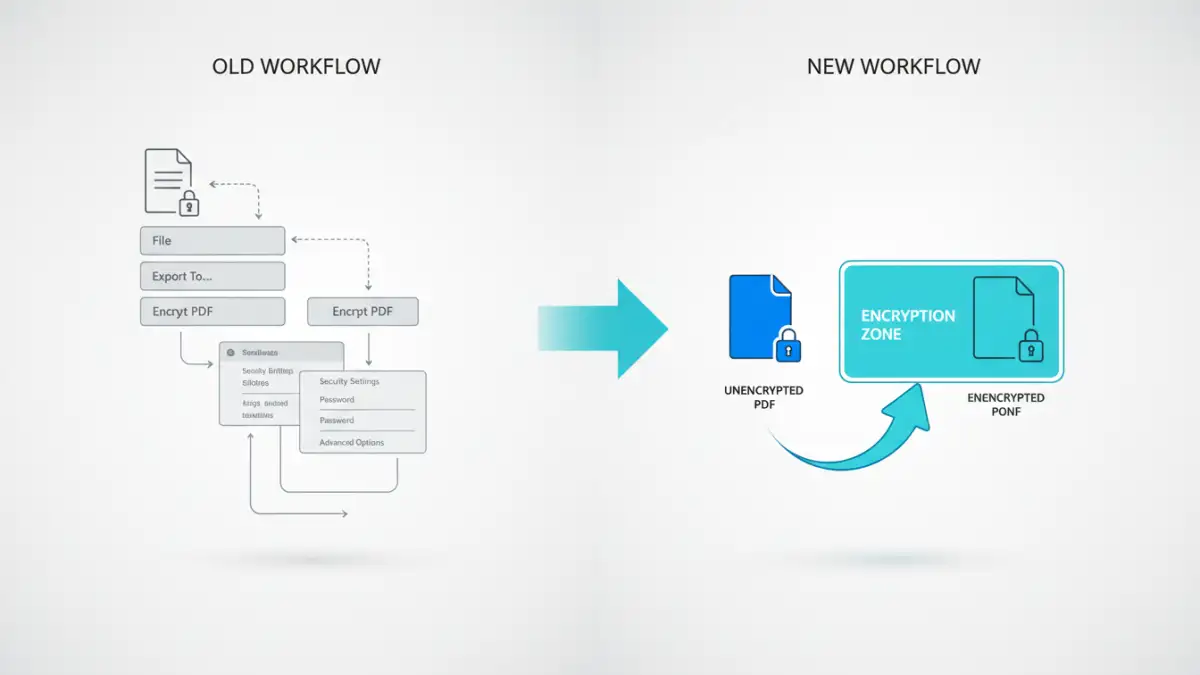
The decision to overhaul our interface wasn't taken lightly. We gathered months of user feedback, and a clear pattern emerged: our core encryption engine was highly praised, but the user journey had pain points. Users wanted faster operations, clearer navigation, and less jargon. They needed a tool that felt like a natural extension of their workflow, not a roadblock.
My engineering team and I saw this as an opportunity. We could build a better document encryption UX without compromising the military-grade security our users depend on. The goal was to eliminate unnecessary clicks, simplify complex processes, and provide clear, actionable feedback at every step. This user-centric approach guided every design choice we made.
Core Principles of the New Design
We established three core principles for the project. First, clarity over clutter. Every element on the screen had to serve a purpose. Second, efficiency in every action. Common tasks like encrypting a batch of documents should take seconds, not minutes. Third, accessibility for all. The new design needed to be intuitive for both power users and those new to document security.
Key UI and UX Improvements

The most visible changes are in the user interface. We've introduced a clean, modern dashboard that provides an at-a-glance view of your protected files and recent activity. The old, text-heavy menus have been replaced with intuitive icons and a streamlined navigation structure. This makes finding the tools you need much faster.
We've also completely reimagined the file handling process. The new drag-and-drop encryption zone on the dashboard is a game-changer. You can now secure a file or an entire folder by simply dragging it onto the application window. The software automatically suggests the best protection level based on the file type, though you always have full control to override it. This focus on easy file security was a top priority.
A Centralized Command Center
The new dashboard acts as your security hub. It features a recent activity feed, quick-access buttons for your most-used functions (Encrypt, Decrypt, Secure Share), and status indicators for your protected files. We removed the need to navigate through multiple windows to perform basic tasks, consolidating everything into one clean view.
Performance Boosts and Faster Workflows
A beautiful interface means little if the application is slow. A significant part of this project involved optimizing the backend code. We refactored our core processing engine to be more efficient, resulting in tangible speed improvements. For example, our benchmarks show that PDF encryption is now up to 40% faster than in the previous version.
This push for faster PDF protection and other file types means less waiting and more doing. Batch processing, in particular, has seen a massive overhaul. Encrypting hundreds of files at once is now a smooth, background process that doesn't lock up the application. You can continue working while the suite handles the heavy lifting, with a clear progress bar keeping you informed.
Under-the-Hood Security Upgrades
While the user experience was the main focus, we also took the opportunity to bolster the core security architecture. Our file security suite now incorporates updated encryption libraries and offers support for more modern cryptographic standards. We've also improved our key management protocols to provide even greater protection against brute-force attacks.
These changes happen behind the scenes, so you may not notice them directly. However, they ensure that your data is protected by the latest advancements in digital security. We believe that the best security is the kind you don't have to think about, and these upgrades help us deliver on that promise.
Feature Comparison: Old vs. New Design
| Feature | Old Version | New Redesign | Primary Benefit |
|---|---|---|---|
| Dashboard | Text-based list of files | Visual dashboard with activity feed | At-a-glance status updates |
| File Encryption | Menu-driven, multi-step process | Drag-and-drop functionality | Faster, more intuitive workflow |
| Batch Processing | Modal window that locked UI | Asynchronous background process | Improved productivity |
| User Guidance | Relied on separate help docs | Contextual tooltips and guides | Easy file security for new users |
| Performance | Standard processing speeds | Up to 40% faster PDF protection | Time savings on large tasks |