I recently helped a colleague who was locked out of a critical project file just minutes before a presentation. The culprit? A forgotten complex password. It’s a scenario many of us have faced, and it highlights a central question in modern security: is there a better way? We now have fingerprint scanners on our phones, laptops, and even external drives, presenting a compelling alternative to the traditional password.
This shift forces us to evaluate the core trade-offs between something you know (a password) and something you are (a fingerprint). Both aim to protect your data, but they operate on fundamentally different principles, each with unique strengths and vulnerabilities. Choosing the right one depends entirely on your specific security needs and threat model.
Table of Contents
Understanding the Contenders: Passwords and Biometrics
Before we can compare these two methods, it's essential to understand how they function. They represent two distinct categories of authentication factors. One is based on secret knowledge, while the other is based on inherent biological traits.
The Old Guard: What Is a Password?
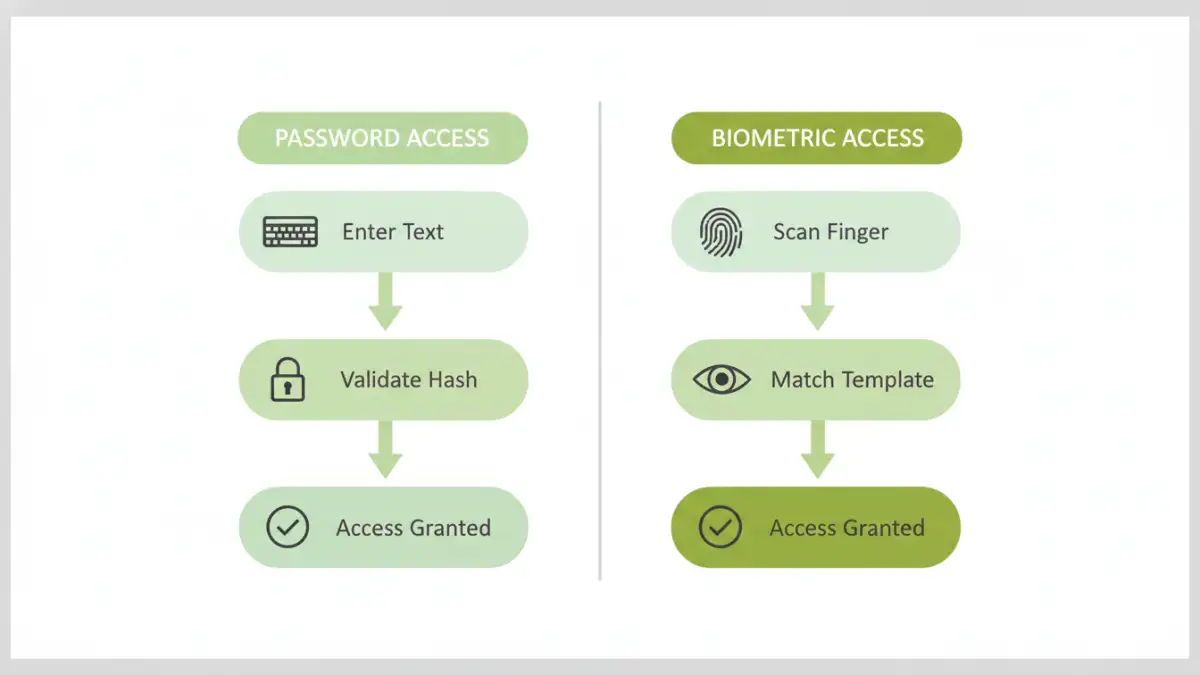
A password is a secret string of characters used to confirm a user's identity. From a software engineering perspective, when you enter a password, the system typically runs it through a one-way hashing algorithm and compares the result to a stored hash. A match grants access. Their security relies entirely on their secrecy and complexity; a simple, reused, or exposed password offers almost no protection.
The New Challenger: What Is a Fingerprint?
Biometric authentication uses unique physical characteristics. A fingerprint scanner captures an image of your finger's ridges and valleys, converting it into a digital template. This template, not the actual image of your fingerprint, is stored securely on the device. When you scan your finger again, the device creates a new template and compares it to the stored one. This method ties access directly to a physical person, eliminating the need to remember anything.
The Case for Traditional Password Protection
Passwords have been the cornerstone of digital security for decades for good reason. When implemented correctly, they provide a robust and flexible layer of protection for your documents. Their strength is directly proportional to the effort put into creating and managing them.
A primary advantage is their mutability. If you suspect a password has been compromised, you can change it instantly, rendering the old one useless. This is a critical feature that biometrics lack—you can't simply change your fingerprint. Furthermore, modern password managers have made it feasible to use long, complex, and unique passwords for every service without needing to memorize them, significantly mitigating the risk of credential stuffing attacks.
However, their greatest strength is also their biggest weakness: the human element. People often choose weak, easy-to-guess passwords or reuse them across multiple platforms. Phishing attacks, where attackers trick users into revealing their credentials, remain incredibly effective. Strong password protection requires constant vigilance and discipline.
The Rise of Biometric Document Access
Biometrics, particularly fingerprint scanning, have exploded in popularity due to their sheer convenience. Unlocking a file with a simple touch is faster and easier than typing a complex password. This convenience can lead to better security habits, as users are more likely to lock their devices and documents if unlocking them is frictionless.
From a security standpoint, a fingerprint is incredibly difficult to replicate without sophisticated equipment. It's unique to you, and you can't forget it or accidentally write it down on a sticky note. The data is also typically stored in a secure enclave on the device itself, meaning the biometric template rarely, if ever, leaves your hardware. This local storage model protects it from remote database breaches that can expose millions of passwords.
Vulnerabilities and Concerns
Despite their strengths, biometrics are not infallible. High-quality fingerprint replicas can sometimes fool sensors, though this is becoming harder with modern liveness detection technology. A more significant concern is that your biometrics are permanent. If a template is ever compromised, it's compromised forever. Additionally, legal protections for biometric data can be murkier than for passwords; in some jurisdictions, law enforcement may be able to compel you to unlock a device with your fingerprint but not to reveal a password.
The Verdict: Which Method Is Superior?
The debate over document security biometrics vs passwords doesn't have a single winner; the best choice depends on the context. For personal, day-to-day document access on a trusted device like a smartphone or laptop, the convenience and strong on-device security of a fingerprint are often superior. It prevents casual snooping and is far easier to manage.
For enterprise environments, shared systems, or high-stakes data requiring long-term archival, passwords often have the edge. Their ability to be revoked, changed, and managed centrally by an IT department is crucial. You can grant temporary access with a password and then revoke it, which isn't possible with a fingerprint. The risk of a permanent biometric compromise is too high for certain top-tier security applications.
Best Practices for a Hybrid Approach
Ultimately, the most secure solution isn't choosing one over the other—it's using them together. Multi-factor authentication (MFA) combines two or more different authentication factors. A common and highly secure setup is requiring both a password (something you know) and a fingerprint scan (something you are) to access a sensitive document or system.
This layered approach provides defense-in-depth. If an attacker steals your password, they still can't get in without your physical fingerprint. This hybrid model leverages the convenience of biometrics for frequent access while retaining the robust, revocable security of a strong password as a foundational layer. For any truly sensitive files, I always recommend enabling MFA wherever possible.
Feature Comparison: Passwords vs. Fingerprints
| Feature | Password Protection | Biometric (Fingerprint) Access |
|---|---|---|
| Security Principle | Something you know (secret) | Something you are (inherent trait) |
| Convenience | Lower; requires typing and memorization | Higher; fast, requires only a touch |
| Revocability | High; can be changed instantly if compromised | None; a compromised fingerprint is permanent |
| Vulnerability | Phishing, brute-force attacks, weak choices | Spoofing, physical coercion, permanent compromise |
| Best Use Case | Enterprise systems, shared access, high-security archives | Personal devices, frequent access, convenience |
| Multi-Factor Auth | Excellent as one factor in an MFA setup | Excellent as one factor in an MFA setup |