
A few years ago, I was helping a client investigate a minor data breach. They had a solid Role-Based Access Control (RBAC) system in place—engineers couldn't see finance files, and marketing couldn't access source code. Yet, a legitimate user's credentials were compromised and used to access sensitive project plans from an unusual location outside of business hours. Their static permission system saw a valid user and granted access, completely missing the suspicious context.
That incident was a powerful reminder that who a user is isn't always enough; we also need to consider the where, when, and how of their access request. This is the fundamental idea behind a more intelligent and adaptive approach to securing our digital assets.
Table of Contents
What is Context-Aware Access Control?
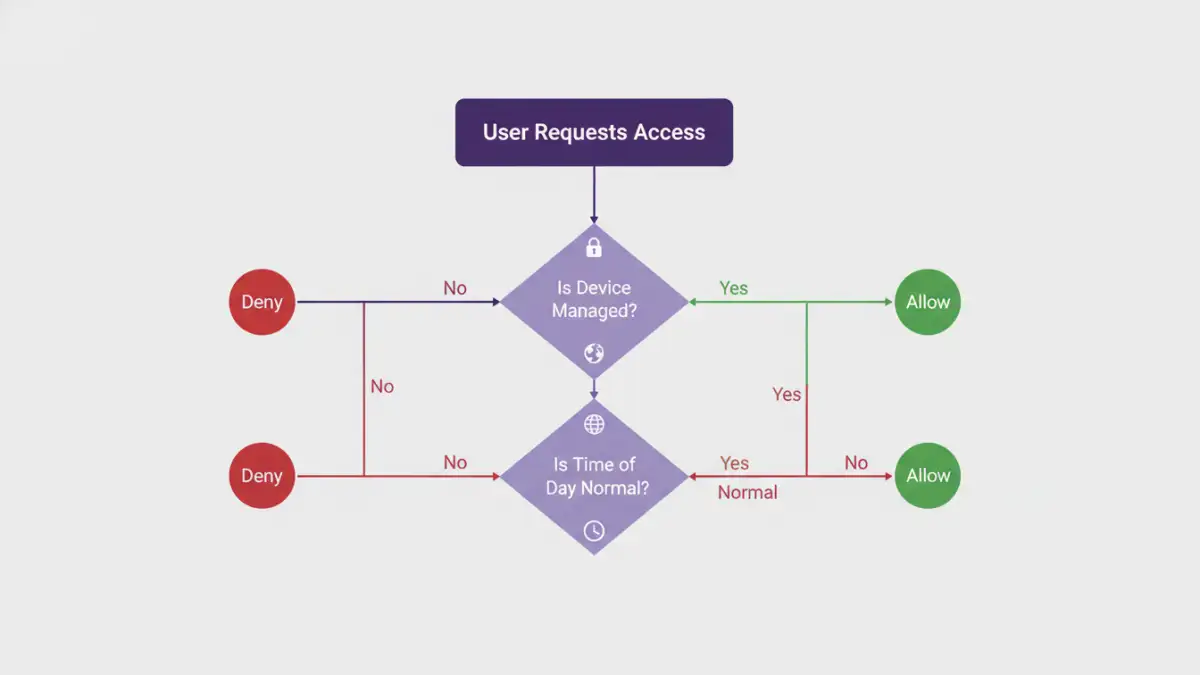
Context-aware access control is a security model that grants or denies access to resources based on a dynamic assessment of various environmental factors, not just a user's role or identity. Think of it as a smart bouncer for your documents. A traditional bouncer just checks your ID (your role), but a smart bouncer also checks if you're behaving erratically, if it's after closing time, or if you're trying to enter through a back window.
Beyond Traditional RBAC
For years, Role-Based Access Control (RBAC) has been the standard. A user is assigned a role (e.g., 'Editor', 'Viewer'), and that role has a fixed set of permissions. It's simple and effective for static environments. However, in a world of remote work, BYOD (Bring Your Own Device), and cloud applications, RBAC's rigidity becomes a liability. It can't differentiate between a manager accessing a file from a secure corporate laptop in the office and that same manager accessing it from a personal tablet on public coffee shop Wi-Fi.
The Core Contextual Signals
This approach builds a richer picture of each access request by evaluating multiple signals in real-time. Key contextual factors often include:
- User and Device Identity: Is the user who they say they are? Is the device managed and compliant with security policies?
- Geographical Location: Is the user accessing from a known office location, their home, or an unexpected country?
- Network Information: Is the connection coming from a trusted corporate network or an unsecured public hotspot?
- Time of Day: Does the access request fall within normal business hours for that user?
- Application and Data Sensitivity: How critical is the document being requested? Access rules for a public-facing datasheet should be different from those for unreleased financial projections.
How Dynamic Access Policies Work in Practice

The real power here comes from creating dynamic access policies that use these signals to make intelligent decisions. Instead of a blanket 'allow' or 'deny', the system can take nuanced actions. This is a form of adaptive document protection that adjusts security levels based on perceived risk.
Let's consider a practical scenario: a project manager, Sarah, needs to access a sensitive client proposal document.
- Scenario 1 (Low Risk): Sarah is logged into her company-issued laptop, connected to the secure office Wi-Fi, during her normal workday. The system verifies her identity, device, location, and time. The policy grants her full edit access instantly and seamlessly.
- Scenario 2 (Medium Risk): Sarah is working from home on her corporate laptop. The system recognizes her home network as less secure than the office. The policy grants her access but first requires her to complete a multi-factor authentication (MFA) prompt on her phone. This is a classic example of risk based authentication.
- Scenario 3 (High Risk): An access request for Sarah's account comes from an unknown device in a different country at 3 AM. The policy recognizes this combination of factors as highly suspicious. It automatically blocks the access attempt and sends a security alert to both Sarah and the IT department.
Key Benefits of Adopting This Model
Shifting to a context-aware model offers significant advantages over traditional methods. It's not just about adding more hurdles; it's about adding smarter ones that are nearly invisible to legitimate users in safe contexts.
The primary benefit is a massive boost in security. By continuously analyzing context, you can prevent breaches that stem from compromised credentials or insider threats. This approach is a cornerstone of a zero trust file access architecture, which operates on the principle of "never trust, always verify." Every access request is treated as a potential threat until proven otherwise.
Secondly, it can actually improve the user experience. When a user is operating in a low-risk context, they face fewer security interruptions like constant password prompts or MFA challenges. Security becomes frictionless when it's safe and appropriately stringent when risk increases. This balance prevents security fatigue and encourages better user compliance.
Implementing Your Context-Aware Strategy
Adopting context aware document security is a strategic shift, not just a single product you can install. It involves a thoughtful process that integrates technology and policy.
First, you must identify and classify your data. Understand which documents are most sensitive and require the strictest controls. You can't protect what you don't know you have. Next, define the contextual signals that are most relevant to your organization. For a global company, geofencing might be critical; for a financial firm, device compliance might be the top priority.
With this foundation, you can begin writing your dynamic access policies. Start simple. For example: "Block all access to 'Confidential' documents from unmanaged devices." Over time, you can build more sophisticated, multi-conditional rules. Modern security platforms, such as Cloud Access Security Brokers (CASBs) and Zero Trust Network Access (ZTNA) solutions, are designed to collect these signals and enforce these policies across your applications and data stores.
Comparison: Traditional vs. Context-Aware Access Control
| Feature | Traditional RBAC | Context-Aware Access Control |
|---|---|---|
| Decision Basis | Static user role and permissions | Dynamic context (user, device, location, time, etc.) |
| Flexibility | Rigid and inflexible; changes require manual admin updates | Highly flexible and adaptive to changing conditions |
| Security Model | 'Trust but verify' (implicit trust within the network) | 'Never trust, always verify' (Zero Trust) |
| Granularity | Coarse-grained (e.g., access to a whole folder) | Fine-grained (e.g., read-only access from mobile) |
| User Experience | Can be cumbersome, often requiring VPNs for remote access | Seamless for low-risk access, frictionless |
| Threat Response | Slow; relies on detecting a breach after it happens | Proactive; can block suspicious access attempts in real-time |