
When it comes to managing documents within an organization, the choice of platform can significantly impact productivity, collaboration, and overall efficiency. Two of the most prominent contenders in this space are Microsoft SharePoint and Google Workspace. Both offer robust solutions, but they cater to different needs and organizational structures.
Deciding between these two titans requires a deep understanding of their respective strengths and weaknesses, especially concerning how they handle enterprise content management and cloud document storage. My work has often involved helping teams migrate or integrate these systems, and the nuances between them are crucial for a successful transition.
Table of Contents
Understanding the Platforms
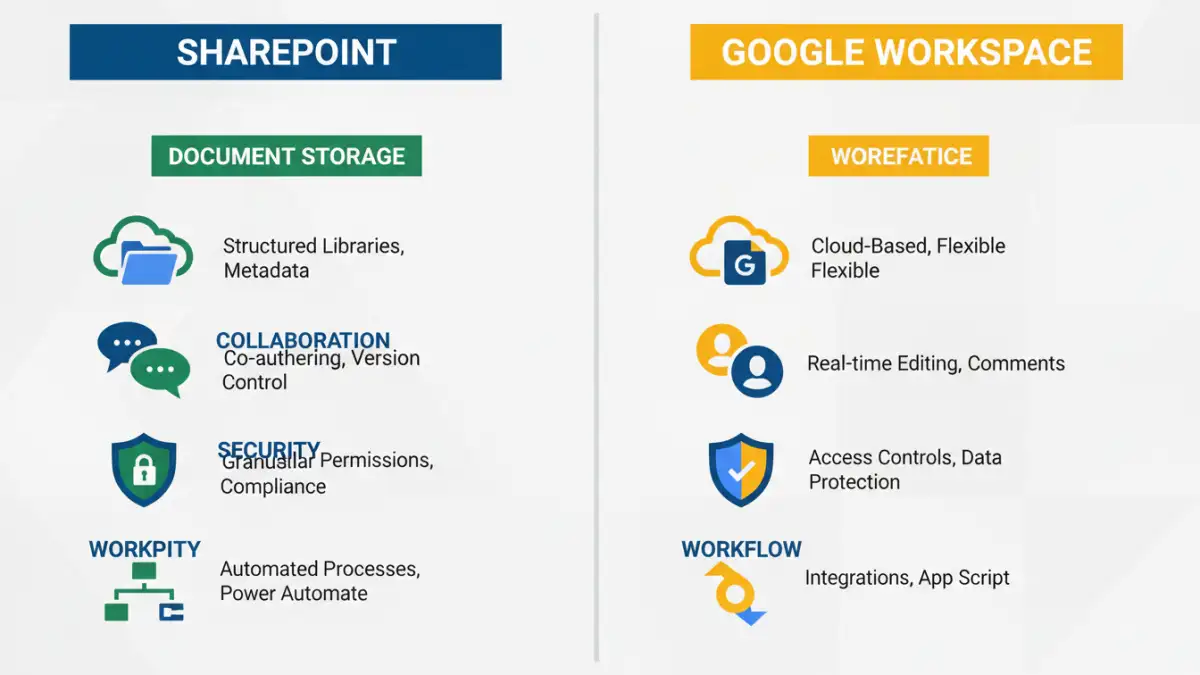
SharePoint, part of the Microsoft 365 suite, is a powerful and highly customizable platform traditionally favored by larger enterprises. It excels in providing a centralized hub for document storage, workflow automation, and team collaboration, deeply integrated with other Microsoft products like Word, Excel, and Teams.
Google Workspace, formerly G Suite, offers a more streamlined and cloud-native approach. It emphasizes real-time document collaboration through its suite of applications like Docs, Sheets, and Slides, accessible from anywhere with an internet connection. Its intuitive interface and strong real-time co-authoring capabilities make it a favorite for businesses prioritizing agility and ease of use.
SharePoint Strengths
SharePoint's strength lies in its depth of features for enterprise content management. It offers granular permissions, extensive version control, sophisticated search capabilities, and robust workflow automation tools. For organizations with complex compliance requirements or a need for highly customized document management processes, SharePoint often provides the necessary flexibility.
Google Workspace Strengths
Google Workspace shines in its simplicity and real-time collaboration. Its document editing tools are designed for simultaneous work, with clear visual cues showing who is editing what. This makes it exceptionally efficient for teams that need to brainstorm and create documents together fluidly. The cloud-native architecture also means updates are seamless and accessibility is universal.
Collaboration Features Compared

When it comes to document collaboration, both platforms offer distinct experiences. SharePoint facilitates collaboration through shared libraries, co-authoring (especially when integrated with Microsoft 365 apps), and version history that meticulously tracks changes.
Google Workspace, however, is built from the ground up for real-time collaboration. Multiple users can edit a document simultaneously, seeing each other's cursors and changes as they happen. Features like commenting, suggesting edits, and chat within documents are seamlessly integrated, fostering a highly interactive environment.
Enterprise Content Management
For robust enterprise content management, SharePoint typically has the edge due to its comprehensive feature set. It allows for the creation of complex site structures, document libraries with custom metadata, and sophisticated content types. This enables organizations to manage vast amounts of data with precise control over organization and access.
Google Workspace provides solid document management capabilities, focusing on ease of access and sharing. While it may not offer the same level of intricate customization as SharePoint for metadata or complex workflows out-of-the-box, its strength lies in its simplicity and integration with Google's powerful search technology.
Version Control
Both platforms offer version control, a critical aspect of document management. SharePoint provides detailed version history, allowing users to view, restore, and even compare previous versions of a document. This is invaluable for auditing and tracking changes over time.
Google Workspace also maintains a comprehensive version history for its documents, accessible through the file menu. Users can see who made changes and when, and revert to previous versions if needed. The visual representation of changes is often more straightforward in Google Docs.
Storage and Scalability
In terms of cloud document storage, both platforms offer scalable solutions. Microsoft 365 plans for SharePoint typically include significant storage per user, which can be further increased. The architecture is designed to handle large volumes of data and complex information architecture.
Google Workspace also provides generous cloud storage, with different tiers available depending on the plan. Its cloud-native infrastructure ensures that storage scales easily with user growth and data needs, offering flexibility for businesses of all sizes.
Security and Compliance
Security and compliance are paramount for any organization. SharePoint, integrated within the Microsoft 365 ecosystem, benefits from Microsoft's extensive security infrastructure, offering features like multi-factor authentication, data loss prevention, and advanced threat protection. Compliance certifications are robust, catering to many industry-specific regulations.
Google Workspace also offers strong security features, including advanced endpoint management, security keys, and robust encryption. Its compliance certifications are also comprehensive, making it a secure choice for many businesses. The ease of managing user access and permissions is a notable strength.
Integration and Ecosystem
SharePoint's integration within the Microsoft ecosystem is a significant advantage. It works seamlessly with other Microsoft 365 applications, Power Automate for workflows, and a vast array of third-party business applications. This makes it a central component of a broader Microsoft-centric IT strategy.
Google Workspace integrates exceptionally well with other Google services like Google Analytics, Google Ads, and Google Cloud Platform. It also supports a wide range of third-party applications through the Google Workspace Marketplace, providing flexibility for users who rely on a diverse set of tools.
Comparison Table
| Feature | Microsoft SharePoint | Google Workspace |
|---|---|---|
| Primary Focus | Enterprise Content Management, Intranet, Workflow | Real-time Collaboration, Productivity Suite |
| Collaboration Style | Co-authoring (integrated with Office apps), Shared Libraries | Simultaneous real-time editing, commenting, suggesting |
| Customization | Highly customizable, complex workflows, metadata | Streamlined, user-friendly, less complex customization |
| Integration | Deep Microsoft ecosystem integration | Strong Google ecosystem integration, growing Marketplace |
| Storage Model | Per-user/per-tenant storage, scalable | Pooled storage across users, scalable |
| Best For | Large enterprises, regulated industries, complex processes | Agile teams, SMBs, rapid collaboration needs |