Working with sensitive documents, especially in the healthcare sector, demands a robust approach to security. The ease of digital sharing means that protecting patient information is paramount, and PDF files are a common format for medical records. Ensuring these documents remain confidential and tamper-proof requires understanding and implementing effective encryption strategies. My experience has shown that a layered approach, combining strong passwords with appropriate encryption methods, is key to preventing unauthorized access and maintaining trust.
The digital landscape presents constant challenges, from accidental data breaches to malicious cyberattacks. For healthcare providers and anyone handling personal health information (PHI), the consequences of a security lapse can be severe, including hefty fines, reputational damage, and loss of patient confidence. Implementing secure medical records pdf practices is not just a technical requirement; it's an ethical and legal obligation. This guide will walk you through the essential best practices for encrypting your PDF documents to keep sensitive data safe.
Table of Contents
Understanding PDF Encryption Basics
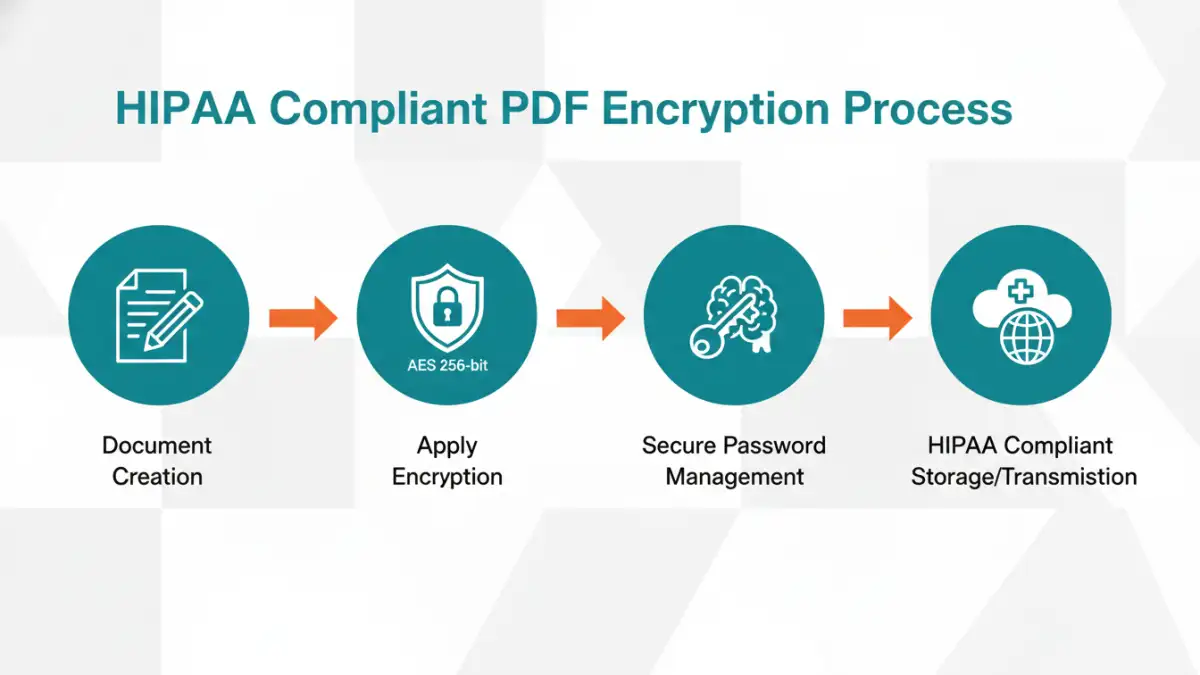
PDF encryption is the process of scrambling the content of a PDF document so that it can only be read by authorized individuals who possess the correct decryption key, typically a password. This ensures that even if the file falls into the wrong hands, the information within remains inaccessible. Different PDF encryption standards offer varying levels of security, from basic password protection to advanced AES (Advanced Encryption Standard) encryption.
Levels of Security
When you encrypt a PDF, you're essentially applying a cipher. The strength of this cipher dictates how difficult it is to break. Modern PDF applications usually support RC4 128-bit encryption, but for truly sensitive data, AES 128-bit or AES 256-bit encryption is recommended. AES 256-bit offers a significantly higher level of security, making it the standard for protecting critical information like patient records.
Choosing the Right Encryption Methods
The method you choose for encrypting PDFs depends on your needs, the software you have available, and the level of security required. Many tools, both free and paid, can encrypt PDFs. It’s important to select a method that balances security with usability for authorized users.
Built-in PDF Software
Most modern PDF readers and editors, like Adobe Acrobat Pro, offer built-in encryption features. These tools allow you to set passwords for opening the document and/or for restricting actions like printing or editing. Using these features is often the most straightforward way to secure a PDF, especially for individual files.
Third-Party Encryption Tools
Beyond standard PDF software, numerous third-party applications and online services specialize in document encryption. Some are designed for bulk encryption, while others offer advanced features like key management or integration with cloud storage. When using online tools, always verify their security protocols and privacy policies to ensure they are trustworthy for handling medical document encryption.
Step-by-Step Implementation
Implementing PDF encryption is generally a straightforward process, though the exact steps can vary slightly depending on the software used. The core idea is to access the security settings of your PDF document and apply a strong password with robust encryption.
Using Adobe Acrobat Pro
For those with Adobe Acrobat Pro, the process typically involves going to 'File' > 'Protect Using Password'. Here, you can choose whether the password is required to open the document or to restrict editing and printing. Selecting 'Advanced Options' will allow you to choose the encryption level, ideally AES 256-bit for maximum security. Remember to choose a complex password that is difficult to guess.
Using Online PDF Encryptors
If you opt for an online tool, the workflow usually involves uploading your PDF, setting a password, choosing encryption strength (if available), and then downloading the encrypted file. While convenient, exercise caution with sensitive data and ensure the service explicitly states its commitment to privacy and data deletion after processing. For secure medical records pdf, it's often better to use desktop software.
Key Best Practices for Security
Beyond simply encrypting a file, several best practices can significantly enhance the security of your PDF documents. These practices are crucial for maintaining patient record security and preventing breaches.
- Use Strong, Unique Passwords: Avoid simple or easily guessable passwords. Combine uppercase and lowercase letters, numbers, and symbols. Never reuse passwords across different documents or systems.
- Choose Strong Encryption Standards: Always opt for AES 256-bit encryption whenever possible. This is the industry standard for high-security applications.
- Manage Passwords Securely: Do not share passwords via unencrypted email or messaging. Use a secure password manager to store and manage your encryption keys.
- Limit Permissions Granularly: If your software allows, restrict not only opening but also printing, copying, and editing. This adds an extra layer of protection.
- Regularly Review Security Settings: Periodically check that your encryption methods and passwords are still effective and up-to-date.
Ensuring HIPAA Compliance
For healthcare organizations, ensuring that all digital health information is protected is a legal mandate under HIPAA. When dealing with electronic Protected Health Information (ePHI), encryption is not just a recommendation; it's a requirement for safeguarding data at rest and in transit. Implementing HIPAA compliant pdf practices means that your encryption methods must be robust enough to prevent unauthorized access and that you have policies in place for managing access and keys.
Encryption is considered a technical safeguard under HIPAA. Using AES 256-bit encryption for your PDFs containing PHI is a strong step towards compliance. Furthermore, it’s essential to document your encryption policies, train staff on these procedures, and ensure that any third-party tools used also meet HIPAA standards. Regularly auditing your security measures is also a critical component of maintaining a HIPAA compliant environment.
Comparison Table
| Method | Pros | Cons | Best For |
|---|---|---|---|
| Built-in PDF Software (e.g., Adobe Acrobat) | Easy to use, readily available, good for individual files | May require paid software, limited advanced features | Securing single documents, basic protection |
| Third-Party Desktop Software | Powerful features, batch processing, advanced encryption options | Can be costly, may have a learning curve | Bulk encryption, complex security needs |
| Online PDF Encryptors | Convenient, accessible from anywhere, no installation needed | Privacy concerns, potential data handling risks, limited features | Quick, non-sensitive document encryption |