Working with sensitive HR documents requires a robust approach to ensure confidentiality and compliance. Employee records, in particular, contain a wealth of personal information that must be protected from unauthorized access and potential breaches. Implementing secure methods for storing and sharing these files, especially in a common format like PDF, is paramount.
My experience has shown that many organizations struggle to balance accessibility for authorized personnel with stringent security requirements. This is where understanding how to properly secure PDF files becomes critical. It's not just about adding a password; it's about a comprehensive strategy that covers encryption, access control, and secure sharing practices.
Table of Contents
Understanding PDF Security Basics
PDFs are a versatile format, widely used for documents due to their ability to preserve formatting across different systems. However, out-of-the-box PDFs don't inherently offer strong security. They can be easily opened, copied, and edited without proper safeguards. This makes it crucial to understand the built-in security features that PDF software offers.
PDF Permissions Explained
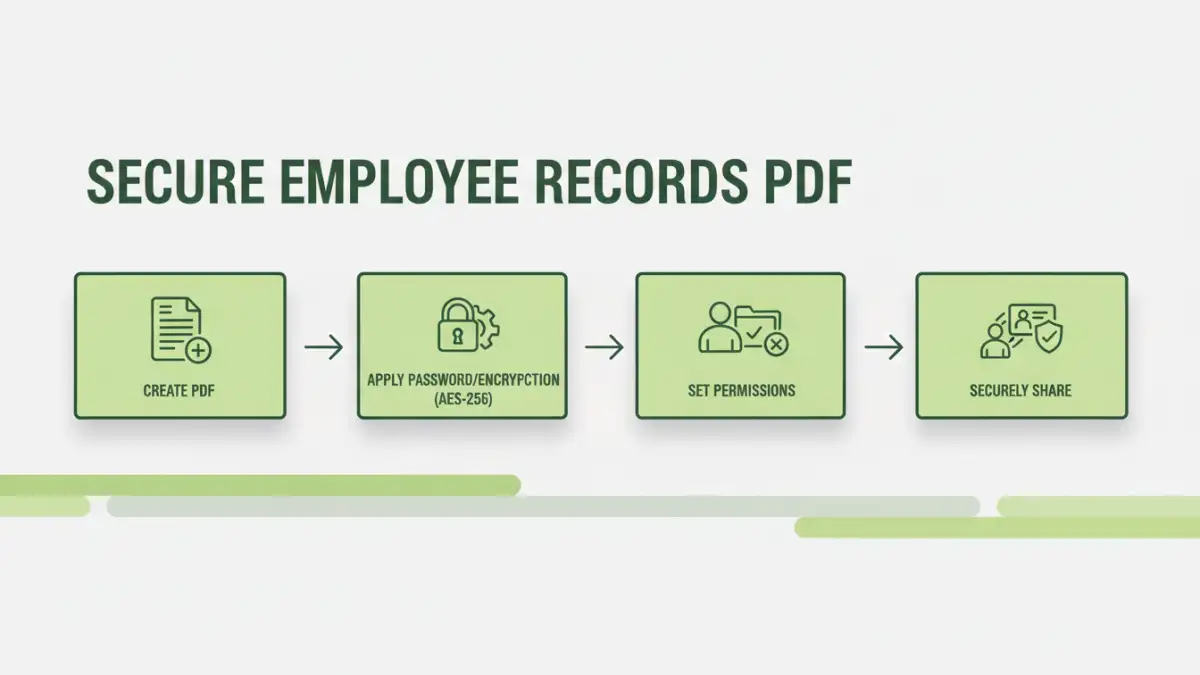
Most PDF creation tools allow you to set specific permissions. These can restrict actions like printing, copying text and images, or modifying the document. While these permissions are helpful, they are often easily bypassed if the document is not also encrypted. Think of permissions as a gatekeeper for specific actions, but encryption is the lock on the vault itself.
Implementing Access Controls

Beyond basic permissions, robust access control is vital for HR document security. This involves ensuring only authorized individuals can even open the file. Password protection is the most common method, but the strength of this protection depends heavily on the password itself and the encryption standard used by the PDF software.
For instance, using a strong, unique password for each sensitive document is essential. Weak passwords can be guessed or cracked using brute-force methods, rendering the protection useless. I've seen cases where simple, common words were used, leading to immediate breaches.
Encryption Methods for PDFs
When discussing secure employee records PDF, encryption is a core component. PDFs can be secured using different encryption algorithms. Older methods, like 40-bit or 128-bit RC4, are less secure by today's standards. Modern PDF applications typically support AES (Advanced Encryption Standard) encryption, often with 128-bit or 256-bit keys.
AES-256 is considered extremely strong and is widely adopted for protecting sensitive data. When you choose to password-protect a PDF, ensure your software is using a modern encryption standard like AES. This provides a significant barrier against unauthorized decryption, even if the file falls into the wrong hands.
Secure Sharing Practices
Sharing confidential employee files requires careful consideration. Simply emailing a password-protected PDF is often insufficient, as email itself is not always secure. If the email is intercepted, the attacker could gain access to both the password and the encrypted file.
Instead, consider using secure file-sharing platforms that offer end-to-end encryption. Alternatively, you can communicate the password separately from the document, perhaps via a phone call or a secure messaging app. This two-factor approach significantly enhances the security of confidential data sharing.
Best Practices for Personnel File Protection
Effective personnel file protection goes beyond just securing individual files. It involves establishing clear policies and procedures for handling employee data. This includes regular training for HR staff on data privacy and security best practices.
Regularly audit access logs to ensure no unauthorized access attempts have occurred. Also, implement a retention policy to securely dispose of old records that are no longer needed, further minimizing risk. By combining technical controls with procedural safeguards, you create a more resilient security posture.
Comparison Table
| Method | Security Level | Ease of Use | Use Case |
|---|---|---|---|
| PDF Password Protection (Basic) | Low to Medium (depends on password strength) | High | Quick, simple protection for non-critical data |
| PDF Permissions | Low (easily bypassed without encryption) | High | Restricting actions like printing or copying |
| AES-256 Encrypted PDFs with Strong Passwords | High | Medium (requires strong password management) | Securing sensitive employee records PDF |
| Secure File Sharing Platforms | High (end-to-end encryption) | Medium to High | Collaborating and sharing sensitive files internally/externally |
Extra tips before you try to secure employee records pdf
First, confirm what kind of protection you are dealing with. Some PDFs require a password to open (user password), while others only restrict printing/copying/editing (owner password). The safest approach depends on which one you have.
For sensitive documents, prefer offline tools and avoid uploading confidential files to unknown websites. If you must use an online tool, read the privacy policy and delete uploaded files immediately after processing.
- Try a different PDF viewer (some apps cache old permissions)
- Re-download the file (corruption can cause false password errors)
- Check caps lock / keyboard layout for password entry
- Differentiate “permission password” vs “open password” prompts
- If it is not your file, request access from the owner