When dealing with confidential information, the choice of file format can significantly impact its security. Many professionals wrestle with whether to use a PDF or a DOCX file for sensitive reports, contracts, or personal data. Both formats have their strengths, but understanding their inherent security features and vulnerabilities is key to protecting your information.
My work often involves handling sensitive client data, and I've encountered situations where the wrong format choice led to unnecessary risks. It's not just about password protection; it's about the fundamental nature of the file type and how it's processed.
Table of Contents
Understanding the Formats
PDF (Portable Document Format) was designed by Adobe to present documents, including text formatting and images, in a manner independent of application software, hardware, and operating systems. Its primary goal was consistent presentation, making it a popular choice for final documents meant for distribution.
DOCX (Document File) is the default format for Microsoft Word documents since Office 2007. It's an XML-based format that allows for extensive editing, collaboration, and dynamic content. This flexibility, while advantageous for creation, can also introduce different security considerations.
Key Differences in Structure
The fundamental difference lies in their purpose. PDFs are generally static, intended to be viewed rather than edited extensively. DOCX files, on the other hand, are dynamic and designed for ongoing editing. This distinction impacts how security measures are implemented and their effectiveness.
PDF Security Features
PDFs offer robust security options that are often built into creation software like Adobe Acrobat or even some free PDF viewers. These features are designed to control access and prevent unauthorized modifications.
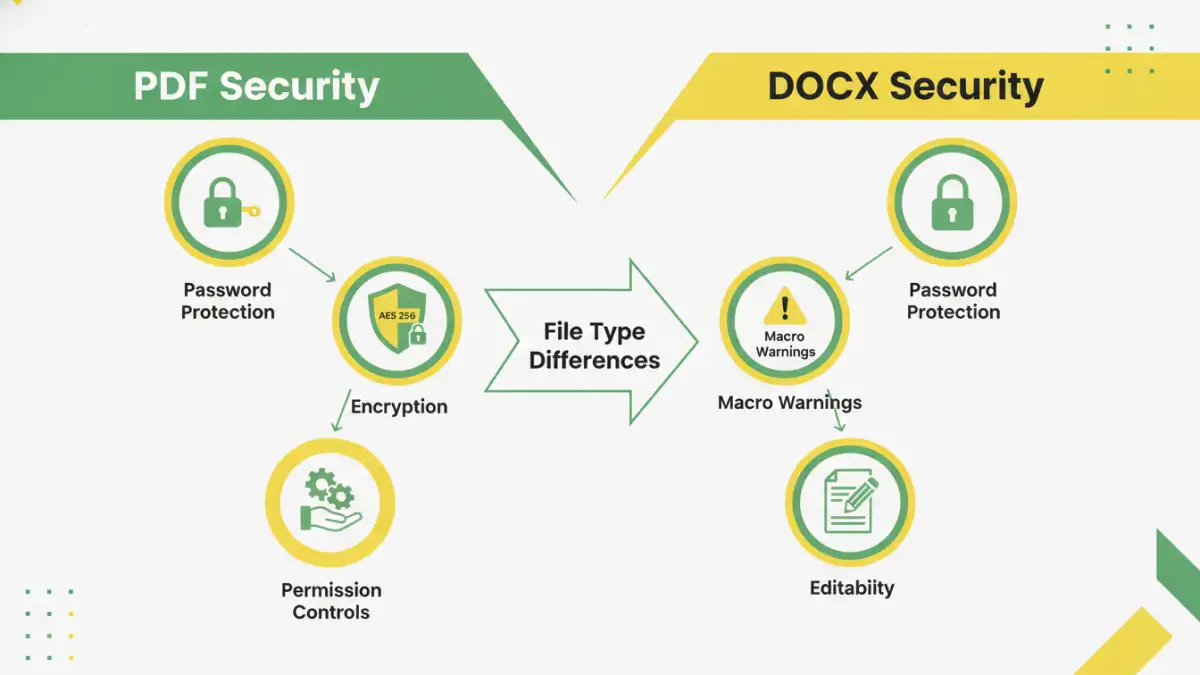
One of the most common security features in PDFs is password protection. You can set passwords to restrict opening the document altogether, or you can set permissions passwords to control actions like printing, copying text, or editing. I've used these permission-based passwords to ensure that a client could read a report but not easily extract or alter sections without my knowledge.
Encryption Standards in PDFs
PDFs support various encryption standards, ranging from older RC4 128-bit to more modern AES 128-bit and AES 256-bit encryption. AES 256-bit is considered a very strong encryption method, making it difficult for unauthorized parties to decrypt the file without the correct password. The strength of the encryption directly correlates with the difficulty of brute-force attacks.
DOCX Security Features
DOCX files also offer security mechanisms, primarily through Microsoft Word's built-in features. These are often focused on protecting the document's content and ensuring its integrity.
Similar to PDFs, DOCX files can be password protected to prevent opening. Microsoft Word also allows for marking documents as final, which discourages editing by disabling most editing features. However, this is more of a deterrent than a strict security measure, as it can often be bypassed.
Macro Security and Trust
A significant security consideration for DOCX files is their potential to contain macros. Macros are small programs that can automate tasks, but malicious macros can be used to spread viruses or steal data. Word has security settings to manage macro execution, typically warning users or blocking them by default, which is crucial for file security comparison.
PDF vs DOCX Security Comparison
When we directly compare pdf vs docx security, PDFs generally have an edge for final, sensitive documents intended for distribution. Their static nature and strong encryption options make them harder to tamper with unintentionally or maliciously.
DOCX files are better suited for collaborative environments where editing is expected. While they can be password protected, the inherent editability and the risk of malicious macros mean they require more vigilance if used for highly sensitive information that shouldn't be altered. The effectiveness of DOCX security heavily relies on user awareness regarding macros and strong password practices.
In my experience, if I need to send a final report that should not be changed, I'll always opt for a password-protected PDF. If I'm sending a draft document for review and expect feedback or edits, a DOCX file is more practical, but I'll ensure any sensitive embedded information is either removed or the document's macro settings are strictly controlled.
Best Practices for Both Formats
Regardless of the format, strong passwords are your first line of defense. Use complex passwords that combine uppercase and lowercase letters, numbers, and symbols. Avoid easily guessable information like birthdays or names.
For PDFs, leverage the permission settings to control printing, copying, and editing. For DOCX files, be cautious with documents from unknown sources, disable macros by default, and consider converting the document to a PDF once editing is complete if it contains sensitive final data.
When to Choose Which Format
Choose PDF when the document is final, needs to maintain its formatting across different systems, and requires strong protection against unauthorized access or modification. Choose DOCX when the document is a draft, requires collaboration and extensive editing, or needs to incorporate dynamic elements like macros (with appropriate security precautions).
Comparison Table: PDF vs DOCX Security
| Feature | DOCX | |
|---|---|---|
| Primary Use Case | Final distribution, read-only viewing | Drafting, collaboration, editing |
| Password Protection | Open, Permissions (print, copy, edit) | Open document |
| Encryption Strength | Strong (AES 128/256-bit supported) | Relies on Office suite encryption, less granular control |
| Editability | Limited (requires specific software/permissions) | High (designed for editing) |
| Macro Support | No | Yes (potential security risk) |
| Overall Security for Final Docs | Generally Higher | Lower (due to editability and macro risk) |
| Ease of Use for Security | Moderate to High | Moderate |