Have you ever needed to send sensitive files—like financial records or personal documents—and felt a bit uneasy about who might see them? In my line of work, handling confidential data is a daily routine, and relying on simple password protection just doesn't cut it. You need robust encryption, but that doesn't mean you have to pay for enterprise-grade software.
The good news is that some of the most powerful and trustworthy encryption tools are completely free. These tools give you the power to lock down your data so that only people with the correct key can access it. Let's explore some of the best options available that I've come to rely on over the years.
Table of Contents
Why Choose Open Source for Encryption?
When it comes to security, trust is everything. With proprietary, closed-source software, you're essentially trusting the company's claims about their product's security without being able to verify them. This is where open source shines, especially for encryption.
The Power of Transparency
Open source means the source code—the very blueprint of the software—is available for anyone to inspect. This transparency allows security experts and the global developer community to audit the code for vulnerabilities or hidden backdoors. This public scrutiny creates a more robust and trustworthy product. If there's a flaw, it's more likely to be found and fixed quickly.
Cost-Free Without Compromise
Many of the best document privacy tools are open source and, therefore, free of charge. This accessibility means anyone can implement strong encryption without a budget. In the world of security, free doesn't mean weak; it often means it's built and maintained by a passionate community focused on privacy rather than profit.
Top Contender: VeraCrypt, The Digital Fortress
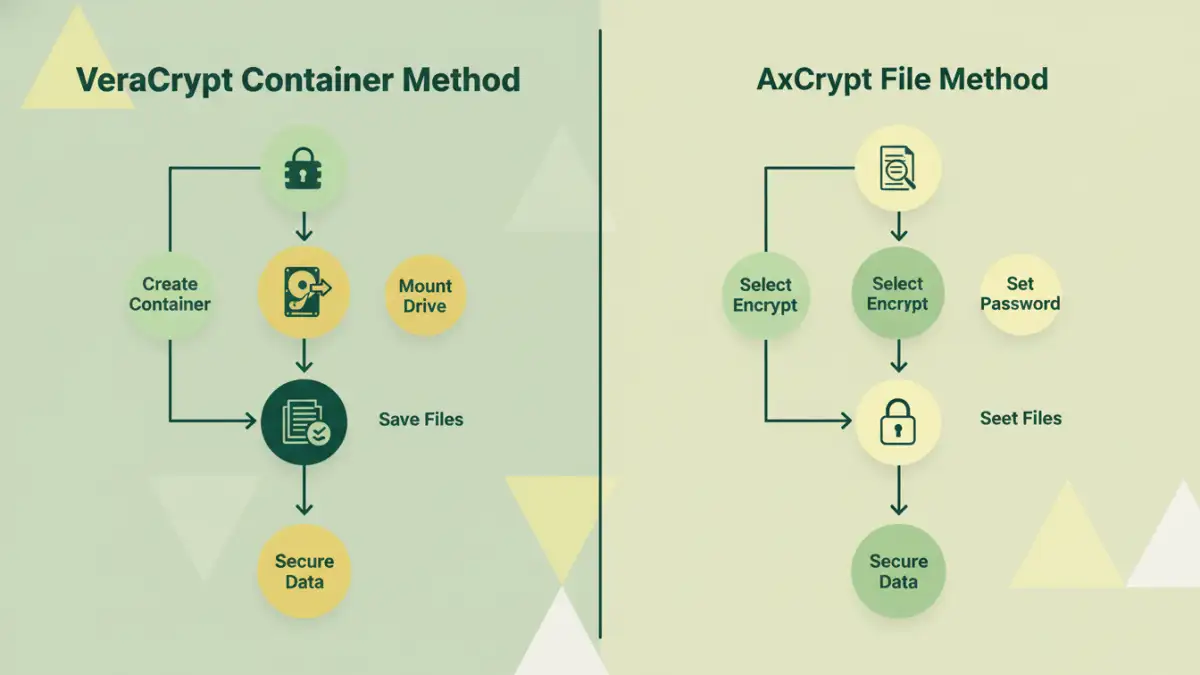
When I need maximum security for a set of files, I often turn to VeraCrypt. It's the spiritual successor to the legendary TrueCrypt and is widely regarded as one of the most secure options for on-the-fly encryption. A detailed VeraCrypt review almost always highlights its robust security model.
VeraCrypt works by creating a virtual encrypted disk within a file, often called a container. You can mount this container like a real drive (e.g., E: drive), and any file you save to it is automatically encrypted. When you dismount it, it becomes an inert, unreadable file again. It also supports full disk encryption, securing your entire operating system. While incredibly powerful, its interface can feel a bit dated and has a steeper learning curve than other tools.
User-Friendly Guardian: AxCrypt Review
If VeraCrypt is a fortress, AxCrypt is a set of high-security personal safes for each of your files. Where VeraCrypt excels at encrypting volumes of data, AxCrypt is designed for encrypting individual files quickly and easily. This makes it one of the most approachable pieces of free encryption software available.
Its biggest strength is its seamless integration with the Windows shell. After installation, you can simply right-click any file and select 'AxCrypt > Encrypt'. It also offers features like password generation and secure file deletion. The free version is quite capable for personal use, using strong AES-128 encryption. A premium version offers AES-256 and additional features, but for basic file protection, the free offering is excellent.
The Everyday Encryptor: 7-Zip
Here's a tool I bet many of you already have installed: 7-Zip. It's known primarily as a file archiver, but it contains a powerful encryption feature that often goes unnoticed. If you need to send a bundle of files securely, 7-Zip is a fantastic choice.
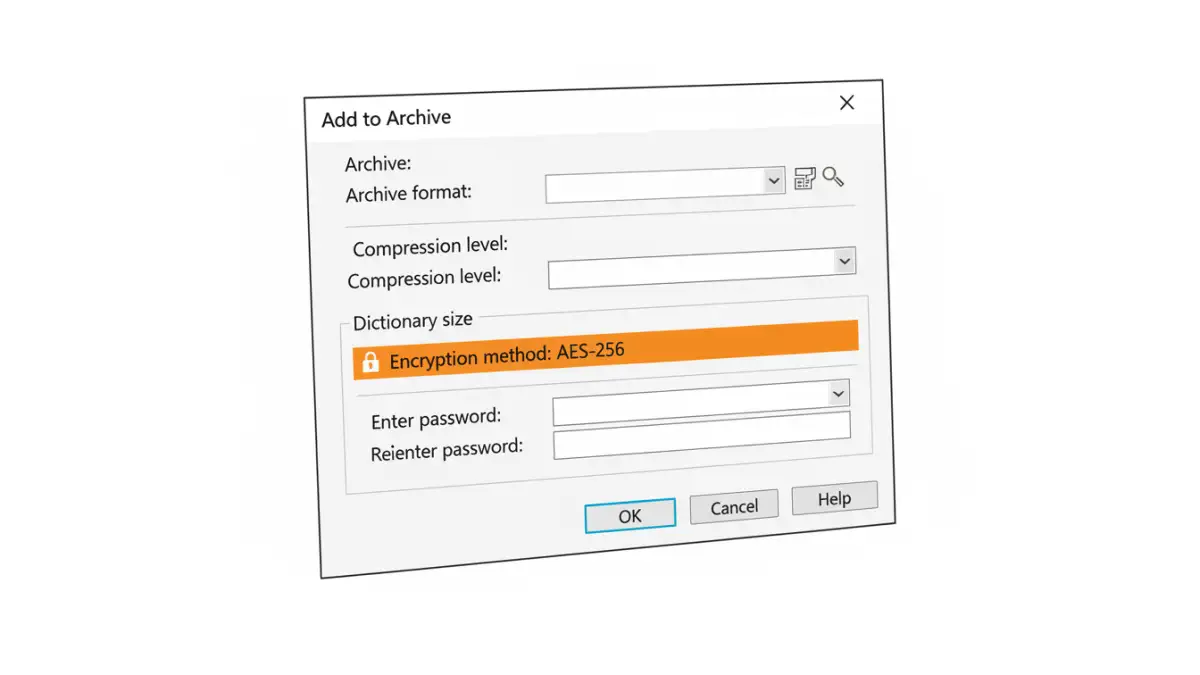
When you create a new archive (either .7z or .zip), 7-Zip gives you the option to encrypt it with a password. It's crucial to select the AES-256 encryption method for the best security. This creates a single, password-protected file that's easy to email or upload. The recipient just needs 7-Zip (or another compatible archiver) and the password to extract the contents. It's a practical and effective method for secure file transfer.
Feature Comparison of Encryption Tools
Choosing the right tool depends on your specific needs. Do you need to secure a whole drive, or just a few files for an email? The table below breaks down the key differences to help you decide which open source file encryption approach is best for you.
| Tool | Encryption Method | Ease of Use | Best For |
|---|---|---|---|
| VeraCrypt | On-the-fly volume encryption (containers) and full-disk encryption. | Moderate to Difficult | Securing large volumes of data, external hard drives, or entire operating systems. |
| AxCrypt | Individual file encryption with right-click context menu integration. | Easy | Quickly encrypting single files, cloud storage integration, and everyday use for non-technical users. |
| 7-Zip | Encrypted archives (file containers like .zip or .7z). | Easy | Compressing and encrypting multiple files together for secure transfer via email or cloud. |
| GnuPG | Public-key cryptography for encrypting files and communications. | Difficult | Securely sharing files with specific individuals without sharing a password directly. |