
When you receive a digitally signed contract or official document, what does that little green checkmark or signature panel actually signify? It’s far more than a digital sticker; it represents a sophisticated cryptographic process designed to guarantee authenticity and integrity. Many people confuse a digital signature with simply pasting an image of their handwritten signature onto a document, but the technology underneath is fundamentally different and vastly more secure.
Understanding this technology is crucial. It’s the bedrock of trust in digital transactions, ensuring that a document hasn't been tampered with since it was signed and verifying that the signer is who they claim to be. Let's break down the cryptographic mechanisms that make it all possible.
Table of Contents
The Core Components of a Digital Signature
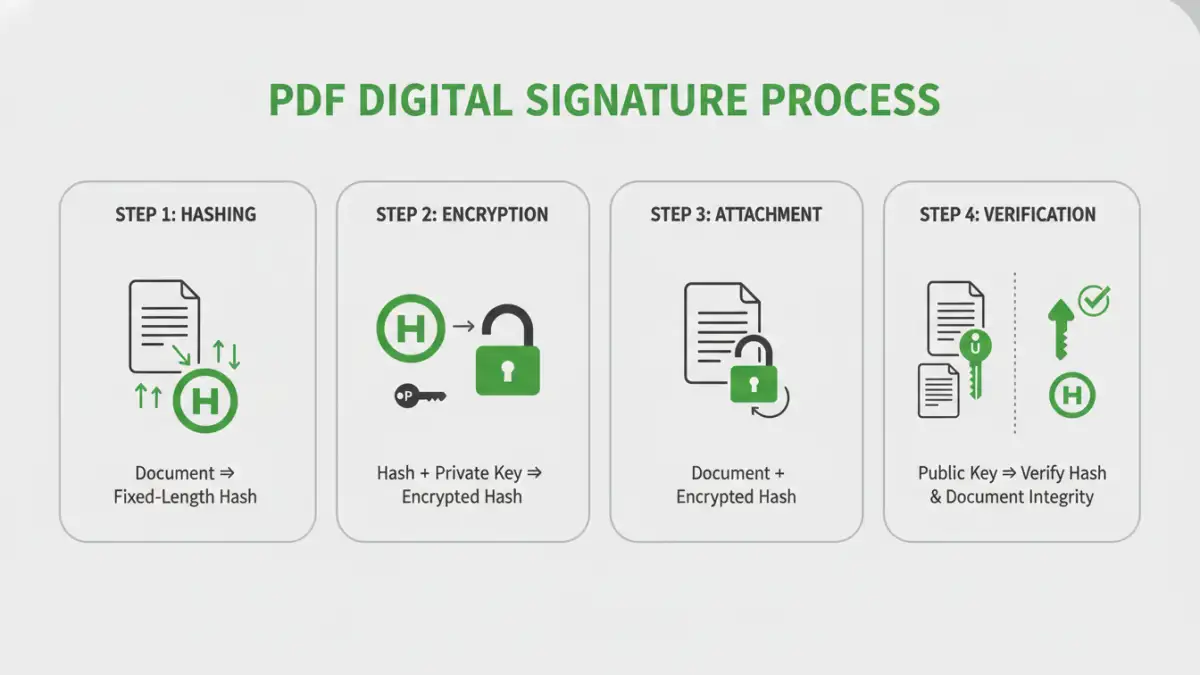
At its heart, a digital signature relies on three core cryptographic concepts working in concert. Each plays a distinct role in creating a verifiable and tamper-evident seal on a document.
Hashing: The Document's Unique Fingerprint
The first step is creating a unique, fixed-size digital fingerprint of the document. This is done using a cryptographic hash function, such as SHA-256 (Secure Hash Algorithm 256-bit). This algorithm takes the entire content of the PDF as input and produces a short string of characters, called a hash or message digest.
Even the tiniest change to the document—like altering a single comma or pixel—will result in a completely different hash. This property is what ensures document integrity. If the hash calculated during verification doesn't match the original, you know the file has been altered.
Asymmetric Encryption: The Key Pair
Next is asymmetric encryption, also known as public-key cryptography. This system uses a mathematically linked pair of keys: a private key and a public key. The private key is kept secret by the signer, like a personal password, while the public key is distributed freely.
What one key encrypts, only the other can decrypt. For digital signatures, the process is reversed: the signer uses their private key to encrypt the document's hash. This encrypted hash is the digital signature itself. Anyone with the corresponding public key can then decrypt it to retrieve the original hash.
The Signing Process: A Step-by-Step Breakdown

Let's walk through the sequence of events when someone applies a digital signature to a PDF. From my experience building systems that integrate with signing services, this process is meticulously standardized to ensure interoperability.
- Document Hashing: The signing software (like Adobe Acrobat) first calculates the unique hash of the entire PDF document, including all its content and metadata.
- Hash Encryption: The signer's private key, often stored on a secure hardware token or a protected file, is used to encrypt this hash. This encrypted hash is the digital signature.
- Signature Packaging: The encrypted hash, along with the signer's digital certificate (which contains their public key and verified identity information), is bundled together and embedded within the PDF file itself. The PDF specification has specific structures for storing this data.
This entire package constitutes the secure pdf digital signatures we see in applications. It attaches cryptographic proof of both the document's state at the time of signing and the signer's identity.
The Verification Process: How Trust is Established
When a recipient opens the signed PDF, their software automatically performs a verification process to confirm its validity. This is where the magic of public-key cryptography becomes apparent.
- Signature Extraction: The software extracts the digital signature (the encrypted hash) and the signer's certificate from the PDF.
- Hash Decryption: It uses the public key found in the certificate to decrypt the signature, revealing the original hash calculated by the signer.
- New Hash Calculation: The software then performs its own hash calculation on the current version of the document.
- Comparison: Finally, it compares the two hashes. If they match perfectly, it confirms the document's integrity. If they don't, it means the document has been altered since signing, and the signature is invalidated.
This process also validates the signer's certificate against a trusted root authority, confirming their identity and establishing non repudiation—the signer cannot later deny having signed the document.
Beyond the Basics: Timestamps and Long-Term Validation
A simple digital signature proves what was signed and by whom. But what about *when* it was signed? For legal and compliance reasons, this is often critical. This is where a trusted timestamp comes into play.
The Role of a Timestamping Authority (TSA)
During the signing process, the software can send the document's hash to a trusted third-party Timestamping Authority (TSA). The TSA adds a secure, verifiable timestamp to the hash and signs it with its own private key. This cryptographically proves that the document existed in its signed state at a specific point in time.
This is crucial for Long-Term Validation (LTV). A signer's certificate might expire or be revoked years later. However, if the signature included a trusted timestamp from when the certificate was valid, the signature itself remains valid indefinitely. This ensures the document's legal standing long into the future, a key feature of the public key infrastructure (PKI) that supports these systems.
Key Cryptographic Components in Digital Signatures
| Component | Purpose | Common Algorithm | Ensures |
|---|---|---|---|
| Cryptographic Hash Function | Creates a unique, fixed-size fingerprint of the document. | SHA-256, SHA-512 | Document Integrity |
| Asymmetric Encryption | Uses a private key to sign (encrypt hash) and a public key to verify (decrypt hash). | RSA, ECDSA | Authenticity & Non-Repudiation |
| Digital Certificate | Binds a public key to a verified identity (person or organization). | X.509 Standard | Authentication |
| Certificate Authority (CA) | A trusted entity that issues and manages digital certificates. | Part of PKI | Trust & Identity Verification |
| Timestamping Authority (TSA) | Provides a secure timestamp to prove when a document was signed. | RFC 3161 | Long-Term Validation (LTV) |