
A few months ago, a project manager in a panic asked me if I had a tool that could instantly open a password-protected financial report. The original creator had left the company, and the password was nowhere to be found. He'd heard about "universal password crackers" and assumed a quick fix was possible. This is a common misconception I encounter. While password recovery tools exist, they operate within very strict and often insurmountable boundaries.
Table of Contents
How Document Password Crackers Actually Work
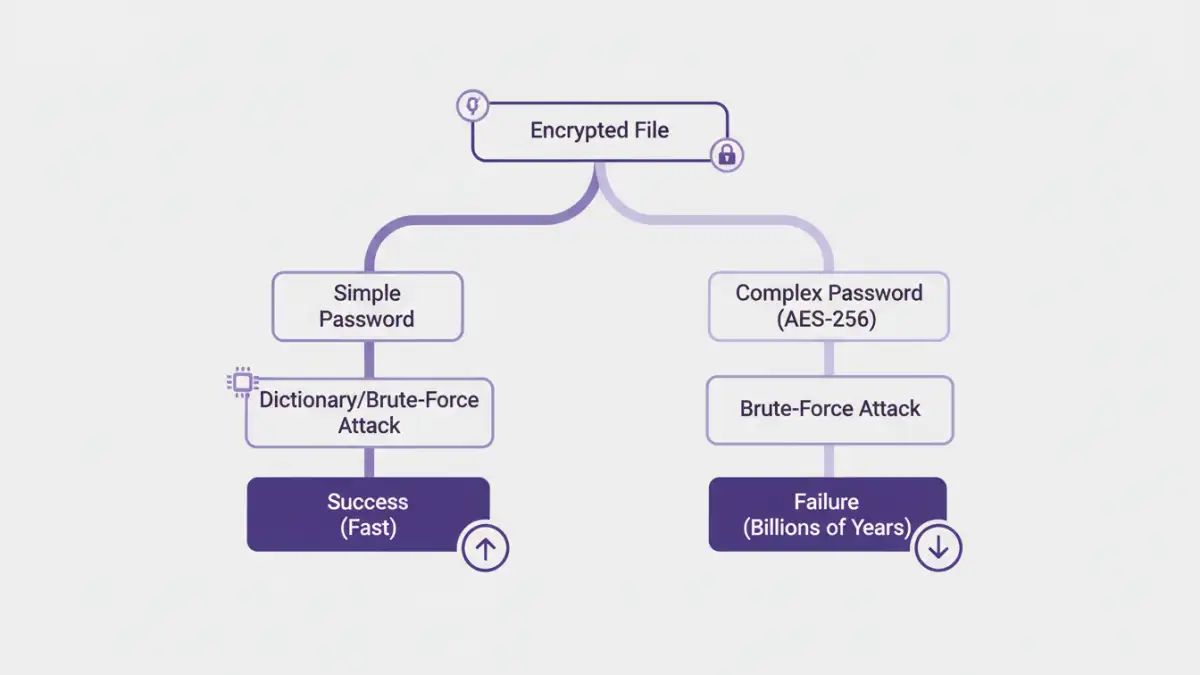
Password recovery software isn't magic; it's a brute-force computational assault. These tools systematically try every possible combination of characters until they find a match. There's no secret backdoor they exploit, especially with modern file formats. Their entire success hinges on raw processing power and time.
Common Attack Methods
Most tools employ a few core strategies. A Dictionary Attack uses a pre-compiled list of common words, phrases, and passwords. A Brute-Force Attack methodically tries every single combination (e.g., 'a', 'b', 'c', 'aa', 'ab'). A Mask Attack is a more refined brute-force method where you can specify patterns you remember, like 'Project202!_', which significantly reduces the search space.
Modern Encryption: The Great Wall of Security
The primary reason universal crackers are a myth is the strength of modern encryption algorithms. Once a file is locked with a strong standard, the only key is the password itself. The encryption algorithm is the lock, and the password is the only key that can be manufactured to open it.
The Power of AES-256 Encryption
Most modern document formats (like recent versions of Microsoft Office and Adobe PDF) use Advanced Encryption Standard (AES) with 256-bit keys. This is the same standard used by governments and financial institutions. To be blunt, this is a form of unbreakable file encryption. There are no known practical attacks that can break AES-256; the only way in is to guess the password.
The Role of Password Complexity
The effectiveness of a brute-force attack drops exponentially as password length and complexity increase. A simple 6-character lowercase password might be cracked in seconds or minutes. However, a 12-character password with a mix of upper/lowercase letters, numbers, and symbols could take centuries for even the most powerful supercomputers to crack. The math is simply not on the attacker's side.
The Practical Document Password Cracker Limits
Beyond the theoretical strength of encryption, several real-world factors limit these tools. The idea of a single program that can handle every file type instantly is pure fiction. Each application and file format implements password protection differently, creating significant hurdles.
File Format Specificity
A tool designed for ZIP archives won't work on a PDF file, and a PDF tool won't work on an Excel spreadsheet. Each format has its own encryption implementation, and a recovery tool must be specifically coded to attack that particular system. This fragmentation prevents a one-size-fits-all solution.
Hardware and Time Constraints
Password cracking is incredibly resource-intensive. High-end GPUs are used to accelerate the guessing process, but even with a powerful setup, the time required for a complex password is astronomical. For most individuals and businesses, the cost of the hardware and electricity required to crack a strong password far outweighs the value of the locked data. These are significant password recovery limitations that can't be ignored.
When Password Tools Fail: Alternative Strategies
So what happens when you're faced with a locked file and cracking isn't feasible? This is a common scenario where password tools fail. Instead of focusing on brute force, it's time to think like a detective and explore other avenues for recovery.
First, check for unsecured or older versions of the file in email archives, cloud storage version history (like in Google Drive or Dropbox), or local backups. Often, a previous iteration of the document exists somewhere without protection. You can also examine the file's metadata for clues about the author or creation date, which might jog someone's memory about the password convention used at the time.
Proactive Security: The Best Defense
The best way to deal with locked files is to prevent the problem from happening. Implementing a policy for strong password protection and management is crucial. For team environments, using a shared password manager like 1Password or Bitwarden ensures that critical document passwords are stored securely and are accessible to authorized personnel, even if an employee leaves.
Encourage the use of long, complex, and unique passphrases. A simple phrase like "Four-Red-Apples-On-The-Desk!" is both easy to remember and computationally very difficult to crack. This proactive approach is far more effective than any reactive recovery attempt.
Password Attack Method Effectiveness
| Attack Method | Effectiveness vs. Simple Password (e.g., 'password123') | Effectiveness vs. Complex Password (e.g., '4rAp!#Desk$9z') | Resource Intensity |
|---|---|---|---|
| Dictionary Attack | High | Very Low | Low |
| Standard Brute-Force (CPU) | Medium (Minutes to Hours) | Extremely Low (Centuries+) | Medium |
| GPU-Accelerated Brute-Force | High (Seconds to Minutes) | Extremely Low (Millennia+) | High |
| Mask Attack | Very High (if pattern is known) | Low to Medium (depends on mask complexity) | Variable |